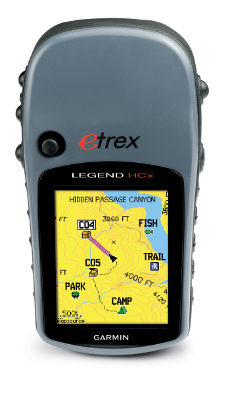
UPDATE: This model has been superseded by the new Garmin eTrex 20.
UPDATE: This model has been discontinued. For more current recommendations, please refer to our handheld GPS buyers guide or our Garmin handheld GPS comparison chart.
Hands on with the Garmin eTrex Legend HCx
I’ve had a chance to try out the Garmin eTrex Legend HCx
One of Garmin’s newer eTrex H-series receivers, the Legend HCx updates the very popular Legend Cx. The “H” stands for high-sensitivity chipset, to ensure great satellite reception under canopy and in other situations where you have a limited view of the sky.
Quick links
More Garmin eTrex Legend HCx reviews
Garmin eTrex Legend HCx resources
How much does it cost?
Like its predecessor, the Legend HCx has a bright color screen and a micro-SD card slot for loading topo or highway maps. A great handheld GPS, the Legend HCx also autoroutes, so you can add City Navigator
Related units
- Step up to the Garmin eTrex Vista HCx to add a barometric altimeter and electronic compass
- Moving down in the H-series line to the Summit HC or Venture HC, you lose the auto-routing capability and the expandable memory
- To see how the Legend HCx stands up against other Garmin models, check out my Garmin handheld GPS comparison chart
Garmin eTrex Legend HCx performance
The new eTrex H-series uses MediaTek’s MTK chipset, which compared favorably with the 60CSX’s SiRFstar III chipset during my testing.
The Legend HCx also performed well in accuracy tests. In a hike in a local park with relatively dense tree cover, the accuracy was never worse than 23 feet.
The other thing I noticed in comparing this unit to my 60CSx was the significantly brighter screen on the Legend HCx.
Garmin eTrex Legend HCx layout
I doubted that I would like the button layout but, as Garmin usually does, they’ve made it pretty intuitive. So let’s take a closer look at that before we go any further.
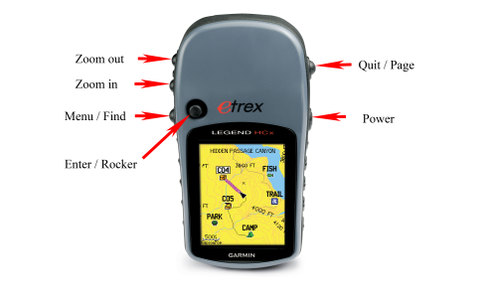
These warrant a little further explanation:
- Power key – In addition to the on/off function, you can press and release to adjust backlighting, and view the time, date and remaining battery charge.
 Quit / Page – Press to cycle through pages. This button will also
terminate the use of any on-screen keyboard or back you out of a menu.- Zoom in/out – In addition to zooming the map, on any other screen, use it to scroll through a list or use a slider bar.
- Menu / Find – Press and hold to see the Find screen. Press and release to display a page’s menu. Press again to get to the main menu.
- Enter / Rocker – Press down on this “thumbstick” to enter. Move the thumbstick / rocker right-left or up-down to navigate menus or pan the map. You can also mark a waypoint at your current location by pressing and holding.
It may sound complicated, but it becomes second nature very quickly. You can discover most functions in the field. The two press and hold functions (Find and Mark Waypoint) are the only ones you really need to remember. The rest is incredibly intuitive.
Customizing your Legend HCx
One of the great things about Garmin handhelds is that they can be customized to display the information that is most important to you. The hunter, geocacher, cyclist, and hiker will all have different needs.
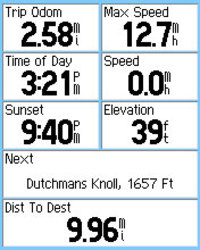
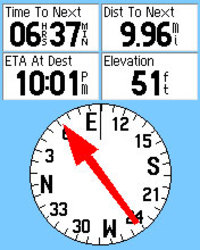 A great place to start, and a fine example of the degree to which you can customize the Legend HCx, is choosing what pages to display and the order in which they are displayed. To do this, press Menu, then press Menu again. Then press Setup, then Page Sequence. The most useful in my mind are the Map, Compass and Trip Computer screens (shown above at right). Personally, I also add Main Menu, Satellite, Active Route, Find, Recent Finds, Routes and Tracks!
The trip computer screen has lots of options for customization, as you can see. Each field can be changed independently, choosing from a list of 34 options. A “Big numbers” option reduces the number of visible fields to three, providing an easier to read display, a feature that cyclists or the visually impaired may find useful.
Similarly, the compass screen and map screen both allow you to customize display fields.
I also recommend going into the setup menu and exploring each option.
More Garmin eTrex Legend HCx reviews
- Several consumer-authored Garmin eTrex Legend HCx reviews have been posted at GPS Now.
- Consumer-written Garmin eTrex Legend HCx reviews
- Backpack Gear Test reviews the Garmin Legend HCx.
- About.com reviews the Garmin Legend HCx, giving it a 4 out of 5 star rating.
- A post about a first geocaching experience with the Legend HCx.
- A Legend HCx review from a motorcyclist’s perspective.
- This post compares elevation gain on the Legend HCx with the Vista HCx.
- A Legend HCx review has been posted at Singletracks.com
- Geocachers review the Garmin Legend HCx
- I’ll be posting more hands on GPS reviews as they appear, but in the meantime, here are some more…
Garmin eTrex Legend HCx resources
- A PDF version of the Garmin eTrex Legend HCx owners manual.
- Want to see how the Legend HCx compares to other receivers? Use this Garmin GPS comparison tool.
- I haven’t found any message forums dedicated solely to the eTrex H series, but there is a UseNet Garmin discussion board and a good Garmin forum at GPSInformation.net.
- The official Garmin eTrex Legend HCx web page.
Compare prices on the Garmin eTrex Legend HCx at these merchants:
- Find the low price on a Garmin eTrex Legend HCx at GPS Now, where shipping is free on orders over $99 (and the upgrade to overnight shipping is dirt cheap!). Order by 5 p.m. Central Time for same day shipment.
- Check the current Garmin eTrex Legend HCx
- Get a great deal on the
Garmin eTrex Legend HCx Expandable Color Hand Held GPS Receiverat TigerGPS.
- Get the Garmin eTrex Legend HCx for an amazing price on eBay.
- Check out our GPS deals site for current specials and rebates on a wide range of GPS receivers
 About Rich Owings

Yes, in general the barometric altimeter on Garmin units can be very accurate in terms of elevation gain. I noticed some problems with the Oregon series, but that seems to now be resolved. Nice post on byond.com BTW.
JUST RECEIVED ETREX LEGEND HCX AND TOPO US (MICRO SD) AND CITY NAVIGATOR (MICRO SD). WOULD LIKE TO AVOID SWITCHING CARDS BY INSTALLING THE CITY NAV INTO THE BASE UNIT MEMORY WITH THE TOPO IN THE MICRO SD SLOT IN THE UNIT. CAN THIS BE DONE? AND IF SO, WHAT IS THE INSTALLATION PROCESS FOR PUTTING THE CITY NAV IN THE BASE UNIT MEMORY. I DID RECEIVE THE MAP SOURCE CD WITH THE LEGEND.
ALSO I NOTED THAT WHEN (USING THE BASE UNIT MAPS) I TRY TO SET UP A ROUTE (SAY FROM DENVER TO LA) IN ANOTHER PART OF THE COUNTRY IT SHOWS MY CURRENT LOCATION AS THE START POINT – AGGRAVATING. WHAT DID I MISS?
THANKS
The City Navigator units are locked to the card. The solution would be to buy one or the other on DVD, so you could transfer them to main memory. Not sure how to do a simulated route on an eTrex.
husband just got me the legend hcx. we live in B.C.’s interior, and i need to know where and which topo map(s) i would need for this area. i assume i w/need a micro sd card (2g?) to get these maps onto the gps? we’re horseback most of the year chasing cows, and i get lost easily. i’m also computer/gps stupid, so please point me in the right direction. i am pretty sure i need the topo maps, cuz the map included is very, very basic. thanks for any help!
Try the Ibycus topo (and depending upon your location, the NW topo) here: http://www.gpsfiledepot.com/maps/country/ca
Yes, you’ll need a micro-SD card. These tutorials may be helpful:
http://www.gpsfiledepot.com/tutorials/how-to-load-maps-on-my-garmin-gps-unit/
http://www.gpsfiledepot.com/tutorials/how-to-install-mapsource-if-it-didnt-come-with-your-gps/
Also, check out my Handheld GPS 101 series: http://gpstracklog.com/handheld-sport-gps/handheld-gps-101
Hope this helps. Have fun and feel free to ask more questions.
for some reason, the ibycus toposeems to be no longer available; at least, i can’t seem to figure it out where else can i find good topo maps of British Columbia that don’t cost a fortune?
thanks so much.
Hmm, it looks like you have to get them from BitTorrent or pay him $25 for a DVD…
http://www.ibycus.com/ibycustopo/
Great site! I need to replace an eTrex Legend (I believe the original model) and am thinking of the eTrex Legend HCx. It is used entirely for walking (not driving) and mainly in urban areas (not mountaintops or on the sea). I especially want to be able to add maps of 1st London England, 2nd all Britain, and much lower 3rd Paris. Can I do this & how? Do I want DVDs or downloads or cards? If I get the inexpensive city maps, can I waypoint using them (major goal)? And is the HCx what I want? The H part seems an advantage with tall buildings.
I’m not sure which “inexpensive city maps” you are talking about. Have you considered something like the nuvi 295W?
I have 2 of the original etrex legends. One I got to put on my motorcycle. It worked well. I navigated from Baltimore to Cape Coral Fl. to Atlanta Ga then to Ashville NC. and back home on one down load or route and a few area maps. My question is would the back battery pannel switch from my old Etrex to the the HCx? I only found one hadle bar mount availible for the etrex line and Gamin implies it is the same but never says for sure. I liked my Old Legend but since new computers come with out a serial ports, I have to move with the times. I just think water proof durable and pocket size is perfect for motorcycles.
I think the HCx models come with an adapter that allows them to use the same battery cover / mounting system…
http://forums.groundspeak.com/GC/index.php?showtopic=196966
i downloaded a garmin topo map dvd onto mapsourse, now i need to get it into my legend hcx; but it won’t go. i go to mapsource, pull up the topo map i want to use, then plug in my 2gb micro card and adapter into the computer, but can’t figure out what to do next. under transfer, i try ‘send to device’, but nothing happens. i assumed i could download it onto the micro card, then put the micro card into the gps, and it would download…..any ideas? thanks so much!
Click on the menu icon that looks like a trapezoid, then start clicking to select map segments.
ok…found out my micro card isn’t micro enough, but i got the topo map on the pc to go pink, put the garmin usb in and plugged into garmin from computer; it says it downloaded successfully, but can’t seem to find it on the garmin; just the original map that came w/it. followed your tutorial, but when i get to map info (in the setup for maps), no name or anything shows up; i am stuck. sorry in advance for my techno ineptness…..
so i try again to download from mapsource, via garmin cable (usb in pc, smaller dealie into garmin gps), because i want to make sure the topo map was downloaded into the gps, but now i get the message “the required memory for storing maps is missing from your gps. if your gps uses programmable data card, check to make sure it is inserted properly”. i have no idea what this means. i assumed you could sent maps from mapsource directly to the gps, and have them visible on the gps. i am CON FUSED.
Is the micro-SD card inserted in the Vista HCx?
yes, the micro card is in the gps unit. however, it w/not eject. any ideas. i think it must have downloaded, because i can see map info now, whereas before i could not.
If you can see contour lines, the topo map is there. The micro-SD cards can be difficult to seat properly, so I wouldn’t remove it unless you have to.
well, ican’t get the micro card out anyways….thanks so very much for your help and your tutorials–it’s finally working! till the next problem………………
Let us know if we can help with anything.
Evidently the only way to measure area with the garmin legend HCx is with “track log”.
The problem with this method is that you have to walk along the property boundary lines which is sometimes impossible.
I wish there was a way to use selected waypoints as with the basic garmin legend.
Am I missing something?
I didn’t know you could do that with the Legend. If you can, it would probably be pretty much the same menu path. You could try creating a closed loop route and see if it comes up as a route option.
Also, here’s a method using MapSource…
http://www.gpsinformation.org/forum/viewtopic.php?f=8&t=6623
Yes I tried creating a closed loop route but it didn’t work.
Once the route is created, the problem is that there is no option such as “route area” or “calculate area”. One of these selections is needed on the “option menu”. I can’t find any software on garmin site to download for this option.
Thanks for your input.
Do you have MapSource? If not you can get it via this method…
http://www.gpsfiledepot.com/tutorials/how-to-install-mapsource-if-it-didnt-come-with-your-gps/
How does the garmin Legend HCX function with a mac?
I’m not sure. But there’s no problem with newer units that go into mas storage mode, like the eTrex 20.
The Legend HCx and the other HCx units work fine with a Mac. I use Garmin’s BaseCamp software to transfer and manage tracklogs, waypoints, etc. It’s far from perfect, but works well enough. It’s available on the Mac App Store or on Garmin’s website. I also use their MapInstall software to put maps on my GPS. You can get it here: http://www8.garmin.com/macosx/
Hi,
Could someone please tell me if the American version works fine in Europe?
Thanks a lot!
Yes, but I’d strongly suggest looking at the newer eTrex 20 instead.
Why? GLONASS and paperless geocatching?
Yes. And a few more reasons…
http://gpstracklog.com/2011/04/five-reasons-to-upgrade-your-garmin-handheld.html
Regarding Legend HCx! How do you set elevation level readings on map page, thank you.
I don’t have one of that generation around, but try this. From the map screen, press the menu button. You’re looking for Change Data Fields, but it may be under Map Setup.
How can I fix or setup our local time and date on etrex Legend HCx GPS? I tried several functions but not succeeded. Also how can I find the north west east and south direction in the field?
Waiting for kind reply.
Thanks!
Once it acquires satellites it will have the current data and time.
You can view N,W,E & S on the compass screen relatively accurately if you are moving.
How can I download the GPS tracks and waypoints to my computer as shapefiles? which software I have to use in which I can dowload large data. I need the free software for that.
Thanks in advance
On the Legend HCx? Try using DNRGarmin to convert them…
http://www.dnr.state.mn.us/mis/gis/tools/arcview/extensions/DNRGarmin/DNRGarmin.html
i just got an etex legend off ebay and am having trouble manually putting in a point i’d like to navigate to. i’m following the instruction on page 25 on the manual but can’t get the numerical keyboard to appear. help!!
Move the cursor to the desired field and click to enter.
The Router/Enter function of Garmin eTrex HC series is not working. How to resolve it?