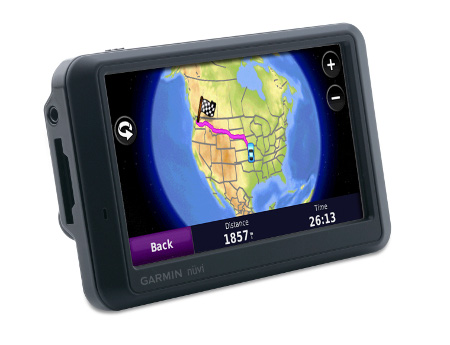
Hands on with the Garmin nuvi 775T
UPDATE: The Garmin nuvi 1370T is a newer model transatlantic navigator
UPDATE 2: This model has been discontinued. For current recommendations, please refer to our auto GPS buyers guide.
UPDATE 3: The latest trans-Atlantic navigators to be introduced are the Garmin nuvi 2475LT and nuvi 2370LT.
The Garmin nüvi 775T
The 4.3″ touch screen unit also includes stereo Bluetooth and text-to-speech, so you”ll hear “drive one-half mile, then turn left on Oak Street,” instead of just “drive one-half mile, then turn left.”
Compare prices on the Garmin nuvi 775T
A closely related unit, the 765T, has the same feature set as the 775T, minus the European maps. This review incorporates relevant parts of a review I did on another 7x5T series model, the nuvi 755T.
To see how the nuvi 775T stacks up against other units, check out my Garmin nuvi comparison chart, or use this handy Garmin auto GPS comparison tool.
More on the European maps shortly, but first let’s look at the newest features on the nuvi 7x5T line…
A2DP stereo Bluetooth
The 7x5T series brings us the first nuvis with A2DP stereo Bluetooth, the exception being the 755T, which doesn’t include Bluetooth at all. This allows for a number of interesting things. For example, you can stream music via the nuvi’s MP3 player to a stereo Bluetooth headset. At the same time such an audio link is established, you can connect your phone to the nuvi as well.
|
|
Yet what impressed me most about the 775T’s Bluetooth feature was how good the sound quality was of calls made from the nuvi. It has nothing to do with A2DP, but rather with dramatic improvements in Garmin’s echo-cancellation technology. Units I’ve tested in the past have been pretty bad for the person on the other end of the call. But the sound quality using the 775T was quite good.
My wife and I took turns on both ends of several calls, as we do every
time I have a test unit with Bluetooth, so she’s been exposed to as
many of these units as I have. And she agrees with me, this one is good
enough for everyday use. She even went further, saying she would use it
if we had one of our own (was that a hint?). It may not be as good as using your
phone or a headset directly, but it is a huge improvement.
We were able to successfully pair and use both our phones – an LG VX8300 and a Motorola V325i.
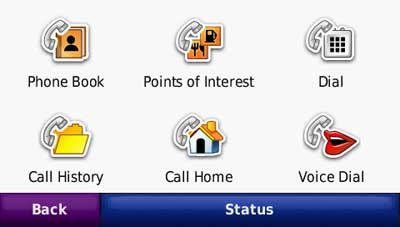
Here’s a video showing how to pair your nuvi with a compatible Bluetooth car stereo:
Lane assist
For me, the lane assist feature is the nicest addition to the the 7x5T
series. It shows up in two places on the device. The flashiest is for
major freeway interchanges, as shown below. This screen appears as you
approach your exit.
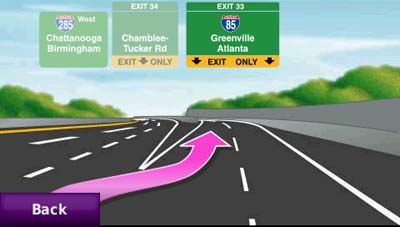
Just as useful, and perhaps more so, is the lane indicator shown in
the upper left portion of the map screen (see below). These don’t just
show up on interstate highways; I found them to be ubiquitous in
downtown Atlanta.
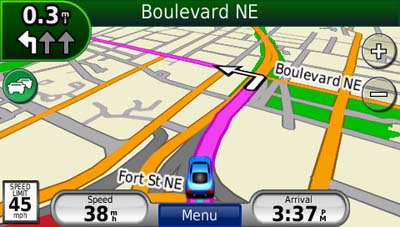
While the lane assist feature was very helpful, I only saw it appear
in Atlanta. It did not show up during my testing in the smaller cities
of Greenville, SC and Asheville, NC.
3-D buildings
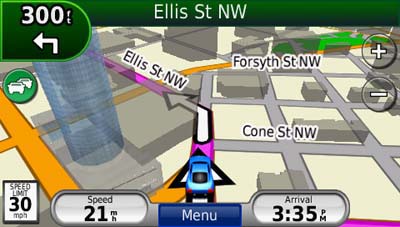
This feature adds some flash, but in my mind is less helpful than lane assist.
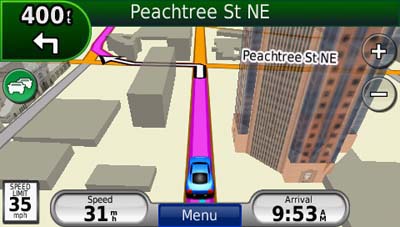
I’ll give Garmin credit for making the 3-D buildings transparent,
but the feature can still obstruct navigation somewhat, as shown below.
Ad-supported lifetime traffic
Without a doubt the most controversial feature on the nuvi 7x5T
series is the ad-supported lifetime NAVTEQ traffic, yet I found the ads
to be low key and unobtrusive. I only saw ads appear when my vehicle
was stopped; they showed up in the following places:
- On startup at the top of the main menu
- At the bottom of the traffic menu page
- On the map screen once you have reached your destination
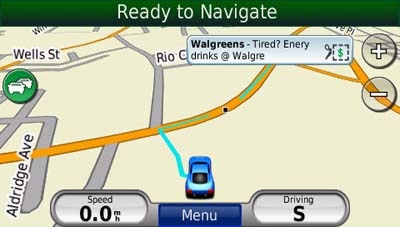
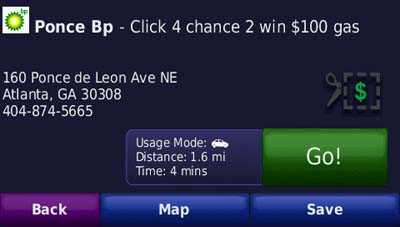
If you touch the ad, you’ll go to a screen showing the nearest
locations for that advertiser. Choosing a location will take you to the
detail screen. In the case of the BP gas ad below, a click on the
coupon gave me a number to text to enter the contest.
The ads are so low key that I would much rather have them and free
lifetime traffic than pay $60 for traffic service. The biggest
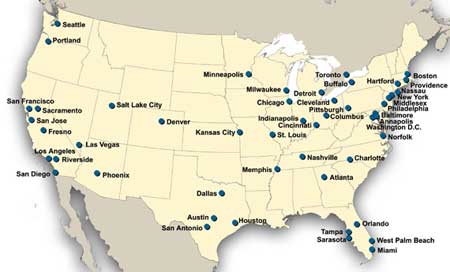
problem I have with the ad-supported traffic is the limited coverage
(see image below). With data for only 50 U.S. cities, NAVTEQ coverage
lags far behind that of other traffic services. Detailed coverage maps are available on the NAVTEQ website.
There is also an option to add MSN Direct traffic service (which
includes gas prices, weather and more), but you’ll need to buy the
receiver, which comes with a one year subscription.
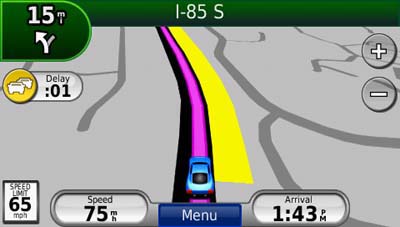
If you enable the traffic map, the moving map screen goes to
greyscale, so that traffic flow (indicated in yellow or red) will show
up better.
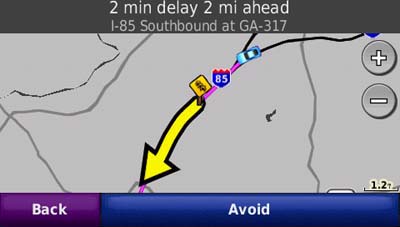
Here’s an incident detail screen…
New customization options
New to the 7x5T series are customization options for the lower right
field on the map screen. Press this field to bring up the options
listed below. When not navigating, the options are:
- Direction of travel (default)
- Elevation
- Time of day
When navigating, the options are as follows:
- Estimated time of arrival (default)
- Distance to destination
- Estimated time to destination
- Direction of travel
- Elevation
- Time of day
Garmin nuvi 775T mount
The nuvi 775T mount has an integrated power/traffic receiver
connection, so you don’t have to plug a cable into the device each time
you mount it. Unlike the nuvi 2×5 series, all you need to do is snap it
into the mount.
Other nuvi 775T features of note
The nuvi 7x5T series has inherited some other features from the 2×5 and/or 800 series units.
These include a redesigned map screen that adds a third data field
(current speed). And while photo navigation is not a feature that I
find useful, you can download Google™ Panoramio™ pictures via Garmin Connect™ Photos and navigate to them.
Finally, as I mentioned earlier, the nuvi 775T has all the great
features already found on the first generation nuvi 700 series. These
include:
- Multi-destination routing
- Automatic sorting of multiple destinations to provide an efficient route
- Tracklog recording
- Speed limit display for many interstates and highways
- Automatic marking of your last position when the unit is turned off (to help you find your car in mega-mall parking lots)
- A “Where am I” safety feature that gives your current location,
nearest address, nearest intersection, along with quick access to POIs
for the nearest hospitals, police stations and gas stations
European maps
The image below shows European map coverage included in the nuvi 775T.
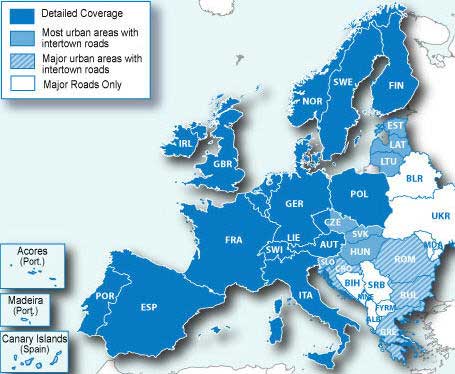
Unfortunately,I was not able to get to Europe to test these maps directly. Hmm, maybe I’ll do that the next time Garmin releases an x7x model!
Conclusion and recommendation
The Garmin nuvi 775T is a superior navigation device and I highly
recommend it. The only caveat is that it is more appropriate if you are
in an area with NAVTEQ traffic coverage. The lane assist feature and improved Bluetooth performance are the
best reasons to upgrade from the 275T, which also
has maps of Europe and lifetime traffic. Like all Garmin nuvis, the 7×5 series is
intuitive and a joy to use. Garmin has created yet another excellent
product, and it’s no wonder they dominate our top ten GPS list and the Amazon bestseller list
More Garmin nuvi 775T reviews
- Consumer-authored Garmin nuvi 775T reviews
have been posted at Amazon
- A comparison of the nuvi 7x5T and 7×0 series
I’ll be posting more hands on GPS reviews as they appear, but in the meantime, here are some…
Other Garmin nuvi 775T resources
- The Garmin nuvi 775T owners manual, in the language of your choice
- Want to see how the 775T stacks up against other models? Check out this Garmin auto GPS comparison tool or my own Garmin nuvi comparison chart
- There is a dedicated Garmin nuvi message forum at GpsPasSion
- The official Garmin nuvi 775T web page
- How to access archived nuvi trip logs
- Five tips for nuvi newbies
Compare prices on the Garmin nuvi 775T at these merchants:
- Get a great deal on the Garmin nuvi 775T North America City Navigator GPS
at BuyDig.com
- Find the low price on a Garmin nuvi 775T at GPS Now, where shipping is free on orders over $99 (and the upgrade to overnight shipping is dirt cheap!). Order by 5 p.m. Central Time for same day shipment
- Check the current Garmin nüvi 775T
- Get the Garmin nuvi 775T Transatlantic Bluetooth Automotive GPS System with Lane Assist & Lifetime Traffic
at TigerGPS, where you get free shipping on orders above $250
- Get the Garmin nuvi 775T
for an amazing price on eBay
 About Rich Owings
Does anyone know if both NAVTEQ and Traffic Master (in the UK) is supported on a US version of the Nuvi 775T?
I have one of these devices and would like to now how to load additional maps for India which I bought from an vendor ( you claims that the maps are compatible to all Garmin Nuvi devices ). Is there any command that I must use to load these maps from the SD Card.
There are numerous ways to load these maps. One is detailed at the end of this post… http://gpstracklog.com/2007/12/free-maps-for-y.html
Thanks for the quick response. I will check it out. The vendor has already given a *.img file.
Do I still do this process. Will the device switch between the two Maps ( ie one that came preloaded with the device and the new one ) automatically.
You’ll need to go into map setup and select which one to show.
I am about to purchase the 775T but have one question, when the bluetooth is paired with a head set and MP3 music can be played. Are the voice directions able to be directed through the bluetooth head set. Reason i ask is i am thinking of putting it in a motorcycle tank bag and already have a bluetooth enabled helmet.
Hello
Hi every body.If you know Garmin 775t work in Istambul(Turkey)?
Thanks, ken
Garmin maps don’t cover Turkey. You can get free ones here though, but I’m not sure which (if any) will auto-route…
http://mapcenter2.cgpsmapper.com/catalogue.php?country=204
Also, here is a third-party map available for purchase… http://www8.garmin.com/cartography/mpc/#Republic of Turkey
I live in Oklahoma City which is one of the listed areas for Traffic Service. The traffic warnings are not sent in real time. These warnings must be pre-programmed to broadcast “Traffic Ahead” warnings where traffic is usually heavy during rush hour/heavy traffic times. These warnings are received even if the traffic is not heavy in these areas when I am driving through them. I also have been delayed by accidents which have slowed traffic down to a crawl and there were no warnings on my 775T. In fact I have never received a “real time” warning from this service. They all seem to be pre-programed as described above.
By the way…. on I-35 South there is a bridge overpass repair that causes the traffic to be routed into one lane on both sides of the road. This has been on going for 4 months. There is no warning of this delay being broadcast.
Currently the system is of no close to worthless to me. A Real Time system is needed for this service to be of any value.
I agree. Traffic services aren’t ready for prime time yet. There are lots of false positives and false negatives. They need many more probes and more bandwidth for this to work.
I intend to buy a nuvi 775T however I need maps for Australia. Will I be able to buy maps for Australia that are compatible with the 775T?
Yes, and here they are… https://buy.garmin.com/shop/shop.do?pID=36360
For the additional maps I buy for my Nuvi 775T, do you suggest I buy it in on CD-ROM or micro SD Card?
Is there enough internal memory for the maps to be transferred to the Nuvi 775T (which already holds USA and Europe maps) or must the map be transferred to a micro SD card and then inserted into the slot?
Will the free GPS maps being offered on the Internet actually work on my Nuvi 775T without affecting the existing pre-loaded maps?
Thank you for answering my questions.I hope I am not being a nuisance with all my queries.
Large maps such as the Australian one will have to go on micro-SD. Smaller maps can go onto internal memory.
One advantage of a micro-SD card is that you could sell the card later if this is a one-time trip. A disadvantage is that you can’t load other maps to the card.
You can use the free maps, but it’s a good idea to back up the contents of your nuvi first (in case you accidentally erase the map!).
No problem with the questions. I like helping folks.
Rich,
Great web site and your information is down to earth and factual. Quick question – is lane assist available for European maps (France, UK, etc.)? Before I move up to a new unit I want to be sure of the lane assist feature as I see this as a major improvement over my old 765.
Thanks,
Lewis
Yes, but as with the US, coverage may be minimal.
Don’t buy this unit.
This unit is totally unreliable and has many problems. I have owned 10 GPS units and after believing in Garmin enough to purchase a unit for my airplane (396) I even bought them for my office. However I moved to Europe and chose the 775T for the map and the amenities. I’ve been using it here for a week now and have no confidence in the unit. As I stated before I am quite adept at using and fixing issues with Garmin’s product line. Immediately upon receiving the unit I updated all the software. The following are the problems, not necessarily in the order received: (1) Unit locks up for no apparent reason – The screen will freeze and the unit needs a soft reset to restart. (2) Unit shuts down on its own – plenty of battery and connected to the vehicle power. (3) Where to takes you to some random point even though you chose a defined point. This one has me scratching my head. Though I only had 3 favorites, I chose one and started navigating to it. Initially, traveling in the right direction, I noticed the “checked flag” positioned in a random point on the map. When I checked the “recently found” folder the 775T listed the place as “point”. In calling Garmin TS, Randy offered the instructions of a master reset as a last resort before sending the unit back.
It won’t take long for die-hard Garmin customers like me to use the “Where To” feature to find TomTom or another.
I use to trust my life with my 396 in the airplane. It takes a long time to “regain” someone confidence after losing it. Please don’t buy this unit if you are in emergency services or need the unit for appointments with work. You’ll find yourself in a lawsuit or losing money.
Garmin, you have provided me years of joy, please get the 775T fixed, I know you can do it!
Additionally, but not of much concern for the time being, the unit doesn’t integrate with the iPhone 3G and the FM transmitter works intermittently.
Thanks for sharing. I’d love to hear of your experience with the replacement unit they send you.
On August 18 I wrote about my experiences with the Traffic Service which is provided free of charge. Today is November 5, I have navigated many more miles and this service is still worthless. We pay nothing for this service so I guess we receive the same value for which we pay.
I have not tried the radio or cell phone stuff. Don’t need or want these features. Garmin should not attempt to build an “everything unit” because they use up valuable space which could be used for more nav. detail or more points of interest ….. just give me the best navigation unit possible…..and that’s all. I want a navigation unit for only one reason and that is….Navigation!
That said……….I believe this unit is for the most part…..Great. I just returned from a 21 day vacation in Europe. I drove 1,184 miles in mostly Germany but also in Switzerland and Austria. There is no way I could have found my way without my Garmin 775T. Also, it was so much better than the navigation unit in my rental BMW 525D. The Garmin provided much more detail and was faster in letting me know information. I turned off the BMW unit 3 days into the trip because it tried to take me the wrong way several times. Plus it was always way behind in providing information. With the Garmin . . . a few times the navigation to a hotel was off a quarter of a mile but at least I was in the right area and eventually found the hotel. The currency converter, metric converter and max. top speed information also came in very handy. I was surprised a German built navigation unit in a German made car was not as good at navigating its own country when compared to the 775T. On the 11th morning we started to another city and the 775T just kept trying to navigate and navigate but could not lock onto the route. I was really concerned since the car unit since not that reliable. But I used the car unit for about an hour (we were just traveling a long stretch of the autobahn) and then all of a sudden the Garmin came up. It worked fine for the remainder of our vacation….thank goodness.
Garmin needs to update their maps more often. I just returned from a trip and found more roads and addresses that are not in this unit’s memory. My uncle lives in a 3 year old housing addition located in Flint, Texas. Flint, Texas and his housing addition are not in the 775T. So the nav. data is at least 3 years old. Garmin should provide updates at least every 2 years.
On the way to Texas I drove to an area of Oklahoma which is a county seat. The Garmin could not find an address in an old part of town in this area. It kept saying something about not being able to navigate in this area due to limited information. Hey Garmin . . . your crews in the vans with many antennas and computers need to get back out there!
BTW……I had my 775T one week and it went blank like other people have experienced. I ask for and received a new unit. So if you have a problem like this get a replacement and your problems should be solved.
With my past experience . . . would I buy a 775T again . . . you bet. It may not be perfect but it has served me well.
Great write-up. Thanks so much for taking the time to share this. I’m sure it will help quite a few folks researching the 775t.
Looking to upgrade my GPS. With a planned trip to Spain next year, the Garmin 775t caught my eye. Can maps of Europe be downloaded and used on other Garmin models like 765t which is a bit cheaper ? Also, sounds like the traffic alert doesn’t work very well. Really need it for driving in the Sierra’s here in Calfifornia.
Yes, you’ll want the City Navigator Europe maps for that, but the 765T + maps may run more than the 775T.
Traffic doesn’t work real well anywhere. GPS manufacturers have a couple of years to go before its up to snuff.
I’ve just had two calls to Garmin where one tech told me neither the 775T Europe map nor the City Navigator Europe map shows the 3-D buildings or Lane Assist. The other tech told me it did. Both techs put me on hold to check with the software dept to be sure they were giving me the correct answer.
Does anybody who actually used the 775T in Europe know the answer? Or anyone who used the SD map in a 765T know for that situation?
Thanks
Teri…..See my reply .. number 20 above………
I know the Garmin 775T has lane assist in Germany, Austria and Switzerland. The 775T is also very useful in guiding the way through turn abouts. It did not pronounce the German street names very well but this was not a problem with such clear guidance on the screen.
In 1,184 miles of driving including large cities like Kolon no 3-D buildings were displayed. But the 3-D feature is just kind a neat thing and does not really aid in navigation anyway.
Thanks Terry. I left out one pertinent piece of information. The tech at Garmin told me that the European maps that are preinstalled on units purchased in Europe are fully functioning – it’s the units purchased in US that are only full functioning North Am maps, not EU maps.
So I guess a better way to word the question might be, who has used a 775 purchased in US for EU navigation? Who has used the CityNavigator NT Europe maps on SD in the 765 and does the SD card feature the 3D and Lane Assist like the 765 preloaded North Am maps?
Now that the 765T is down to $220ish, would I be just as well off to buy it and a pre-owned SD EU map for about $50 rather than the still $370 for the 775T? I go to Europe a couple of times a year, mostly France.
Also, I’d like to buy my son a new GPS and if we both get the 765, we can share one SD EU map when we go to Europe separately. So further total cost reduction over buying two 775s for both of us.
OK, so we know my 775T was purchased in the US. Lane assist functions worked for my Germany trip but the 3D view was not there.
My question would be does the SD EU using the 765T have as much map detail, as many points of interest, etc. as the 775T would provide. About 15 days into our trip we were a little tired of German style breakfasts so checked points of interest for a McDonalds. The 775T found one within 1 mile of our location. Another time we did not want to stay in a recommended hotel located within a walled city. No elevator, little bitty rooms, etc. Our 775T located a modern (chain type like Hilton)hotel that was only 3 miles away.
BTW……why are you so intent on finding a unit which provides 3-D in Europe. Hey….I just remembered there was one 3-D view we saw on our 775T ….. the cathedrial in Kolon.
I should probably give more information. I am OK with tech stuff but not great. I haven’t used GPS. I want a unit that is as easy as possible to figure out, has blue tooth and preferably voice recognition. Reliable information of course. I do foreign travel at least once a year and would love to have the pedestrian help with Cityscape. For instance I have an upcoming London trip and it can be difficult finding a place by address-only in that city. It would be more convenient to use a GPS than a map when coming out of a tube station that has multiple entrances to orient which way to turn for the next destination. I don’t necessarily need foreign maps on the unit permanently, as will use mostly at home.
I am shopping Garmin because I had read that they are the easiest to learn to use. What GPS would really be best for me? I REALLY appreciate any help.
Definitely go with a Garmin; they are very intuitive. One option for you would be to add CityXplorer maps to a unit without European maps…
http://gpstracklog.com/2009/06/garmin-cityxplorer-review.html
The more advanced pedestrian navigation features are only available on the nuvi 1xxx series though, not on the voice command 8xx models.
Feel free to follow up with more questions once you decide which is more important — the CityXplorer maps or the voice command feature.
I don’t find 3D buildings helpful; more of a hindrance actually, in that they can obscure your route. Re: an SD card, yes you can swap it between units. If you buy the 775T or the maps on a disc, you can buy an update, but they are locked to one unit.
Thanks both Terry and Rich. The reason I think I want the 3D in Europe is because I plan on using the unit mostly in pedestrian mode in the big cities. I’m a French teacher and at least one of my trips each year is leading my students. We do the cities mostly on foot, and I think it would be very helpful to be able to see major landmarks, especially in cities I don’t know by heart.
So Rich’s comment that they are a hindrance leads me to a new question – can the 3D function be turned off?
I don’t think it can be turned off.
Given your use, you should look at the 12xx, 13xx, and 14xx series that are compatible with Garmin’s CityXplorer maps…
http://gpstracklog.com/2009/06/garmin-cityxplorer-review.html
Thank goodness for forums! I will research the ones you have recommended.
Regarding turning off 3D, I found this on Garmin’s FAQs. So am I correct in reading this that it can be turned off by simply chaning the map view?
http://www.garmin.com/garmin/cms/site/us/support/searchsupport?search_key=nuvi%20765T
Question: How do you change the Map View on my nuvi 2×0, 2x0W, 7xx, 8xx or 5000?
Answer: To change the Map View on the nuvi 2×0, 2x0W 7xx, 8xx, or 5000, please follow the steps below:
1. Power the unit on.
2. From the ‘Where to?’ and ‘View Map’ page, touch the wrench icon (Tools).
3. Touch ‘Settings’.
4. Touch ‘Map’ (may need to arrow down to see this option).
5. Tap on the blue box adjacent to or under ‘Map View’. This box will usually be labeled ‘3 Dimensional or 3D View’.
6. Touch ‘Track Up’ or ‘North Up’.
7. Touch ‘OK’.
8. Press and hold ‘Back’ to return to the main screen.
The Map View will now be changed to your view setting.
Last modified on: 06/10/2008
Afraid not. We’re talking about two different things here. Using the settings described above, you can switch from a 2D / flat map view, to a 3D, / birds eye perspective, which is the normal mode for auto GPS. 3D buildings are something else entirely. You can see in the images in this review where 3D buildings can partially obscure your route. Its not a huge issue, but I wanted to make you aware of it.
I purchased my Garmin 775T in October, I updated my North American Maps and I added some favorites. I use the Garmin in my real estate business. Frequently I get the prompts Memory Full & Waypoint Memory Full and soon afterwards my GPS then locks up. I then have to do a reset and I lose all my imput information. I still have my Garmin Nuvi 370, used in both North America and Europe and never had a problem, never had to reset. What can I do to eliminate this problem with the Nuvi 775T. Thanks for any help you can give me. I also own the Street Piolet 2760 and had to send it in for repairs for connectivity under an extented warranty purchased.
I’d talk to Garmin support about the problem. You can remove unnecessary files, such as audio files. You should also get a copy of MapSource and back everything up before doing a reset…
http://www.gpsfiledepot.com/tutorials/how-to-install-mapsource-if-it-didnt-come-with-your-gps/
I purchased a 775T and a 765T recently. Does any one know if I could load the 775T software (maps, etc) into the 765T? They’re supposedly the same, except for the Europe map (on the 775T).
That would be software piracy.
Sorry. Do not mean to pirate the software. The 765T which was purchased from Amazon says it comes with a GTM 21, but was shipped with a GTM 20. My brother who was using the 765T complained of poor reception on the return trip, but had no problem with the 1st leg of his travel. I read that the US version might have limitation due to FCC regulation, and that the transmission for the European version has fewer issue. I have a replacement order coming, but was just wondering if the software on the 775T would make a difference on the 765T just because of this issue.
My apologies. I thought you wanted to copy the European maps over to the 765T. I think the only differences are in the GTM receivers, not the unit software. Hope that helps.
No need. The replacement unit arrived today – still the GTM20. I spoke with 3 Amazon reps already, and even put in the gift note that please send the GTM 21 vesion not the GTM 20 and they still not do it right. Their latest email says it was a mistake on their web page. I spoke with Garmin rep, who says the 765T actually is packaged with either GTM 20 or GTM 21. I guess Amazon does not carry the GTM 21 version.
I use the 775T FM transmitter (GTM 21) without the hissing noise on channel 88.7. I just use the 765T FM transmitter (GTM 20) tonight; big difference. Lots of hissing/inteference. I autoscan, and selected 2 other channels with minimal improvement. I guess it would be the hardware. Does any one ever gotten a GTM 21 which was shipped with a 765T? Thanx.
we are americans in germany and want to buy the 775T..
are the voice directions in german or are they an english version? will the GPS know the german street names? i heard it defaults to distance and cardnal direction instead of the german street names, etc..
pleaase advise.
thanks
The 775T speaks in English. It provides directions using the German street names but the way it pronounces them it is hard to understand. However this is no problem because turns, exits, autobahn numbers, etc. are very clear. Also turn abouts are no problem. The 775T tells you to take the next turn about, the street name is given and then it says …… take the first, second, third, etc. exit. So if you do not understand the street name all you have to do is take the correct exit out of the turn about.
One day we came to one of those German villages and the hotels were very old, run down and the hotel people did not speak English. Using our Garman we found a very nice Chain hotel just 7 miles away. Then we drove back the the village to see the sites the next day. Also after 19 days in Germany we wanted hamburgers/french fries a couple of times and found a Burger King and a McDonalds using the Garman.
There is no way I could have found my way around Germany without the Garman. Hope this helps.
Thanks for helping out!
Hello, I have had a Nuvi 350 with the Europe SD Card for over 3 years and I have been very happy with the unit. I need to upgrade the maps, but the costs would almost be enough to buy a new unit, so I thought I would and keep the 350 for backup. I use the unit mostly for driving, but I also use it while walking in some cities in Europe. Would I be better with the 775 or the 765 or 755 with the New Europe SD card (which would be cheaper than the 775 with integrated maps). Is there any advantage to having integrated maps with the 775?? Thanks.
I thought of something else, my SD Card in my Nuvi 350 is 3 years old and says V9. Is this the same card that is available now?? If so, can it be used in a new unit (i.e. 765)? Also, how does the 7×5 units compare (from anyones’s experience) with the 13XX or 14xx?
Other than the fact that you tie up the SD slot, no, there’s no advantage one way or the other. Go the cheapest route — pre-loaded European maps or another model + City Navigator Europe NT 2010.
Also consider the nuvi 1370T, which is compatible with CityXplorer maps…
http://gpstracklog.com/2009/06/garmin-cityxplorer-review.html
No, V9 is old, though you could still use it, perhaps in conjunction with CityXplorer maps.
7×5 units have a powered mount (no need to connect mini-USB each time you use it), better Bluetooth, multi-destination routing and audio features. There are also touchscreen accuracy issues with some units.
13xx/14xx offer CityXplorer compatibility and more customization options. See my 1490T review for more details…
http://gpstracklog.com/2009/06/garmin-nuvi-1490t-review.html
Hope that helps.
Rich,
THANKS for the reply. Your site is very helpful. NOW I have more questions! What is the difference in in CityXPlorer and City Navigator Maps? We are going to Europe for a little over two weeks in April. We will be driving in Tuscany for a little over a week, walking in Venice (The 350 was a life saver before in that maze) and in Paris (5 days and 3 days respectivly). I Mainly want it for driving in Italy (WHEW, thank goodness for GPS). The 14xx units are nice, but a bit on the large size for walking around.
Blue Tooth, MP3, are features that I really don’t care about. Multi-destination routing would be great (would be nice to pre-plan, say several hill towns on the way to the final destination. I REALLY want a reliable unit (my 350 has been rock solid) with faster updated features. Originally, I was looking at the 775T and the 1370T. However, I could possibly get a unit without the Europe Maps and buy the SD card for the same or less. Any Thoughts….. Again THANKS.
Rich,
This is what it is down to:
Nuvi 765 @ ~$206 + Europe SD maps @ ~$107 = ~$313
Nuvi 775 ~$370
Nuvi 1370 ~$270 (con no multi point routing)
Nuvi 1690 @ ~$340 + Europe SD maps @ ~$107 + ~$447 (con $$$)
Advantage to Nuvi without SD, new SD purchased can be used in older Nuvi 350 that I own. Advantage to Nuvi with built in maps, can purchase map updates for both, not just US, SD cards have to be replaced.
With these considerations and cost NOT being a major factor, and reliability and useful features being the main driving force (I don’t need Blue Tooth, Voice command, MP3, etc, would like multi point if possible), what would your reccommendations being. THANKS!
I think its a toss up. If it were me and I was going to use mass transit any, I’d get the 1370 and some CityXplorer maps. Otherwise I might go for a 7×5 for the powered mount. You may find the 755 a little cheaper BTW.
Multi-point routing can be nice, but you can pretty easily get around this by using Favorites, Vias and Recent Destinations. Still, you can only route to two points at a time.
But then if cost isn’t a factor, its awfully nice having Google Local search available on the 1690.
Ha! Don’t know if that helps any at all!
Also, the CityXplorer maps maps do have road coverage, just for a more limited area. They also have enhanced pedestrian navigation, offering multiple route options if I recall correctly.
Rich,
THANKS for all your help AND the web site!! I got the 1370t based on much thought and your reccommendations. The unit cost me ~$250 which is only about $70.00 more than what the 2 map updates on my 350 would have cost. I really like the 1370t unit, my only complaints so far would be that Garmin only allows you ONE free update to the pre-loaded maps. You can ONLY update either the European OR the American maps. You would figure that when you buy a new GPS that the company would at least give the latest maps available when purchased. So I updated the more expensive Euro maps and will live with the older versiion of the US maps (2010.10 vs 2010.30) that came out in early 2009. The other of course is the feature I knew about due to your web site, is that the 1370t does not offer the powered car mount which is a VERY desireable feature found on my 350.
Glad it was helpful. Enjoy your next trip!
I own a 775T for some time now, had it replaced twice (1 dead, 1 locked (turns on but no functions) and I am quite happy. One thing I noticed recently on a trip in the desert: The tracking function is great to watch on MapSource and Google Earth where you had been. However, if I try to track back, by following my way I came from (the blue line), I noticed that it stopped after perhaps 20km or so. The blue line (my way I came from), disapperas. Not helpful at all if you want to depend on it for your way back. The track is available via MapSource, but it would not show on the Nüvi screen. I thought the track could be as long as 10000 track points. After that, the unit would overwrite the oldest points. I am talking here about a track of say 2000 points, or even less. And it appears, I see on my way back only perhaps 300 or so. By the way, I dbl checked: Not only on my way back, also at my destination, trying so see where I came from, I don’t seem to see the track complete (as I do in MapSource). Why?
Any idea how I can resolve this issue? Thanks, Erhard
I searched Garmin.com support and found this in reference to the 1xxx series, but I’m betting its the same on the 7×5’s:
“You can view the most current 500 points on the nüvi device itself by enabling the Trip Log. Beyond 500 points the nüvi will begin to drop off the oldest points as new ones are added.”
I’d call Garmin support and let them know you want to see the full tracklog.
hi,
I just purchased a garmin 775t and was trying to pair the bluetooth with my 2010 highlander. But I was unable to do so. I made sure that the passkeys were the same, but still with no luck. Please advise.
Sincerely,
Kris
Pairing often takes multiple tries, so don’t give up too soon. Sometimes the order you do things in can impact it. You might also make sure you have the latest firmware for your nuvi.
I am tryng to decide between the Garmin 775T and the 1370T. I want the European maps. Would you have a recomendation of one over the other.
Thanks.
I’d go with the 775T if the powered mount, MP3 player, FM transmitter, (better) Bluetooth, and / or the ability to automatically mark your parking spot are important to you.
The 1370T would be a better choice if you will be using it for mass transit or want a thinner, lighter device in your pocket.
Or you could pick another model and just add European maps to it!
Hope this helps.
Jerry, I recently faced this same dilemma. After all the good advice I got here from Rich, I went with the 1370T and have already used it in Europe last month.
I do miss the powered mount and I really like the marking feature on the 775, BUT I did not want to have to spend additional money to buy the European maps AND I wanted to be able to load the City Xplorer maps as well as use it in pedestrian mode. I have been extremely well pleased. So much so in fact, my son who went with me on my European trip purchased one for himself. Both of us were upgrading from the Street Pilot series.
Oh, and I have purchased and used the City Xplorer maps for both Washington DC and Paris, and I liked that feature just as much as I hoped I would.