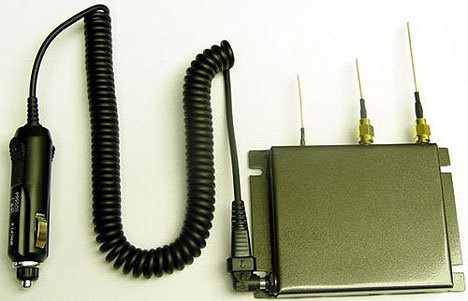
 This is bad. The Register reports that car thieves in the UK are now using illegally imported GPS jammers to avoid the GPS tracking systems now found in many autos. Consider the implications — bank robbers and sex offenders with jammers, bleed over from the signals affecting emergency services, etc. Not good.
Archives for February 2010
Criminals turn to GPS jammers to avoid tracking
February 23, 2010 By 6 Comments
Handheld GPS 101: Routes
February 23, 2010 By 1 Comment
This is the second in a series of posts designed to help introduce beginners to the use of handheld GPS receivers.
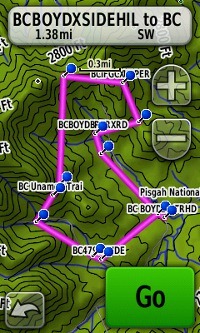 Routes are used for navigation. As the name implies, they are about where you are going. Routes consist of a series of waypoints, navigated to sequentially in the order you specify.
Most GPS receivers allow you to create a route from waypoints stored on the device. You can also create a route with mapping software and then transfer it to your device. My personal favorite for this task is Garmin MapSource, which allows you to click from waypoint to waypoint to create a route. It’s hard to get any simpler than that!
Backcountry GPS routes are generally laid out as the crow flies, giving you the straight line distance to the next waypoint (as seen in the screenshot at left, which shows a loop route). This is a very important point; the route in the image is 4.2 miles in length, while the actual distance on trail is 6.4 miles. Don’t be fooled into thinking your outing is shorter than it will be!
Garmin nuvi 1450
February 19, 2010 By 179 Comments
 The Garmin nüvi 1450
Magellan RoadMate 1700
February 17, 2010 By Leave a Comment
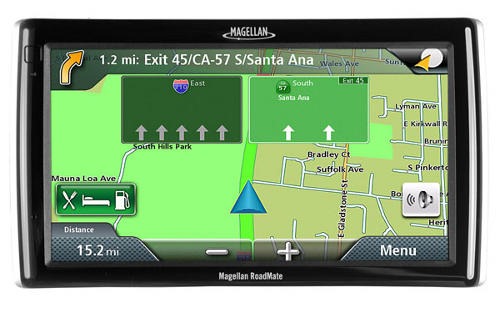 UPDATE: A new model, the 1700LM, adds lifetime map updates
The Magellan RoadMate 1700
Getting over SiRFstar III
February 17, 2010 By 31 Comments
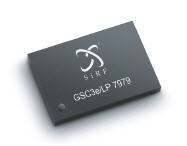 The most common handheld GPS question I get these days is about chipsets. People agonize about buying a unit without the SiRFstar III chip, partly because GPS enthusiasts like me have long sung its praises. So it’s time to set the record straight, or at the very least give you my opinion on the newer chipsets being used in current GPS receivers.
First some background — up until couple of years ago, the SiRFstar III chipset was the gold standard for GPS receivers. Before this chip, reception in mountainous terrain and in other challenging conditions was often hit or miss. Manufacturers had to use the SiRFstar III or risk being ignored by the market. Then a patent dispute with Broadcom was settled, and not in SiRF’s favor either. Manufacturers began looking for high-sensitivity chipset alternatives, usually turning to MediaTek or STMicroelectronics.
Handheld GPS 101: Waypoints
February 16, 2010 By 21 Comments
This is the first post in a new series, designed to help introduce beginners to handheld GPS receivers.
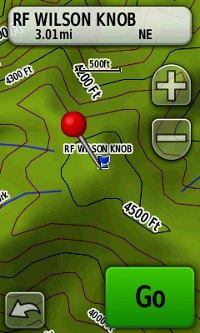 Waypoints are perhaps the single most important handheld GPS term, since they are key to navigation. So here’s our definition: A waypoint is a location which can be stored in your GPS receiver in the form of coordinates, allowing you to navigate to it. Each waypoint has a unique name or number assigned to it.
Select a waypoint and your handheld GPS can point you towards it and tell you the distance to the waypoint. Just remember that, with handheld units, the distance is generally given “as the crow flies” — a straight-line distance to the waypoint that doesn’t include all the twists and turns and switchbacks of the trail.
You may already be familiar with some specialized waypoints, such as geocache coordinates, or the points of interest (POIs) pre-loaded in auto GPS navigators.
SPOT gets some competition
February 11, 2010 By 8 Comments
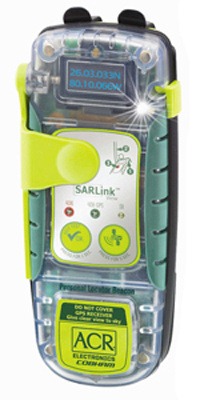 The SPOT Satellite Messenger is getting some new competition from personal locator beacons (PLBs). These emergency devices utilize the Cospas-Sarsat satellite system designed to aid in search and rescue missions. The advantage SPOT has enjoyed, is the ability to send non-distress signals. Today, Cobham Life Support-ACR Products announced a new service that will take advantage of PLB’s self-test function to send non-distress messages via text and email.
While PLBs are more expensive than the SPOT Satellite Messenger, this newly-leveraged functionality will be priced at $39.95 to $59.95 per year, significantly lower than SPOT’s $99.99 basic plan. Another differentiating factor is that the PLB can continue to be used for emergency extraction, even if the subscription plan expires. These advantages may help drive sales volume, allowing further reductions in unit costs.
The extent to which messages can be customized is unclear. For the most advanced functionality, the ACR PLB 350C (pictured) is required. The news release cites “the added features of multiple text and e-mail messaging, trip planning, and GPS test location.”
Garmin nuvi 1260T
February 10, 2010 By 3 Comments
 UPDATE: This model has been discontinued. For current recommendations, please refer to our auto GPS buyers guide.
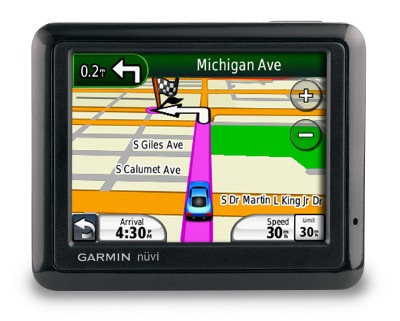
The Garmin nüvi 1260T is a mid-level unit in a line of Garmin GPS navigators introduced in 2009 (here is a list of more recent nuvi introductions). All of the units in the 1200, 1300 and 1400 series come with customizable data fields and the ability to utilize the pedestrian and mass transit features of Garmin’s CityXplorer maps. They also have text-to-speech, so you’ll hear “drive one-half mile, then turn left on Elm Street,” instead of just “drive one-half mile, then turn left.”
Garmin Foretrex 401
February 6, 2010 By 25 Comments
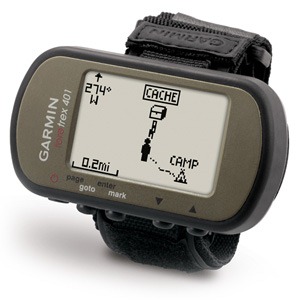 The Garmin Foretrex 401
A new look for GPS Tracklog
February 5, 2010 By 9 Comments

Today I’m rolling out a new design for GPS Tracklog. At nearly five years of age(!), its about time. I had planned this for last year following the move to WordPress, but I had a few distractions in my life, so I’m just now getting around to it.
Let me give you a brief guided tour; after all, this site is about navigation! It’s pretty intuitive, but there are a few items I want to call your attention to:
