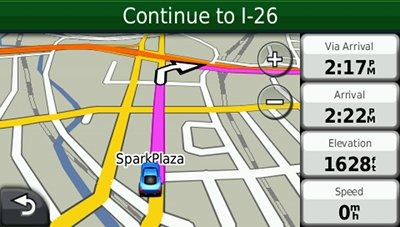
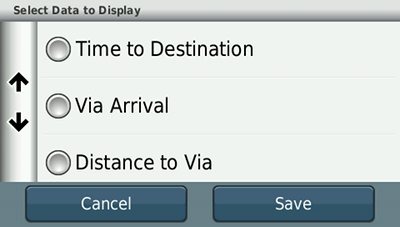
 Hey, what do you know! While testing the Garmin nuvi 2350LMT, I found yet another new feature. You know how you can touch the left data field on newer models to change what is displayed? There are now three new options when actively navigating: Via Arrival, Distance to Via and Time to Via. And as with the 13xx and 14xx series, if you go to Tools > Settings > Navigation > Automobile > Map Data Layout > More Data (whew!), you can get more fields to show up on the right, as pictured above. I like the Via Arrival option; quite useful!
This feature is available on nuvi 23xx and 24xx models. I don’t yet have access to a 22xx, so I can’t verify that the Via data field options are found on those units (I know the More Data option isn’t, due to the 3.5” screen).
Related posts:
 About Rich Owings
What is Via data? is it via some waypoint?
Via’s are points that you insert into a route. So if you entered “home” as your destination and then decided to stop off for a beer along the way, you would be going home VIA Joe’s Bar. 🙂
I’m trying to figure out how to ad via points with my home address to show last. Meaning imput all address for the day and find best rout. My old GPS had this feature and I’m thinking this new one doesnt have that feature.
What model do you have?
Sorry I didnt mention this in my first post. Garmin nuvi50 LM
If this unit doesnt have this feature what one does? Thank you.
You can add a single via point, but that’s it.
Go to this page… http://gpstracklog.com/compare/garmin-nuvi-comparison-chart and click twice on the header that says multi-point routing for models that allow you to plan a route with multiple stops. The 2555LMT would be the next model up with this feature set in the current generation line. Hope this helps.