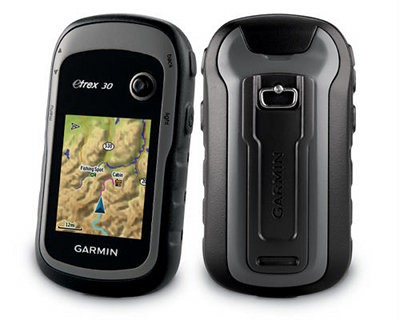
The Garmin eTrex 30
I’ll get into all the details in a moment, but first let’s look at what separates the eTrex 30 from the other models in the series…
Related units
- Drop down to the eTrex 20 and you’ll lose the 30’s tri-axial electronic compass, barometric altimeter, wireless data sharing and Garmin chirp compatibility
- The entry level eTrex 10 has a monochrome screen and no ability to add maps
- To see how the eTrex 30 stacks up against other models, check out my Garmin handheld GPS comparison chart
NOTE: Much of the following is adapted from my hands on review of the eTrex 20.
Garmin eTrex 30 hardware
Buttons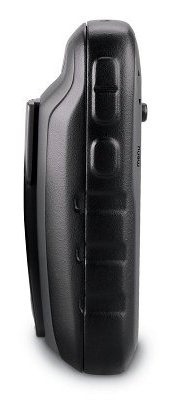
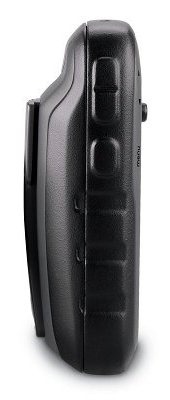
There are six buttons on the eTrex, three on the left, two on the right and one on the front (see image at top of page):
- Zoom in and zoom out buttons – These are on the left and can also be used to navigate menu lists a page at a time
- Menu button – (Also on the left side) Brings up a context sensitive menu; double-tap to access the main menu; press and hold to bring up the Find menu
- Back – On the right side; moves you back a step in the menu structure
- Power/Light – (Also on the right side) A short tap brings brings up a screen with date/time, battery and GPS status; additional short taps toggle between 0, 50 and 100% backlight; press and hold to power down
- Thumb stick – Located on the front of the device, you can toggle it side to side or up and down to navigate menus and pan the map; press down to enter a menu command or select a map point; press and hold to mark a waypoint
Display
The eTrex 30 has a bright but small display that is easily visible in sunlight or with the backlight engaged.
Garmin eTrex 30 interface
When you power up the eTrex 30, you’re taken to the Main Menu (below at left). You can change the order of items by pressing the menu button. If you select another screen (e.g., map) and then press the menu button, you’ll find a context-sensitive menu (shown below at right).

Garmin eTrex 30 features
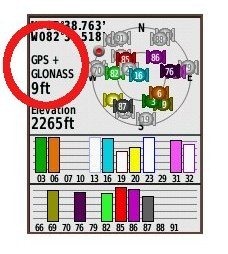 GLONASS

The one item found on the new eTrex series missing from all other Garmin units is the ability to use GLONASS as well as GPS satellites. There is an option to use GPS only, but no option for GLONASS only. Theoretically, GLONASS will improve accuracy. This may be especially true at northerly latitudes and in urban (and natural) canyons. I’ll talk about this a bit more in the performance section of this review.
More new features for the eTrex series
Many of the features found on higher-end Garmin handhelds are now available on the eTrex 30. These include…
Paperless geocaching
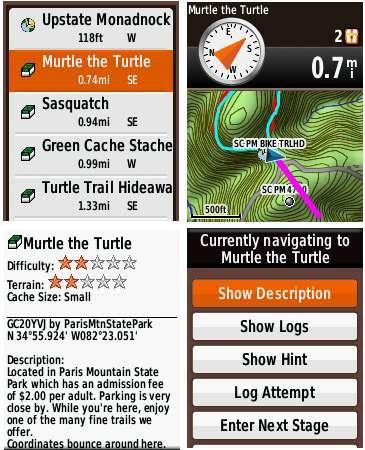
This gives you the ability to view description, hints, log, etc., in the field. The eTrex 30 also allows you to filter caches, letting you search by size, difficulty, terrain, etc. I’ll have more to say about geocaching in the performance section of this review. Some screenshots:
BirdsEye aerial imagery and topo maps
The eTrex 30 is fully compatible with Garmin’s BirdsEye products, including their aerial imagery and topo maps of the US and Canada. Each runs $30 for a one-year subscription; imagery you’ve downloaded during that period can still be used, even if you don’t renew. While the images below weren’t captured on an eTrex, they should give you an idea of the capabilities…
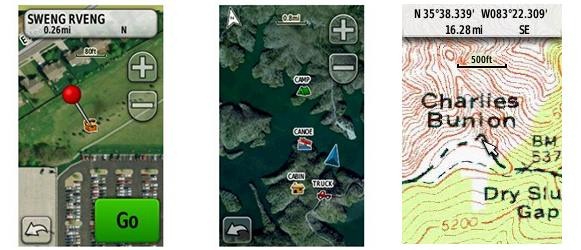
BirdsEye aerial imagery is particularly useful for urban cachers, outdoors lovers in the open landscapes of the American west, and for boaters. I find it less useful under the dense canopy of the eastern US.
I absolutely love the BirdsEye topo product. There is nothing quite like having the map on your device look exactly like the USGS topo in your hand.
Advanced track navigation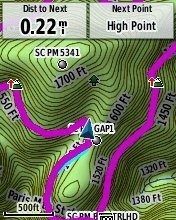
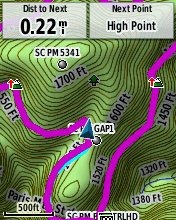
I have written before about advanced track navigation, but basically it will give you the best of both worlds when it comes to following a track or route. Simply choose a track to navigate and it will construct a route of waypoints along the track, add in high and low points, and give you the actual track mileage to each point, as shown at left.
Garmin custom maps
Now that we have BirdsEye Topo, there isn’t as much need for custom maps, but hey, you can put a PDF park map on your eTrex, and that’s pretty sweet.
Calendar
The Calendar displays dates when waypoints and tracks are saved, and it also displays geocaches that you’ve logged.
Profiles
Profiles allow you to save different groups of settings; you can have one for geocaching, one for mountain biking, one for road riding, etc. These are discussed more below under “Customizing the Garmin eTrex 30.”
More eTrex 30 features of note
Route, Track and Waypoint management
The eTrex 30 has excellent route, track and waypoint management tools, including:
- Waypoints – The ability to project a waypoint, average location, set proximity alerts, and to reposition a waypoint at your current location
- Tracks – You can choose to hide or show multiple tracks on the map, view an elevation plot, and give them a custom color (17 colors are available); the color of the active track may also be changed
- Routes – You can view a map of the entire route, edit the route, reverse it and view an elevation plot
Ability to add free maps
One of the great things about Garmin handhelds is the ability to add free maps to them, and the eTrex 30 is no exception. GPS File Depot is an excellent source of maps for the eTrex.
Customizing the Garmin eTrex 30
Main menu item order – You can customize the main menu item order by pressing the Menu button while viewing the Main Menu.
Accessing pages via the back button – Use Setup > Page sequence for this, but be aware that these pages will disappear from the main menu.
Profiles – The eTrex 30 comes with recreational, geocaching, automotive, marine and fitness profiles. You can switch profiles by selecting Profile Change from the Main Menu. Or create a new one by going to Main Menu > Setup > Profiles > Create Profile. Select the new profile to edit the name. Any changes you make in menus or other settings will be retained in that profile. So start changing things! Want track up when geocaching and north up when biking? No problem. How about a separate profile that just shows USGS topos or aerial imagery? The possibilities are nearly endless.
Data fields – You can change data fields on just about any screen that has these; usually you just press Menu > Change Data Fields.
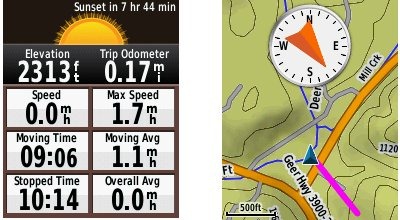
Dashboards – Instead of data fields (and in some cases in addition to), you can select a dashboard for the map, compass and trip computer screens. Choices (depending upon page) may include automotive, stopwatch, small or large data field, recreational, compass, geocaching or elevation plot. I’ve included screenshots showing a couple below. For the trip computer and compass pages, you access this via Menu > Change Dashboard. For the map screen, choose Menu > Setup Map > Data Fields > Dashboard. The one downside here is the small screen on the eTrex series; using a dashboard can significantly reduce map real estate.
Unique to the eTrex 30
Let’s go over the features found on the eTrex 30, but not on the 20:
- Triaxial electronic compass – Having an electronic compass means the eTrex 30 can point to your destination while standing still; triaxial means you don’t have to hold it level like other electronic compass models; the downside is that you will have to calibrate the compass after each battery change
- Barometric altimeter – This will give you more accurate elevation readings and allow you to see an elevation plot of your tracks
- Wireless data sharing – The eTrex 30 is capable of wireless data transfer with other compatible Garmin units; you can transfer waypoints, tracks, routes and paperless geocache details
- Garmin chirp compatibility – Adds a new dimension to geocaching
Garmin eTrex 30 tips
I imagine there are more, but here’s a few tips:
- Use the zoom buttons to jump a full page in a menu
- When entering a name, the zoom buttons will switch between keypads
- You can create a custom startup message (e.g., if found, please call…) by connecting it to your computer and editing the Garmin/startup.txt file
- You can check the battery level by briefly pressing the power button; you may also dedicate a data field to battery status.
Garmin eTrex x0 series performance
The following refers to tests done on the eTrex 20:
Battery life
With the eTrex set to record a track point every five seconds, I left the device on, sitting stationary, under light canopy, powered by a fully charged set of Eneloop NiMH rechargeable AA batteries. With the backlight set to remain on full, batteries lasted 10 hours and 17 minutes. The backlight off test is still running, but I wanted to go ahead and post this. I’ll update that info later today. UPDATE: With the backlight off, the eTrex 20 ran for an amazing 23 hours and 29 minutes before shutting off.
Tracks
Tracklog accuracy was tested with the eTrex 20, GPSMAP 60CSx (with SiRFstar III chipset) and a GPSMAP 62s mounted on the handlebars of my mountain bike. All units were set to record track points every five seconds. Tracks were collected on out and back runs and then analyzed for track separation errors. The idea here is that, ideally, the track recorded on the way out should match perfectly with the one recorded on the way back to the trailhead. Of course no unit ever meets the ideal.
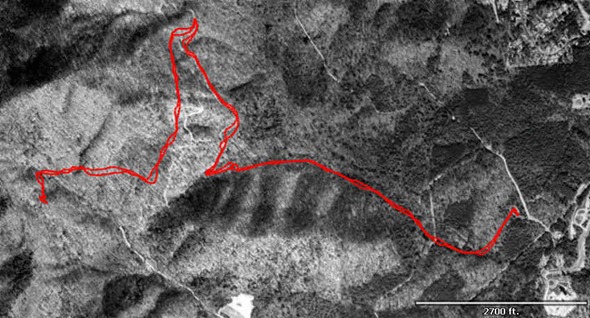
The 60CSx performed best, with less errors in general and a maximum track separation error of about 80’. The 62s had significantly more segments with easily visible track separation errors, maxing out at around 120’. The eTrex was worst, with more visible errors that tended to be separated by a greater distance, maxing out at around 125’. I find it interesting, but not surprising, that the oldest unit with the most mature firmware performed best, while the newest unit with the least mature firmware performed worst. Here’s an image of an eTrex 20 track (you should be able to click on it for a larger image)…
It gets more interesting when you look at the geocaching test results…
Geocaching
Caveat: I’ve yet to come up with a good way to test geocaching accuracy. There are just too many variables – accuracy of the cache coordinates, satellite constellation variability, terrain (multipath effects), etc.
So having said that, here’s a very unscientific test. After becoming familiar with the unit, towards the end of my testing, I made some cache runs. I set the units down on top of the cache one at a time and recorded the reported distance to cache in feet. The results are shown below.
GPSMAP 62s Oregon 450 eTrex 20 with GPS+GLONASS eTrex 20 with GPS only Cache 1 6 14 16 6+ Cache 2 20 49 10+ 15 Cache 3 36 29 13 48 Cache 4 30 37 26+ 44 Average 23 32.25 16.25 28.25 Not bad, and you can see that GLONASS appears to result in some improvement. The plus signs indicate cycling, where the distance to cache would cycle from a low number to a higher number over a period of a minute or so and then repeat. In this situation, I used the lower number in the charts above. The eTrex 20 seems to suffer from the malady that affects all new Garmins, where the firmware is far from perfect. This cycling was also seen in early firmware versions of the GPSMAP 62 and Oregon series.
Lags and redraws
I noticed some slight lags when navigating menus, and a bit of a delay (a second or so) on map redraws when panning the map. I noticed no map redraw delays while mountain biking with the unit though. Some users have reported map redraw delays with raster imagery such as Garmin’s BirdsEye products, though I believe these reports have been limited to map panning and not delays on the moving map.
Garmin eTrex 30 pros
- Bright display
- Small size
- GLONASS for improved accuracy
- Paperless geocaching capability
- BirdsEye aerial imagery and US/Canada topo compatibility
- Advanced track navigation
- Garmin custom maps capability
- Customization options (dashboards, profiles, etc.)
- Excellent battery life
- Triaxial electronic compass
- Barometric altimeter
- Wireless data sharing
Garmin eTrex 30 cons
- Small display
- Distance to destination cycling and tracklog separation point to immature firmware
Garmin eTrex 30 conclusion
Despite some early bugs, I like the new eTrex series, and think it will be a good unit for all sorts of outdoors lovers. My quibbles with it are pretty minor, and Garmin has a good track record of fixing significant issues (although it can often take awhile). The track separation issues aren’t bad enough to cause most folks navigation problems, though the distance to destination cycling could prove frustrating to geocachers. The extensive feature set, including paperless geocaching, GLONASS support and BirdsEye aerial imagery capability, is very nice. The eTrex series is lightweight and has extraordinary battery life, making it an especially choice for backpackers.
More Garmin eTrex 30 reviews
- Consumer-authored Garmin eTrex 30 reviews
have been posted at Amazon
- TakeAdventure.com has posted a first looks review of the eTrex 30
- An in-depth eTrex 30 review has been posted at GPS Information
I’ll be posting more hands on GPS reviews as they appear, but in the meantime, here are some…
Other Garmin eTrex 30 resources
- The Garmin eTrex 30 owners manual
- To see how the eTrex 30 compares to other models, check out my Garmin handheld GPS comparison chart or use Garmin’s own comparison tool
- The official Garmin eTrex 30 web page
Compare prices on the Garmin eTrex 30 at these merchants:
- Check the current Garmin eTrex 30 Worldwide Handheld GPS Navigator
- Find the Garmin eTrex 30 GPS
at REI.com, where satisfaction is guaranteed and members get 10% back on eligible purchases
- Get the Garmin eTrex 30 from GPS City
- Buy the eTrex® 30
direct from Garmin
- Find the eTrex®30 Handheld GPS
at Abes of Maine
- Get the eTrex 30 from GanderMountain.com
- BassPro.com also carries the Garmin eTrex 30 Handheld GPS Unit – Outdoor Electronics
- Or you can buy the Garmin eTrex 30 from Cabelas.com
 About Rich Owings

Very informative review. Graphics,layout,content very professional and pertinent,IMO. Your review convinced me to return the 20 and get the 30. The electronic compass is the real deal in the woods at night, and to have it available in the Etrex series is large. Great value at under $300. I purchased mine at Overstocked.com for $256.00 no shipping or handling charges, and got it two days later. I understand from their website that the 30 is on backorder as of 12-15-11; at that price, no wonder! No other site was close.
Just checked the Overstock site and they jacked the price up to $275.00 since I got my unit on Tuesday.
Amazon has the etrex 30 at $250, and the 20 at $183.
Yeah, they’ve had this up for a week or so. The eTrex 30 is the best deal…
Garmin eTrex 30 at Amazon
So here’s a question that might be useful for folks, like myself, new to mapping GPSr’s: I could use a little disambiguation on the map types available. (i get raster v. vector, I just don’t know what the GPS can do with them) What are the different kinds of topo’s this unit uses? I see the USGS birds eye topo, ($30) and of course there is the Garmin 24k topo, purchased by region. And for comparison, there is the topo offered for the Earthmate PN60. Are the USGS maps that can be interpreted by the unit as terrain, or just dead images like the aerial views? It seems like the GPS can do more with some types, and less with others! Thanks if you can help, and if not, thanks for great site anyways! Q
The advantage of BirdsEye Topo is that they are the same maps as USGS topos.
The advantages of the 24K topo is that the maps scale better as you zoom, and they include routable trails and roads.
These posts may help…
http://gpstracklog.com/2011/05/garmin-birdseye-topo-us-and-canada.html
http://gpstracklog.com/2011/06/garmin-topo-us-24k-review.html
I’m not sure what you mean by “Are the USGS maps that can be interpreted by the unit as terrain, or just dead images like the aerial views?”
I can certainly see ( and want! ) the advantage of USGS topo’s, and I get how you can zoom in on computed curve (vector) vs. the finite detail that is offered by pixels. Again, I’m new at this, and haven’t had hands on time… What I don’t understand is what the units can do with them. For instance, the elevation profiles of a planned route you show; it seems like the GPS couldn’t get that info from a raster image of a topo, and that it would need something like the Garmin 24k topo, which seems like more than just a vector image, but something the GPS actually can interpret, and can generate a elevation profile from. This one might be better posted in the forums…
Thanks!
Q
These models come with a worldwide digital elevation model (DEM), but you will get much more detail in terms of the elevation profile if you have one of the newer Garmin topo products installed, though it does not need to be enabled to take advantage of this. So you can display only BirdsEye topo (without the vector lines showing up from Garmin’s 24K product) but still get detailed elevation data from the latter. Hope that’s clear enough.
I think so. The DEM is the key part for me. Understanding that a DEM doesn’t come with the BirdsEye/Topo is the critical fact. The DEM coming with the units would be not so detailed as the DEM that would come with a 24K regional ( required to be useful I think). And a DEM wouldn’t come with the BirdsEye/Topo imagery, even though the info would be there for me to eyeball, but not there for the machine to work with, to say, generate an elevation profile between two points. So, unless there are other sources for 24k Dem’s (GPS file deopt?) it looks like I’ll have to get 2 regionals ( I live on a border area) plus one for the national park trip upcoming. Or, just live with digitized USGS paper maps for 1/3 the price. So, more or less, I think I get it. Thanks!
Q
Bought an eTrex 30 2 weeks ago – I’ve never bought anything more disappointing since “sea-people”. It hangs, crashes, turns itself off, the CPU is so slow that I can ride off the screen with a bicycle and the device doesn’t manage to keep up with the map scrolling, the magnetic compass is a bad joke and the altimeter is extremely complicated and both work like something you found in a surprise bag. Using OSM maps makes it even more crashy, routing fails and when I settled with using it as a GPS-logger, it didn’t even manage to do that without hanging up and turning itself off. It’s a horribly unsettling thought that the same company that put this bunch of malfunctioning everything is making aircraft avionics!
Sounds like you have a lemon. If you can exchange it where you bought it, I’d do that. If not, call Garmin support (works better than email).
Thank you for your comment! You may be right, though gathering reports from the net, mine is obviously not the only one turning off by itself etc. and meanwhile I discovered a nasty RFI-vulnerability, device gets shot off reliably by a cellphone mast when get near to it from 3 different directions, RFI is crashing the computer part, not the receiver chip… I’m sorry, I hate that I have to assume this because all I wanted was a MTB with Garmin GPS (old dream I had in the early 90s), but even if my example is a dud, the device design is a dud, too. Just did another tour and the eTrex 30 turned off twice and couldn’t be reactivated despite removing the batteries etc., recently I was standing in the middle of nowhere and there was just no way I could get the routing going – it’s the worst bunch of gawd-awful I’ve ever bought..
Sounds like a defective unit. Have you contacted Garmin or the seller about returning it?
Yes I did, got an RMA number, just didn’t have a working printer to print the needed stuff but I’ll keep you posted! 🙂
While I haven’t had your turning-off issues, this device has serious other issues, most of which I think can be boiled down to software, and in its current state I cannot recommend the 30 to anyone.
Sticky issue – No comment – There are lots of videos of this on Youtube and software v2.70 didn’t fix it. It’s still really bad once you get below a certain speed, the coordinates will just stick for tens of meters. Geocachers beware.
Magnetic compass a bad joke? Yep. Fully agree. Perhaps usable during fifteen minutes after a calibration, then it becomes a dud which oscillates randomly 180 degrees during walking. Strange thing that the compass in my $100 GPS-enabled smartphone had to be calibrated once, and has since worked. This is really really bad for intended navigational equipment and seems to be not only my device.
Altimeter a bad joke? Yep. Fully agree. The combination between GPS and altimeter (barometer) seems to be some sort of simple linear tuning once the discrepances are high enough between GPS alti and barometric alti. Generally it just makes the readings worse and I disabled the barometeric input. While it is good to have a barometer on board to keep track of weather, using it as an altimeter with the current software is no good. The garmin software team must read up on Kalman filtering, not use an algorithm which a summer worker could have written in two hours!
Map drawing slow? Can’t really agree, quite racey in fact, but POI searching on maps is! An actual alphabetic search can take FIVE MINUTES to run on a small terrain map! It seems the search works terribly slow on especially older maps!
And oh, the D-ring on the back broke after just a few battery changes. This was however replaced swiftly by the reseller.
All in all I would have returned my 30 for a refund if it was possible – Don’t buy it with its current software. After several months of tedious efforts from the software team, then maybe…
Thanks Tobias.
No problem.
Addition to my review: As of beta version 2.71, actually released today, the “sticky issue” and possibly also the compass seem to be fixed. Altimeter is still bad, though.
I’d take M.Agellan a little more seriously if his name was different; is this so-called critique for real or just someone amusing themselves. Hell, I own five or six Garmin Products and never had any problems at all. Sounds like the dude dropped his 30 thirty times.
What random name pulled out of a nose would you deem more “serious” then? :confused: Unless you have a working eTrex 30 and something to add to the discussion, please keep your fanboy-ish insults for yourself Mr. Wise Guy!
Hey, lets please keep it civil lest I have to go to Facebook logins for comments so you are all posting under your real names!
Painfully slow panning and zooming. In paper it is 62s in a small box with small display. I changed my 62s to the etrex 30 for its size. Big mistake!
VERY SLOW, sometimes tha map freezes. Moving the map (with the basemap activated only) is as “fast” as on my 10 year old monochrome Gpsmap76. Garmin did not make a big progress in terms of speed during the last 10 years…
Routing is also slow. If I miss a a turn while navigating, it does not finish the rerouting until the next intersection, so I shoul stop for waiting, which is not always possible.
For hiking it’s ok., but for Mtb or motorcycle is too slow.
I guess the CPU is slower because of the lower power consumption, but the working time with one charge not much longer that the 62s. (which has both bigger display and faster CPU and consumes more energy.
Just tried my 62s and eTrex 20 side by side and yes the eTrex does seem slower than the 62s.
i agree completely, that one of the reasons why im considering a change to the gpsmap 62d, plus that the enoying stick-button keeps creating unwanted waypoints in my pocket! I do have a solution for the last problem.
Is the unit slow with both vectorial and raster maps?
I haven’t tested it with raster maps, but I have heard complaints about the new eTrex series being slow. A unit like the 62s would probably be faster.
Hi, i wonder if i chose to “navigate to waypoint x” and by default the blue line “as-the-crow-flies” comes up. Is there a way to get the unit to construct a route towards the waypoint based on terrain, roads, paths etc? if they are available in the loaded map of course. Thank you!
Yes, you need a map with routable roads and/or trails, like City Navigator or this…
http://gpstracklog.com/2011/06/garmin-topo-us-24k-review.html
Don’t expect good trail coverage though. More options…
http://gpstracklog.com/2012/02/handheld-gps-201-using-online-tracks-for-trails.html
http://gpstracklog.com/2010/07/navigating-tracks-on-the-new-garmin-handhelds.html
I have a great map, with detaild paths, roads etc. It even gives you the name of the trekking path you are on! (swedish, friluftskartan pro v.2) I still dont get how i should go about making the gps tell me suggested route. Is this posible?
Unless the developer made it routable, you can’t. See my last two links above for other ways to route on trails though.
Hey Homerboy, let m.Agellan speak for himself. Read the beginning of this thread, I started it.
Hi!
You’ve mentioned the possibility to load PDF files to the GPS. Could you tell me some detail about it? How should I do it with “GeoPDFs” or GeoTIFFs/digital raster graphics (DRGs) downloaded from the USGS/governmental sites?
Thank you!
Here are all the posts I’ve done on the subject: http://gpstracklog.com/tag/garmin-custom-maps
And here is Garmin’s how to:
http://garmin.blogs.com/softwareupdates/2009/10/creating-and-using-garmin-custom-maps-in-five-easy-steps.html
But if you just want USGS topos, this is well worth the $30:
http://gpstracklog.com/2011/05/garmin-birdseye-topo-us-and-canada.html
Ok. Thanks a lot for the quick reply!
I have another problem. I have Garmin US 24k Topo maps and OSM maps also, which are should be “routable”. Does it mean that when I am planning a route it will follows the existing roads (instead of “as-a-crow-flies” mode)? I couldn’t find out how to set it up. Can you help me?
Thank you!
Setup > Routing > Guidance Method > On Road for Time
I just ordered one at REI for $219 with free delivery. I was in the market for a handheld gps in the summer of 2011. I waited for it to be released in September, the price to drop down from $300 and the initial bugs to get worked out. I regret that I am unwilling to wait longer for a larger screen, thermometer and personal location beacon (plb) to find its way into the product, but I’m happy with my decision. The Dakota 20 is tempting to buy with its larger screen and touch-screen capability, especially for typing notes for <= price,…. but…., I'd rather have the purported 10' pinpoint accuracy that some report they get and attribute to the extra satellite points. This will be my first gps unit so I'm a newbie with this, but I do try to do my homework. More experienced users may have a more insightful opinion.
Cool! Handheld GPS are complex beasts. Just take your time with it and you can always come here with questions. This series is a good starting point…
http://gpstracklog.com/category/handheld-sport-gps/handheld-gps-101
I recently purchased an ETREX 30. It looks like a great piece of hardware.
The main problem I see is the cost of charts. The Garmin Nautical charts for the Northeast alone could cost $500. example Garmin Bluechart US700J, Entire East Coast $479
Garmin have a product called Garmin Bluechart g2 – HXUS039R, this covers the whole of the US waters for $139. What is left out that they can sell the whole US for 139 but charge $479 just for the east coast
There are many sources for free topo, satellite and vector nautical chart data. Have I tied myself into a proprietary platform that forces me to spend $1000 to put data into a $300 piece of hardware.
Thanks,
Mike Cohen
Thanks Mike. I’m not a marine guy, but I agree that the cost of charts looks crazy!
I’m also trying to work around the cost of the nautical charts.
Is there any way to connect the eTrex 30 to a computer mapping program, such as Open CPN, or SeaClear? I’ve discovered that there isn’t a direct NMEA feed (why not, when Garmin’s ancient and cheaper handhelds do!!??). It also seems as though the handheld slips into mass storage device mode when I plug it into my computer via the USB cable.
If not, is there a way to upload scans of nautical charts to the eTrex 30? Naturally Garmin has not been very helpful in answering this question. I work in very remote, coastal South America, and the best charts are locally produced and not available electronically. And, like Mike, I’m not about to drop more money on charts than the cost of the actual GPS handheld.
Thanks a lot guys!
Yes you can upload scans of nautical charts to the 30. You can use google maps for that, it’s called custom maps. However, you’ll have to split the maps into 1024×1024 pixels large images or smaller. In short, you scan the nautical map and fit the scanned image(s) over Google earth, then export the work to a .kmz file which you put under \CustomMaps on the GPS. The process is not that complicated but could have been made easier in my opinion.
“I’ve discovered that there isn’t a direct NMEA feed (why not, when Garmin’s ancient and cheaper handhelds do!!??)”
If you are looking for a NMEA feed for your laptop, the GlobalSat BU-353 USB GPS Receiver is very good. I’ve used it for years and am very happy with it. Amazon has it for $26.99. I haven’t tried it head to head against my eTrex 30, by my general feeling is that the BU-353 is not as sensitive as the eTrex. In other words, it needs a more clear view of the sky than the Garmin. However, the BU-353 may still meet your needs very nicely….even better than eTrex 30 in practice…. because it is waterproof and magnetic. You can put it on the roof of your car or boat cabin and run the cable to back to your laptop. If the cable isn’t long enough for your preferred placement, you can use an inexpensive USB cable extension.
Overall, I feel this is much better in normal usage than tethering your nice compact handheld GPS to a laptop.
Hi,
I have given up on Garmin. I sent mine back. It looks as if Garmin is treating its customers as cash cows and squeezing all they can out of them before people discover the things maps they are selling at outrageous prices are free in many other places.
You can spilt up NOAA charts into smaller blocks, but you still have raster instead of vector charts which means when you zoom out the text gets too small to read.
I’ve gone to an Android tablet (Asus Transformer Prime) plus the MXMariner ap for Nautical use and Topo USA and an old Earthmate GPS for on land use. I have better and cheaper hardware and software than with Garmin.
If you wait until the new Microsoft Surface PC Tablets come out you might even get up and running cheaper when the hardware prices come down
Indeed in a watertight boat there is little point at all of getting this GPS, you can get a better oversight on a tablet with the appropriate software for less money. This one’s for water exposure, such as hiking/kayaking/biking.
I have no problem about Garmin taking good payment for the products and services they provide – worse is, as they do now – selling stuff for moderate amounts of money which just doesn’t work very well. As of software version v2.80, every bug in my list above except the “sticky problem” is still valid. Worst is the compass, in software version 2.73 it could actually work for a few hours after a calibration, now it goes dud in mere minutes and starts to rotate!!!
Another issue I have noted is the fact that tracks are followed in the opposite direction of in which they are defined!
I’ve also given up on mine and getting another GPS. This product line pulls Garmin down the dirt and IMO sales should be stopped until the more serious issues are resolved. I never had problems with my three previous Garmin receivers.
The Garmin errata for the new versions says it all: Improved ability to factory reset the unit on power up – now just requires holding two buttons instead of three! ….
Hi Rich-
Thanks for the great reviews!
Why no mention of ANT+ support for wireless fitness accessories such as heart rate and cadence monitors? For me, this is the biggest reason to upgrade to the ETrex 30 over the ETrex 20.
(I say this in theory… I haven’t tried it out yet and I’ll really want to explore the software support for this. I’m not yet sure how the heart rate data is transferred. Is it part of the gpx file or stored separately? I assume the heart rate data will be ignored by a lot of software packages… I’ll probably need separate fitness software to take advantage of that.)
I’m not really sure how much of the audience is interested in those features.
You might want to try the Gamin Connect website for transferring fitness data.
I cannot find the heart rate in the GPX data of my eTrex-30 at all. It seems it’s only capable of displaying it, not recording it. But I might be wrong.
Try uploading data to Garmin Connect, and please let us now if it works.
Thanks for checking! I did some more research on this. I’m planning to order my eTrex 30 today with a heart rate monitor so I should able to provide hands-on data later. In the meantime, a few references to other forums will help:
1) TopoFusion Pro software itself (beloved by GPS Tracklog) already supports reading and reporting heart-rate data.
a) Here is a quote from the TopoFusion site: “TopoFusion PRO also offers advanced features like calibrated map import, shapefile support, more map servers and power, heart rate and cadence support.” http://www.topofusion.com/download.php
b) Here is a great mountain biking review of TopoFusion including use of heart rate capability. http://www.singletracks.com/blog/gps/topofusion-a-mountain-bikers-dream-app/ Check out the Endurance Training / Activity Tracker section.
2) At least two other readily available software packages also support download of this data from a Dakota 20 (presumably eTrex 30 and other ANT+ compatible Garmin receivers as well): Garmin BaseCamp and Sport Tracks reference: http://www.zonefivesoftware.com/sporttracks/forums/viewtopic.php?f=43&t=9858
3) This data is apparently stored in the GPX file which should “contain heart rate subentries within the entries” Reference: http://www.zonefivesoftware.com/sporttracks/forums/viewtopic.php?f=43&t=9858
I do a lot of treking and am currently using a fairly old GPS, and it very complicated to create routes and want to replace this with a current that I can plot routes by moving the pointer to a location and either click a button or touch the screen and it enters a way point.
I think most have the facility to load maps or may even come with some e pre programmed.
The above discussion has not really clarified Garmin eTrex 30 is the one or not. Any ideas would be appreciated, do not make it to techy or jargion orientated, I afraid I am a user not a programmer and only read the instructions when all else
Personally, I find it easier to construct a route on my computer using a program like Garmin BaseCamp and then transfer it to the device. But yes, you can go to the Main Menu > Route Planner > Create Route > Select First Point > Use Map > then pan the map, select the points in order, and press the Back button when finished.
In short Mokey, yes, the eTrex 30 is indeed a map capable device. Whether good maps are available for your region or country I don’t know; if you live in the EU, USA or Canada the answer is definitely yes. Pricing varies (if you are lucky there might exist good free maps for your region) but count on spending almost as much money for the maps as for the GPS!
You can plan routes on the 30’s tiny screen but I’ve never been doing that, the overall overview is pretty bad with such a small screen. I just use the PC software (mapsource) and plan the route there, then upload it to the GPS.
Rich Owings and Tobias
Thanks for the response, I will go with your advice and create the routes on a computer and then upload to the GPS.
Hi, does anyone know if there’s a way to increase the number of audible alerts for the low battery.
My e30 just bleeps the once and switches off and I’ve had a few instances where I’ve not heard it.
In comparison, my old garmin gave several warnings and were clewarer.
Thanks
Not that I know of. But you can show battery level as a data field.
I created a route on computer using Garmin BaseCamp software and sent it to my eTrex 30, but I can’t figure out how to select the route on the GPS so I can use the route. Anyone know how to do that?
It should be under Where To? > Routes.
Would I notice any real difference betwen the eTrex 20 and eTrex 30 apart from the cost. There seems to be very little difference when just looking at the specs.
The 30 has a barometric altimeter and electronic compass. These posts are old, but they should help explain these features…
http://gpstracklog.com/2006/06/why_have_a_baro.html
http://gpstracklog.com/2006/03/why_have_an_ele.html
Thank you so much for all of your hard work. Your information has been very helpful to me.
Glad to help!
I have had this model for two months, and still learned new stuff. Thanks a lot.
One question, how many caches can the etrex 30 hold? Just want to know so I don’t make too many pocket queries.
5,000.
Is buying the Garmin TOPO US 24K maps nearly a required option to get the most out of this unit?
No, there are plenty of great topo maps available for free at http://gpsfiledepot.com
Besides the touch screen, which is not a big deal to me. Garmin eTrex 30 or the Garmin Oregon 450?
How will you be using it (hiking, mountain biking, driving, etc.)?
If you plan on using custom maps you might consider a different Garmin because the eTrex 30 is slow when panning and zooming custom maps. Slow enough that it makes reading the map difficult if you have to scroll around or zoom.
Sorry if this is old news, but what is ‘custom maps’ all about? Is it better to just buy the Garmin maps or get the free ones from filedepot? And if custom maps is really the way to go, should I go with the Oregon 450?
There are some cases where custom maps are very handy. Info on custom maps – http://www.garmin.com/us/products/onthetrail/custommaps
I found a good free topo map at http://gpsfiledepot.com. Check to see if they have the area you need.
Best way (IMHO) is to get the free ones. If you need something else, go with Garmin maps. I would do custom maps only as a last resort, like if you need to use a PDF map not available in other formats.
Im torn.
I’m intrigued by the battery life and GLONASS, but there are MANY posts about issues with the device rebooting, freezing, and erratic compass. At the same time there are many that have no issues, however the issues that do come up appear to be common.
Is the Oregon 450 also plagued with similar issues? I like the etrex over the Oregon (on paper anyway), but I’m more than willing to sacrifice some features for better reliability.
Primary use will be geocaching. Backwoods trekking someday. Would NOT use as auto GPS.
I’d certainly appreciate some insight from those who have owned these.
Thanks,
Rob
It seems like all models have glitches at first and as the firmware matures, they get better. I have the eTrex 20 and haven’t noticed such problems, but I’m not a hard core cacher. I usually only cache when I’m testing a model or occasionally with my son. I’d say look at the date on comments so you can see if they are using later firmware or not. You might also want to look at eTrex 20 threads at http://forums.groundspeak.com/GC/index.php?showforum=11
Hi,
I have just been reading this review as I am hoping to buy an Etrex 30 to use for Geocaching in the U.K. (England).
What I would like to be able to install onto it are 1:25000 Ordnance Survey Maps which show all footpaths etc. but I am not sure if these are readily available.
Is the Garmin ‘Birds Eye’ offering my best option, or are there other options available please?
I know that most folk on here are based in America, but hopefully there are some from the U.K. who are familiar with our slightly different maps, and their general availability.
Thanks!
That probably is the best option, although there is also this which offers “OS-look” contour maps… http://talkytoaster.info/ukmaps.htm
Do you have feedback on how well the E trex 30 might work in Portugal and Spain?
It will work fine, but getting maps may be harder and/or expensive.
I’d also suggest reading this for “The Airport Problem” section… http://gpstracklog.com/2012/01/what-to-do-about-gps-reception-problems.html
Can you elaborate on the “but getting maps may be harder and/or expensive” I am thinking of getting an eTrex30 but I have scoured the Garmin site and can not find ANY Spanish maps. Detailed maps are limited here (there use to be only the military maps availabale) but I am aware that they are available electronically now because I looked for some to use on my tablet but that just isn’t readable outside. However I don’t know what/how you get detailed maps for the Garmin products.
Depending on what your requirements on maps are, you may not have to shell out any cash to Garmin for maps. First download garmin’s Basecamp, http://www.garmin.com/basecamp/ and install it, then download and install this:
http://openmtbmap.org/donate/odbl/download_spain_en.html
Have a look and see if it seems to suite your needs. There are contourlines and a fair bit of terrain detail – I’d not hesitate much to use it.
That’s probably the best free option. For ones that you can buy, look near the bottom of this page: https://buy.garmin.com/shop/shop.do?cID=255&fKeys=FILTER_REGION_EUROPE
More free options…
These maps may also still be available, but they are old: http://mapcenter.cgpsmapper.com/catalogue.php?country=66
and
http://mapcenter.cgpsmapper.com/maplist.php?cnt=66&rgn=&cat=4
These do not appear to be topo maps: http://www.elsinga.net/maps
and thanks Tobias, I have done as you suggested and they seem more than adequate for my requirements, road/MTB cycling and hiking
Thanks for that Rich, right at the bottom is “TOPO Alpina Espana – Mallorca (Tramuntana)” which is what I ws looking for (I live at the base of them in the south of the island.
At first sight they look ideal but I will look at the other options as well Thanks again for the help.
Thank you for your reply and the “reception problem–airport” link. It was very enlightening.
I think I’ll stick to my compass and maps–with cell phone GPS when dislocated.
In my opinion however this is quite a non issue. Any modern receiver will do a full relocation / cold start in merely a few minutes even if you have moved halfway around the globe.
Probably, but a lot of people give up before a few minutes!
Are you going to have a data plan for your phone there?
This product has numerous adverse reviews at Amazon.com, and they’re doozies, some as recent as just a few days ago. Based on what I saw there, I wouldn’t buy an eTrex 30; I may not buy ANY Garmin product, for that matter. It looks like the company has lost its technical edge.
I agree Phil – my prior eTrex devices (the Legend, classic eTrex and eTrex H) are rock solid in their basic functionality and actually put the eTrex 30 to shame.
When I first received my eTrex 30, it worked so terribly bad i thought I’d received a Chinese pirate copy of the real thing. Crashed, hanged, incredibly slow, random error messages, turned itself off. With the latest firmware, it’s just about acceptable, but the compass still doesn’t work.
Please don’t rate a product you don’t own.
I just want to know if etrex 30 has capability to measure roughly the area of a particular parcel of lands, say about one to three hectares contiguous farmlot.
I don’t understand exactly what you mean, but yes the etrex has an “area calculation” feature. Note that you need to walk around (encircle) the area that is to be measured.
Please don’t rate a product unless you own it and have used it.
Based on above reviews, I noticed that eTrex30 has no pre-loaded detailed maps. Could it be possible for a vendor of Garmin eTrex 30 to include the detailed basemaps of Cambodia for say 10 gps units that we wish to purchase this coming November 2012. The most important features of the basemaps are province, district, commune, and village road networks. We will appreciate if rivers and other bodies of water are also included in the basemaps. And if available, shall include also easily identifiable landmarks or structures in the village like churches, schools, and village hall. Please give me an indicative cost of a gps unit with detailed basemaps. Thank you for your immediate reply.
I suggest you contact a Cambodian dealer…
http://www8.garmin.com/cgi-bin/dealers.pl?country=Cambodia&dealer_type=All
Following on from your earlier replies to my questions about Spanish maps I have now found that I can get electronic versions of the 1:25.000 I use for walking and cycling here in mallorca.
These maps, MTN25 raster, come as a TIFF file and a TWF file (e.g. 0698C131.TFW & 0698C131.TFW) Do you know if these can be used on the eTrex30. I have downloaded Garmin Basecamp but I don’t seem to be able to import these maps in to it.
You should be able to fit the TIFF files over Google Earth and then upload them as .kmz files into the\CustomMaps folder of the device. There are tutorials on the web on how to do this. It might be a rather unsmooth alternative though and there may well be better solutions or devices for you than the eTrex 30.
Yeah, here are Garmin’s instructions: http://www.garmin.com/us/products/onthetrail/custommaps
But the results may not be ideal. Registration (accurately matching up the overlay) can be quite difficult.
I am in the market to purchase my first handheld GPS and looking at the etrex 30. There is a used one locally on craigslist that owner says he received as gift but never used. I am meeting him tonight to check it out. Anything special I should check for or be aware of? His asking price is $200 which I believe is high. Thanks.
It’s a good unit. Lists for $300, sells for about $250. You can get the eTrex 20 for about $170.
Hey guys,
I just purchased the Etrex 30 as my first backcountry GPS. I was pretty excited about getting this device until I started to read all of the horrible reviews. I hope I didnt set myself up for a big failure! :/ Any updates or feedback since the new firmware has been updated?
-Jonathan
Hi Jonathan-
I’ve had my Etrex 30 for 6 months and am very happy with it. I’ve used it for hiking, cycling, heart rate monitoring, GIS data collection, geocaching, and even basic street navigation with open source maps. I’ve customized the screens to optimize them for my usage.
I do have to calibrate the compass fairly often. Perhaps this would improve with new firmware. I haven’t compared this to other small handheld electronic compasses.
I saw some complaints above about map update rate. I’m happy with the update rate. If it were faster, it would require a faster processor that would deplete my batteries faster. Map update rate depends on many factors including the number of geocaches, the zoom level, the detail setting, and the map. For example, the specs say this is limited to 500 geocaches. Based on my experience, you can actually load more than this. However, doing so greatly slows screen updates in map view, especially if zoomed out.
There are a few things I would change in the firmware if I had the chance, but overall I really like this unit. If you have any specific concerns based on negative reviews, ask away. I’ll be happy to share my experience with it. I am very curious which competing products are being compared by those posting negative reviews. An iPhone has a crisper larger screen and a very snazzy user interface. However, its too expensive, big, fragile and battery-life limited for most of my GPS applications.
Oh. I should mention that I did have one negative experience with it. Shortly after installing some open source maps, the unit failed to power up. At first, I thought the batteries were dead, but brand new batteries did not solve the problem. After a web search, I connected to the unit via usb cable and deleted the new map. This fixed the problem. This problem could have been bad if I was already out in the wilderness before I noticed the lockup. Since then, I only install open source maps on a flash card that I could remove if it locked up again. Lockups are a risk with untested open source maps. I appreciate that Garmin allows the use of open source maps. I do not expect Garmin to test all possible open source maps. Garmin is not responsible for problems with 3rd party maps.
Such a fault is however indicative of quite poor system design. Resources that are not system critical should be disabled in the case of a failure and an alert be raised, that’s pretty much embedded systems design 101. What it means in plain english is that a GPS should not fail to boot up or crash because of corrupt map or waypoint files; it should just alert the user with an error message (“failed to read mapfile XX: ignoring”) and continue to operate.
But to answer the question: As of version 2.87 beta most of the issues with the eTrex 30 seem to have been fixed. Wouldn’t hesitate to buy if one really likes the operation and form factor, etc.
If you look around enough, you can find bad reviews of any product. I have the eTrex 20 and love it.
Regarding third-party maps, the easiest way to to avoid issues is to put them on a microSD card. That way if they cause a problem you can just pull the card.
Yes, I’ve done some embedded design myself and I agree. I’m still impressed with this design. I only had the 3rd party map freeze occur one time in 6 months. Its been fine ever since. I do keep 3rd party maps on a microSD card now, but haven’t had to remove it. Thanks for the update on version 2.87 beta. I’m still on firmware version 2.50. Do you know if Garmin has a page for suggestions for improvement to the firmware?
Don’t worry about it Jonathan. Its a great device. Just get out there and enjoy using it.
[email protected]
Hey guys,
Thanks for the updated reviews. I am now pretty excited again to get the new device. Ive got a pretty good trip planned for this weekend. If I have any questions, Ill ask after I receive it. Thanks Tobias, Condor and Rich!
-Jonathan
complimenti per il sito ! quale sarebbe il palmare migliore per un uso moderato su tre campi trekking ,bike car. grazie
From Google Translate:
“congratulations for the site! what would be the best handheld for moderate use of three fields hiking, biking car. thanks”
My answer: The Garmin Montana series or the forthcoming Oregon 600 series.
How often does Garmin update their product lines? It seems like these etrex models have been around for several years now and some of the complaints are still currently being made. Is firmware updated regularly? Should I wait for a new model to come out with better features at the same price point? HOw long can I expect an etrex 30 to be supported if new models come out within the next year?
The new eTrex models came out about 16 months ago. I think they’ve worked out most of the firmware bugs. I expect we’re at least two years from new eTrex models and even if new ones come out these will be supported for years to come.
Anyone know of a site where i can download free topo maps for south africa
There is one of Capetown here but that’s all that I know of… http://mapcenter.cgpsmapper.com/maplist.php?skip=10&cnt=241
This is the worst thing i ever bought in my life ,not only was it insanely expensive but the maps was just as expensive.
i need serious help ,i dowloaded the maps for africa and it is installed and avaliable under the maps menue ,i installed the T4A tracs for africa aswell and it is also avaliable in that menue.but not one seems to be working right ,the device only displays my position where i am and nothing else like streetnames and stuff around me ,i mean in town surely it must display other streetnames or at least the street layout.as for the T4A there is just nothing there ,i struggle my ass of just to scrol to an area and then when i zoom in there is just nothing except maybe a basic map .im trying to load the T4A for botswana on this device and it is failing me
How did you load them? You may have overwritten one if you loaded multiple maps… http://gpstracklog.com/2011/05/loading-multiple-maps-to-garmin-devices.html
Hi, thanks for good topic, I like to read all above experience. Short question: I like to buy gps for desert and off road driving and for paragliding. Should I go for eTrex30 or GPSMAP 62s??
Thanks Petr
PS: any link where to download Dubai, UAE map for free?
eTrex: Great battery life, but substandard firmware with strange bugs and slow map rendering.
62s is much faster, has better firmware, and its bigger screen provides for easier to read maps. Which may be hugely important for action sports. Also keep in mind that it has frontal buttons in contrast to the eTrex, which might provide a big usability benefit for in vehicle use. I’d go for the 62s in your case no doubt.
Or maybe the Oregon 600? Otherwise I agree with Tobias and would go with the 62s over the eTrex 30 for your uses.
Are you looking for a highway map or topo map?
I like to have both, but mainly GPS use as a backup if lost in desert.
Considering E-trex30 or 62st for trekking in Europe (mainly Switzerland and France), and geocaching among other… what is the best compromise and why?
I need something fast, reliable, with long lasting performance and relatively precise.
many thanks for the great reviews!
Rich – I’m new to GPS but do a lot of hiking and want something that will show me, compass, altitude, and elevation. I don’t geocache or anything like that. no special programs. just compass, altitude and elevation. for instance, say I go hiking on the AT in Georgia. it would be cool to see the trail and my location on the trail – and what altitude – and direction i’m going. is the etrex 30 a waste of money for me? if so what would you recommend? thanks in advance!
Not at all. It’s a good model. Handheld GPS are complex beasts and definitely have a significant learning curve, but we’re here to help. I’d suggest starting here, paying special attention to the handheld GPS 101 series: http://gpstracklog.com/handheld-gps-faqs
very useful information 🙂 thanks
Hi!
Thanks for your great review and info! I currently own the Garmin eTrex Summit HC which I bought in 2007. I thought it’s time for a new one, especially the slowly loading mapdata is getting annoying 😉
I find it difficult to choose and was eying the eTrex 30, but how is it’s speed (scrolling through the maps) compared to the Summit HC?
Do you think this would be a good replacement for me? I don’t have many requirements:
– Ability to scroll though the loaded map / current surroundings fast!
– Memory for extra map(s)
– Barometric altimeter
– Long battery life
– Cost about $250 to max $400
– Water resistant
I’ll be using it for hikes in the mountains and when my son is older maybe Geocaching.
Regards,
Ron Jansen
G’day,
Am in the process of finding a GPS to suit us and our travels. Was looking at the GPSMAP 64st initially as its right up there with being New, Quite advanced and with all the bells and whistles etc. Have since spotted the Etrex 30. It has all the features we need as a start out device. We are currently travelling through Europe and wanted something to help us off the beaten track as we plan a few hikes. I noticed there are no maps for Romania and Bulgaria.
My question is, without a pre-loaded topo map on the gps, can we use a paper/hard map to mark out our path with way points, then enter the way point coordinates into the gps device so that the device can still give us a distance between way points, and/or a compass bearing from one point to another? Can the device still give us our current gps coordinates so we can mark our current position on a hard/paper map (with out an electronic topo map of the area we are in at the time loaded on the device). In short can we use the device in conjunction with a hard/paper map to navigate our way if we do not have electronic topo maps of certain areas loaded on the device? Sorry it’s a bit wordy, just trying to be clear.
Kind regards.
I’m having printing issues. I bought the Garmin etrex 30 and topo US 24k west disc. Expanded memory chip. I find a topo map I want to orint print it and get a huge “Navteq maps” logo that takes up half the page. Can anyone help me with this issue? I need to minimize the logo to something reasonably unoffensive. Thanks
I decided to buy this for geocaching based on your review. However, I am having problems getting the geocaches I’ve downloaded on my GPS. Can anyone help? There were no instructions included and right now I’m reduced to entering in all 40 caches for my next trip one by one.
Which geocaching service/site are you using? If you are using geocaching.com, do you have a premium account or a free account? Your question has more to do with the data source than the device itself, but I can help once you provide more info.
Thank you so much for your quick reply! Yes I’m using geocaching.com and I’m premium account. I think I figured it out though. My mistake was going big for my first attempt and trying to add a whole pocket query. It came in a zip file and I didn’t realize I had to extract it before adding the file to my GPS. Once I did that they are showing up like they are supposed to. Thanks so much for your willingness to help.
Stumbled on this site while looking for some customising tips fo rthe eTrex 30.
Had mine since 2014. It has never let me down, crashed or given any cause for concern.
Brilliant piece of kit.
I use OSM mapping from http://garmin.openstreetmap.nl/ for European maps and Talkytoaster for UK ones at https://talkytoaster.co.uk/#GPSRs-Only
Hi, I’ve been using the eTrex30 for about two years now and generally have got on pretty well with it. However, I have one major problem. Occasionally the unit has a breakdown and hides all the waypoints I have programmed in. The first time over 300 waypoints disappeared, this time I have lost over 600. The trip counter details are still there and new waypoints entered commence at the end of the already entered sequence ie 688 not 1, so the unit knows these waypoints are in there. The first time the points reappeared after a few months. Garmin have replied quickly but their suggestion involves deleting current software and reloading and I don’t want to lose what’s currently in there especially if the waypoints could reappear sometime soon. Anyone else encountered this and know a quick fix?
Hi Mick-
Yes, my 4 year old Etrex-30 does this as well. In fact, it stops displaying old tracks and waypoints routinely. For me, the most recent tracks or waypoints that I’ve recorded tend to show up… it seems to be the older ones that aren’t there…. so in practice, if I add stuff for a specific trip or hike, etc, it tends to show up while older stuff (that I’ve mostly forgotten about anyway) fades away. For my purposes at the time, my goal in marking the waypoints was for subsequent upload to my computer and viewing on Google Earth. Now that I think of it, disappearing waypoints would be a MAJOR problem if you were relying on them for navigation. I agree with you that this is a problem and that Garmin absolutely should be addressing this in a meaningful way if they want their device to be taken seriously.
A few points about software/firmware:
You and I should be updating our firmware to stay current as Garmin fixes bugs and refines features. I have done this several times, but not in the last few years. Doing so should not lose your data you already have in there. However, its highly recommended for you to backup your data to your computer frequently independent of software upgrades. If your Garmin quits working altogether (it happened to my Garmin Nuvi) or you lose it then you’ll want to know that your hard-earned data is safe. I’m interested in what Garmin told you about deleting the current software and reloading. That might be cleaner than the standard software upgrade. Yes I agree its a hassle and feels strange as I sit at a computer fiddling with my GPSr when I want to be on the trail. However, I guess that’s a cost of choosing to mix technology with our outdoor activity.
Hi
Thanks for your reply. I left it a while and after a few weeks all the waypoints reappeared. the answer may be to continually switch it on and off until they do. I’m not sure what I’m going to do now as I don’t want to lose what’s in there. I’ll think about this one. meanwhile the unit is functioning properly again.