 In this, the latest in our best of the (discussion) boards series, we take a look at geocaching utilities. Before we get started, here’s the place to go if you haven’t heard of geocaching.
While my book, GPS Mapping, covers a wide range of mapping software, I did not get around to reviewing geocaching utilities in it. I was pleased last week to see this post on geocaching software show up on the official geocaching discussion board. Sputnik 57, a geocacher from Texas, was kind enough to pull this list together, giving a little bit of space to each manufacturer’s blurb, and a link to their product:
- Geocaching Swiss Army Knife (GSAK) is the all in one Geocaching and waypoint management tool. Major features include: Multiple databases, sending/receiving waypoints to GPSr, conversion to many mapping formats, HTML output, extensive searching, macro support, backup and restore, distance/direction from other waypoints (including caches, locations, post codes) and much more.
- CacheMate™ is a database for tracking GPS cache hunts. You can store information about caches or benchmarks, decode hints, and transfer data between CacheMate and the MemoPad application. Registered users can import LOC and GPX formatted XML files, which are available from Geocaching.com.
- Watcher is a program that lets you view GPX files obtained from Pocket Queries (a membership benefit for Geocaching.com members). Offline viewing. filtering, and sorting are all possible, as well as merging multiple GPX files and outputting custom GPX files. Watcher is a GPX utility available at no charge (although tips are always appreciated) to paying members of Geocaching.com. It is our way of saying “thank you” to all those who support the site from which we have found countless hours of enjoyment.
- Plucker is an offline Web and e-book viewer for PalmOS® based handheld devices and PDAs. Plucker comes with Unix, Linux Windows and Mac OSX tools, scripts, and conduits that let you decide exactly what part of the World Wide Web you’d like to download onto your PDA (as long as they’re in standard HTML or text format). These web pages are then processed, compressed, and transferred to the PDA for viewing by the Plucker viewer.
- GPX Spinner puts a spin on your GPX files. Features include: Output a set of HTML files suitable for sending to a handheld device using Plucker or iSilo; Change the waypoint name to include the cache name, ID, difficulty, terrain, or any combination; Change the waypoint description to include the cache name, who it was placed by, difficulty, terrain, or any combination;Change the symbol to represent the type of cache (e.g. a camera for Virtuals, a penny for Micros, or a picnic table for Event Caches). Even change the default ‘Geocache’ treasure chest for regular caches; Change the symbol (e.g. to an animal) if the cache contains any travel bugs; Change the symbol (e.g. to a tombstone) if there are several recent Not Found logs; Fully configurable!
- EasyGPS is the fast and easy way to create, edit, and transfer waypoints and routes between your computer and your Garmin, Magellan, or Lowrance GPS. Using EasyGPS, you can manage all of your waypoints and routes, and display them in lists sorted by name, elevation, or distance. EasyGPS connects your GPS to the best mapping and information sites on the Internet, giving you one-click access to street and topo maps, aerial photos, weather forecasts, and nearby attractions. And because EasyGPS is part of the TopoGrafix family of outdoor products, you’ll be able to exchange GPS data with EasyGPS and ExpertGPS users all over the world!
I should add that the focus here is on software for paperless geocaching, relying instead upon a Palm or Pocket PC device. Also, as long as EasyGPS was mentioned, I want to let you know that there is a full chapter on it in GPS Mapping, since it is such a great (and free) waypoint management tool.
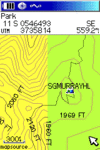
 which shows contour intervals closer to USGS 1:24,000 scale maps than their
 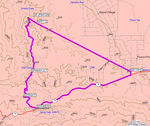 but the image to the right comes from the MapSource desktop. You can see that the software routed along the highway and a trail, but that it had to do "line of sight" routing where one trail was not on the map. It was really nice to know just how far I had to go to the next junction.
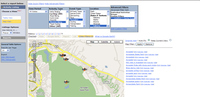 Recreation for event type and California for location. I then narrowed the location to Santa Rosa using the advanced filters. This brought up 11 records for Annadel, which I selected using the check boxes. The next step is to click on the left side of the screen to select Map View instead of Table View. Your screen should now look something like the thumbnail to the right.
 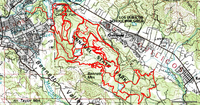 There are other ways to do this, but I chose to open the saved .gpx files in TopoFusion and used its Cut Track feature to remove stray track segments. The result is shown in the screenshot to the left. I then transferred the tracks to my GPS.
 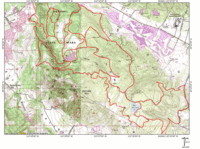 the tracks to
 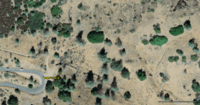 You can see a fire road going off to the north from the waypoint and, while the online image isn’t as sharp as the original, you can actually make out single-track going off to the northeast! The single-track leaves the image near the top of the right-side.