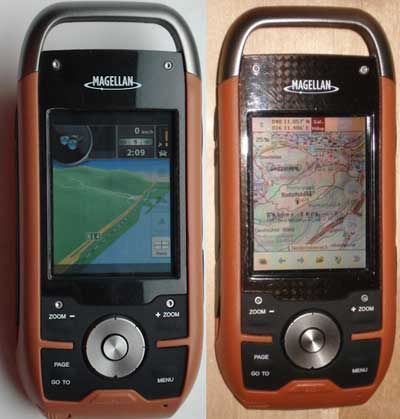
There’s been a lot of progress recently on making custom maps for the Magellan Triton series. For any of you with these handhelds, here are some resources to check out…
GPS reviews, news, tips, tricks and deals
There’s been a lot of progress recently on making custom maps for the Magellan Triton series. For any of you with these handhelds, here are some resources to check out…
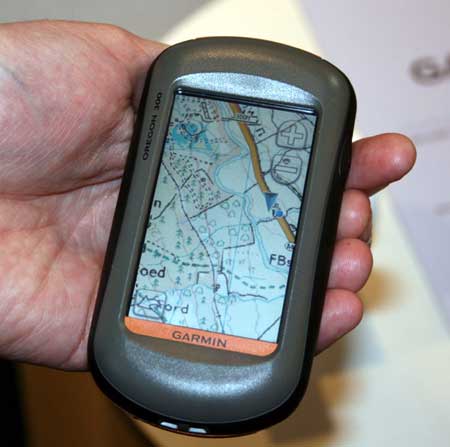
UPDATE: Garmin UK has a page up on the product, dubbed called Garmin GB ActiveTM.
Garmin Oregon owners in the UK will soon be able to view Ordnance Survey raster maps on their units. Raster aerial imagery has been available on marine units since the release of the Garmin Colorado and Oregon 400c/i models, yet we landlubbers have had to make do with vector maps.
The OS maps, due to be released early next month, will reportedly overlay vector data on top of raster imagery, allowing for turn-by-turn navigation.
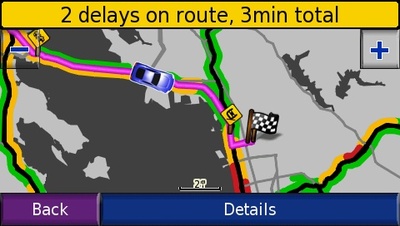
Is MSN Direct superior to TMC / TTN for live traffic info? Jack Yeazel of the well-respected site GPSInformation.net thinks it may be. He recently posted on the sci.geo.satellite-nav UseNet group:
"For a couple of months I’ve been comparing these two traffic sources in the Atlanta area with a nuvi 660 (TTN) and a 680 (MSN Direct)…
Well here, MSN Direct obviously uses more of the traffic monitoring stations than TTN, resulting in a more-detailed display of changing traffic conditions… As for "reality", MSN Direct also seems superior…
(Not to mention that you also get Gasoline Prices, Weather Forecasts, and Movie Schedules (not available with TTN) for $50 a year as compared to $60 for TTN)… And pardon for "beating this dead horse", you get one year trial subscription with MSN Direct as compared to three months with TTN."

GeoJournal is a new geocaching program for Mac that allows you to "plan, manage and record your geocaching activities." It includes the following features:
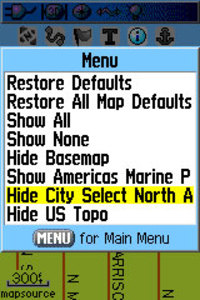
Oftentimes, handheld users will load both highway and topo maps to their unit. Garmin handhelds will show the highway maps by default. The highway map (City Navigator or City Select) for an area must be turned off before you can see the topo map. This is especially problematic when you have a lot of maps loaded and you don’t know the name of the map for your current location.
In the past, I’ve laboriously scrolled through long lists of highway maps, deselecting each one until contour lines appeared on the map. But there is a simple solution. The instructions below are for the Garmin 60CSx, but I’m hoping this works for the eTrex series too. Perhaps someone can verify that and comment below.
From the map screen, press Menu, then Setup Map, and scroll over to Map Setup – Information. You’ll see your list of loaded maps with a check mark next to each one. But rather than de-selecting them one by one, press Menu again and you’ll see two choices – Hide City Select (or Navigator) and Hide US Topo, as shown in the image. Pretty cool, huh?
Thanks to Hogrod on Groundspeak for this tip.
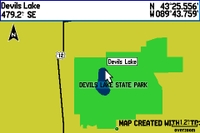
A member of Groundspeak, Geocaching.com’s message board, has posted a video tutorial showing how easy it is to make custom maps for a Garmin GPS. Unfortunately, it’s hosted on MediaFire and I wasn’t able to embed it here. Follow the link above and look for "click here to start download." That’s the video tutorial, not the Paris Hilton video showing below it (the one I saw was family safe though)!
In the example, he traces the outline of a park boundary and lake in Google Earth, and uses it to create a map for his GPS as shown. The Groundspeak post links to the map making tools he used.
I covered many of these techniques in my 2005 book, GPS Mapping: Make Your Own Maps. The video only scratches the surface of what is possible. There is a ton of free GIS data on the Web that you can use to build custom maps. There’s a bit of a learning curve but if you use a handheld GPS and like to play with hacks, you should probably check it out.
UPDATE: Check out our MediaTek vs. SiRFstar III smackdown.
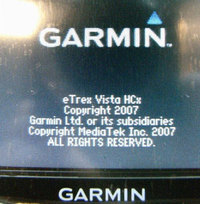
Two independent reports are confirming that the new Garmin eTrex H series is using a MediaTek chipset.
One is coming from Groundspeak, Geocaching.com’s message board, where people are reporting good reception.
Another report, via GpsPasSion, includes screen shots comparing the MediaTek chipset in the Vista HCx with the SiRFstar III chipset in the 60CSx. While I can’t read German, it looks like the Mediatek chipset holds its own pretty well in that comparison.
Have a ton of contacts in Outlook Express? Find yourself manually entering relatives’ addresses for holiday travel? A solution has shown up on Groundspeak, Geocaching.com’s message forum. Basically, it involves using BatchGeocode.com and GPS Visualizer’s convert form. Details here.
Call them message boards, discussion groups, online forums, or some other combination of those terms — Connecting with other folks on the web, who are using your particular brand of GPS can be one of the quickest ways to get an answer on anything from basic noobie queries to perplexing technical questions. Especially helpful are groups that focus on particular brands and models of GPS.
A few caveats before the list of message boards…I’ve tried to screen out those groups dominated by spam. Also, some of these groups overlap, and they vary greatly in posting volume. Speaking of which, I have one tip for the many Yahoo groups below — you may want to choose to view messages on the web only, rather than by email, lest your inbox quickly become clogged. Finally, be sure to drill up and down through these websites. There were just too many forums to list them all, and there are other great message boards out there.
I’m happy to say that my wife and I are both getting a new mountain bikes. Decommissioning of the old ones is nearly a decade overdue! The problem is, these days, most nice bikes come with 31.8 mm diameter handlebars, and I’m having a hard time finding a mount for my Garmin 60CSx that will fit.
In the past, I’ve used RAM mounts, and have been very happy with them, but that’s not a good option unless I switch out handlebars. So I emailed RAM, and they suggested this monster mount. Um, thanks guys, but I don’t really like the plumbing clamps.
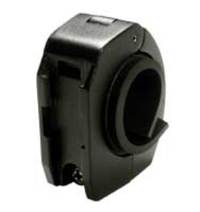
It turns out that Garmin has a large diameter rail mount adapter (seen at left) for their mount. Unfortunately, Garmin mounts (for the 60 series) have a reputation for disengaging in rough terrain, sending that very expensive GPS flying. I don’t like that idea either.
The best solution I’ve seen was posted in this thread about Garmin 60CS bike mounts on Groundspeak:
"What I finally did, which doesn’t obscure the screen, is to take a wire tie, like the ones used for vegetables and string it through the lanyard strap hole on the 60CS and then to the space on the 60CS holder where the holder clips onto the mount on the bicycle handlebar. Tighten up the wire and twist it around itself to hold it in place. Tuck the ends under the 60CS and then click on the 60CS to the bike."
I’m not sure that would hold it in place if the mount broke, but that may be the solution I go with. I’ll try and remember to update this post once I’ve made a final decision and tested it out.
Technorati tags: GPS
