Sunday, March 18, 2012

Archives for August 2007

New Magellan Maestros – Thinner, and maps of Mexico too

UPDATE: Read our reviews of the new Magellan Maestro line:

Magellan has announced the Maestro 3200 and Maestro 4200 series GPS receivers. What’s new is a thinner design (0.7"), and two units that have pre-loaded maps of Mexico.

Here’s how they break down; the 3200 series will feature a 3.5" touch-screen; the 4200 series widens this to 4.3". The flagship units, the 3250 and 4250, will include real-time traffic information and voice commands, ala the Maestro 4050. Models ending in 20 (the 3220 and 4220) will have pre-loaded road maps of Mexico, in addition to the U.S., Canada, and Puerto Rico.

Most units appear to have 6 million POIs. I suspect that the budget-priced 3200 and 4200 will have less.

I’ll post images and links as they become available.

A few more details from the news release:
read more

Garmin introduces nuvi 750, 760 and 770 with multiple destination routing

Nuvi_770_2

UPDATE: Read our Garmin nuvi 750 review, Garmin nuvi 760 review and Garmin nuvi 770 review.

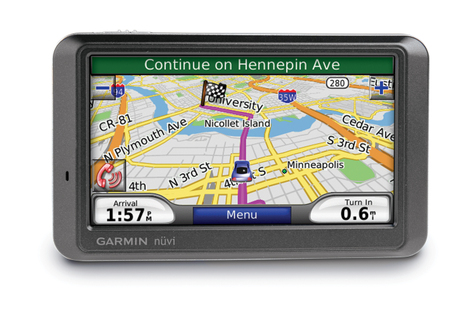
Garmin announced today the introduction of three new models, the nuvi 750, nuvi 760 and nuvi 770. These units marry the slimmer form factor of the nuvi 200W series with the high-end features of the nuvi 650, 660 and 670.

What is perhaps the biggest improvement isn’t even mentioned in the news release though. The spec sheet says that, unlike other nuvis, these new units will store up to 10 routes, and will "auto sort multiple destinations (provides most direct route)." Finally!

UPDATE: The Garmin nuvi 700 series will also record tracklogs, and MSN Direct services can be added as an option. This is true for all three models —  the 750, 760 and 770.

read more

MediaTek vs SiRFstar III chipset – Smackdown in the redwoods

Last month we learned that Garmin was using a MediaTek (MTK) chipset in its new eTrex H-series. I’m currently testing an eTrex Legend HCx and decided to put it up against the SiRFstar III chip in my trusty 60CSx.

With a new baby in the house, I couldn’t get away for a long trek, nor could I record tracks over multiple days, so this isn’t the most scientific test possible. Fortunately, I live near redwoods, which are dense enough that stray track points occur frequently and lesser receivers will often lose their satellite lock. This made for an ideal testing ground.

read more

Garmin eTrex H review

Garmin_etrex_h_review

UPDATE: We recommend the newer eTrex 10 instead of this model.

UPDATE: This model has been discontinued. For more current recommendations, please refer to our handheld GPS buyers guide or our Garmin handheld GPS comparison chart.

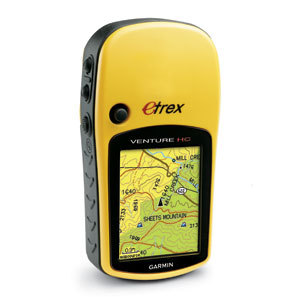
The Garmin eTrex H updates the basic yellow Garmin eTrex. A great first GPS for the budget-minded geocacher or hiker, this classic has been updated with a high-sensitivity chipset for superior reception under canopy and in other difficult conditions.

read more

Garmin – Failure to innovate?

Garmin_logo_pms_rgb

"We continue to focus on what we do best, which is innovating stuff," Garmin spokesman Ted Gartner said.

I have to say, I find that quote particularly interesting, considering how often other companies are beating Garmin to the punch these days. Which begs the question, has Garmin reached a point where they no longer innovate, preferring to play it safe?  Let’s look at recent innovations in consumer GPS products and where they are coming from:

read more

Garmin eTrex Venture HC review

Etrex_venture_hc_review

UPDATE: This model has been discontinued. For more current recommendations, please refer to our handheld GPS buyers guide or our Garmin handheld GPS comparison chart.

The Garmin eTrex Venture HC is the entry-level mapping receiver in Garmin’s eTrex H-series lineup. With a high-sensitivity receiver for superior reception under canopy, a bright color screen, and the ability to load topo maps (purchased separately), this is an excellent backcountry GPS.

read more

Switching between highway and topo maps on Garmin handhelds

Hidemaps
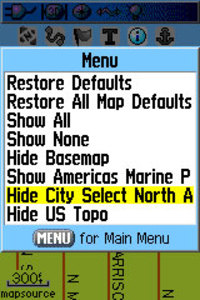
Oftentimes, handheld users will load both highway and topo maps to their unit.  Garmin handhelds will show the highway maps by default. The highway map (City Navigator or City Select) for an area must be turned off before you can see the topo map. This is especially problematic when you have a lot of maps loaded and you don’t know the name of the map for your current location.

In the past, I’ve laboriously scrolled through long lists of highway maps, deselecting each one until contour lines appeared on the map. But there is a simple solution. The instructions below are for the Garmin 60CSx, but I’m hoping this works for the eTrex series too. Perhaps someone can verify that and comment below.

From the map screen, press Menu, then Setup Map, and scroll over to Map Setup – Information. You’ll see your list of loaded maps with a check mark next to each one. But rather than de-selecting them one by one, press Menu again and you’ll see two choices – Hide City Select (or Navigator) and Hide US Topo, as shown in the image. Pretty cool, huh?

Thanks to Hogrod on Groundspeak for this tip.

A baby boy!

Baby_boy_4
I’m thrilled to let you know that, as of 1:51 p.m. yesterday, my wife delivered a healthy baby boy at 39.43158° N, 123.79994° W.

As a result, you’ll probably see a drop in posting frequency for at least a couple of weeks. I’ll try to continue covering the big stories and letting you know when reviews of new GPS units like the eTrex H-series show up. Comment approval may be slow, and I probably won’t be responding to many, but things will soon return to normal. EDIT: Oops, meant to say I have a couple of posts stored up too.

Can’t wait to take the little tyke geocaching!

Mio C220 review

Mio_c220_review

UPDATE: This model has been discontinued. For current recommendations, please refer to our auto GPS buyers guide or check out our other Mio GPS reviews.

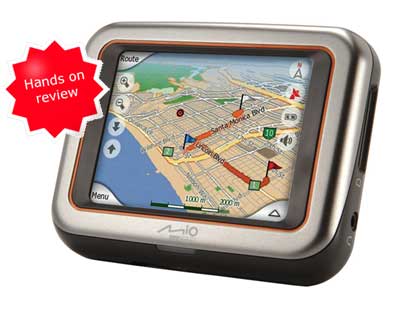
I’ve been trying out the Mio C220 for the past couple of weeks, and I am convinced that it is a great value. Currently available for around $185 $165 (and the price may drop even more between now and the holidays), this unit will likely be one of the market leaders in terms of budget car navigation systems.

read more

Details on the Magellan Triton series

Magellan_triton_1500

UPDATE: Read my Magellan Triton 1500 review.

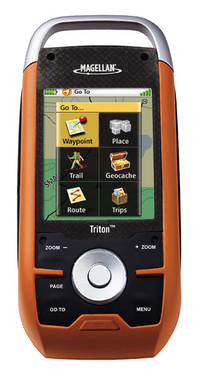
As promised, here is more information on the forthcoming Magellan Triton handheld GPS series that I posted about earlier today. I just got off the phone with a Magellan rep and was able to ask some key questions; here’s what I found out…

The touch screen on the 1500 and 2000 will have a lockout — a hold button under a flap — to prevent accidental use of the interface. The touch screen interface is designed to be primarily used by your finger, though a stylus (and five spares) are included for detailed work like selecting a specific go-to point on the map.

I confirmed that the unit can display raster imagery, so users will be able to load 1:24,000 scale National Geographic TOPO! maps (and Weekend Explorer 3D), which are compatible with all Triton units except the Triton 200. Third-party map developers can partner with Magellan to create additional maps for the unit, so there is little standing in the way of us seeing aerial photos for the units at some point in the future.

The VantagePoint software, used to transfer maps and data to and from Triton units, will
be compatible with existing Magellan eXplorist units and future auto
units. I don’t believe you will be able to transfer raster imagery like National Geographic TOPO! to an eXplorist though!

Geocoded photos can be added to waypoints.  The unit’s battery life is being conservatively estimated at 10 hours of intense use. This number may change as Magellan conducts further tests.

I had to ask about support, because Magellan has a weak reputation in that arena. The answer I got was that they paid a lot of attention to this issue in designing the series. It’s all built on one platform (as opposed to the eXplorist series) which they say should make it easier for the company to support and provide future upgrades.

Magellan Triton features on the different models break down as follows (links go to PDFs):

read more