Sunday, March 18, 2012

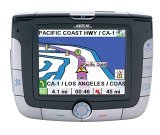
Magellan RoadMate 3000T review

UPDATE: This model has been discontinued. For current recommendations, please refer to our auto GPS buyers guide or check out our other Magellan auto GPS reviews.

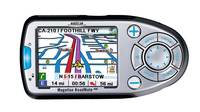
The Magellan RoadMate 3000T features built-in maps of the U.S. and Canada, a digital music player (MP3 and WMA compatible), a photo viewer and the SiRFstar III chipset. A built in li-ion rechargeable battery makes it easier to use these features away from your car. Stepping up to the Magellan
3050T
adds Magellan TrafficKit™ (available as an add-on to the 3000T), which provides live traffic incident reports. A subscription is required, of course.
Compare prices on the Magellan RoadMate 3000T

read more

Magellan eXplorist 400 review

Explorist400

UPDATE: The Magellan eXplorist line has been officially discontinued. For an overview of our current recommendations, check out our handheld GPS buyers guide.

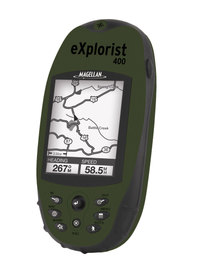
The Magellan eXplorist 400 is one of eight different eXplorist models (16 if you differentiate between the North American and European editions).

So what distinguishes the 400 from adjacent models in the series? Lower units like the eXplorist 300 don’t have SD slots like the 400 does, so you are limited to the memory onboard in lower models. The eXplorist 500 is identical to the 400, except that the 500 adds a color screen with improved resolution.

Compare prices on the Magellan eXplorist 400

Here’s what others are saying about the eXplorist 400:


Here are some additional resources that may prove useful:

Compare prices on the Magellan eXplorist 400 at these merchants:

New version of National Geographic TOPO! – GPX support added

Ng_topo_new
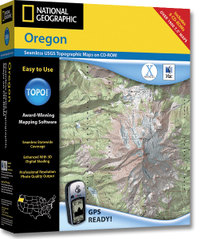
National Geographic is selling a new version of its TOPO! state series mapping software. Instead of separate Windows and Mac versions, the new edition integrates support for both in one box. This release also incorporates the features found in the TOPO! Streets & 3-D Views expansion pack:

  • 3-D views and fly-throughs
  • Updated street layer information
  • Live map update feature allows you to download new USGS quads
  • Support for more GPS models including those using a USB interface

If you have one of the older versions (3.X), you’ll need to buy Streets & 3-D Views to upgrade. If you already have Streets & 3-D Views, you can download the latest upgrade to version 4.1.5. A Mac version of the upgrade is expected to be posted any day now.

The latest version also adds GPX file support, although at this time it only allows import of GPX files. I have been told that the next upgrade, due to be posted in April, will allow GPX file export. No word yet on whether this will allow the export of tracks, the current lack of which is the only major fault I can find with TOPO!

Finally, although the image on the TOPO! state series website shows the new version, it does not appear to have been otherwise updated. The current GPS compatibility list doesn’t even show the Garmin USB units made compatible by Streets & 3-D Views.

UPDATE: A conversation at Groundspeak tipped me off that, even though the update says v. 4.1.5, it is in reality now v. 4.2.2. This update includes support for Garmin x-series receivers and Magellan eXplorist. Still no .gpx file export though.

Related posts:

Technorati tags: GPS

How are Garmin and Magellan topo maps different?

Over at Groundspeak, Geocaching.com‘s message forum, Peter gave a great explanation of the differences between Garmin and Magellan topo maps:

"As Sputnik indicated, the approaches taken by Magellan and Garmin are different. Garmin uses Digital Raster Graphics (DRG) to basically create an image of the USGS 1:100,000 series maps. Therefore their maps have all the detail and accuracy provided by those maps, and nothing else – which means they lack most road names and anything built since the maps were last updated (20 years or so ago in many areas). But they do show the features included by the USGS: springs, fire roads, quite a few trails, etc. Also note that the 1:100,000 maps are metric so the contour spacings are based on rounded numbers of meters. When your GPS is set to feet the spacings look a bit strange (e.g. contours at 164′, 328′, 492′, etc.)

Magellan’s topo maps are instead based on the Digital Elevation Model (DEM) technology where elevations are sampled in a grid pattern and the contour lines are then recreated by interpolation between grid points. That provides the contour line detail but by itself wouldn’t give you anything else. So Magellan combines this topology data with the same road data they use for their street maps (based on TIGER for the original Streets and Topo programs, based on NavTeq for DirectRoute and 3DTopo).

If you want to get by on just a single set of maps then Magellan’s approach is clearly superior. But anyone who wants auto-routing and elevation data (both good things to have) will need to get both sets of maps anyway. In that case each approach has its good and bad sides. Magellan lets you see all the data at one time on your screen since their street data is identical on both and therefore doesn’t cause a problem, but they lack many of the older dirt roads and trails that are included on the old USGS maps used by Garmin. And, as Sputnik said, you can load both sets of maps in your Garmin and toggle between them. I frequently use CitySelect to get to a trailhead and then switch to Topo to see the terrain and trails for a hike."


Hacking eXplorist 100, 200 and 300 GPS Receivers

PC-Mobile.net, a popular aftermarket supplier of GPS cables, has a product that may bring joy to many Magellan owners. It’s a PC interface cable for the eXplorist 100, 200 and 300 units. These GPS receivers don’t come with this capability, nor can you buy such a cable from Magellan. The only options I know of are this aftermarket unit or a do-it-yourself hack.

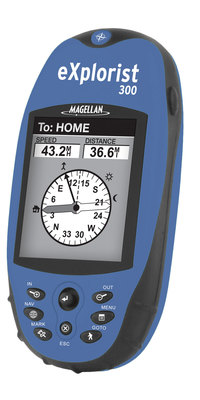
Magellan eXplorist 300 Review

Explorist_300

UPDATE: The Magellan eXplorist line has been officially discontinued. For an overview of our current recommendations, check out our handheld GPS buyers guide.

The Magellan eXplorist 300 GPS is one of eight models in the eXplorist line (16 if you differentiate between the North American and European models). With that many different models, you can bet there is confusion over the differences between them, so here’s the low-down on the 300. It is very similar to the eXplorist 200, except that the 300 adds an electronic compass and barometric altimeter (features found only in the 300 and 600 models in the eXplorist line). Moving further up in the product line, the 400, 500 and 600 models add SD card slots so that you can load maps to the unit. With the 300 you are limited to the built-in 8 MB base-map.

Several readers have posted Magellan eXplorist 300 reviews at Amazon.

Compare prices on the Magellan eXplorist 300

read more

Magellan RoadMate 800 Review

Roadmate_800

UPDATE: This model has been discontinued. For current recommendations, please refer to our auto GPS buyers guide or check out our other Magellan auto GPS reviews.


The Magellan RoadMate 800 GPS is an auto navigation system with multimedia extras — a photo viewer and MP3 / WMA music player. Similar to the RoadMate 760, the 800 adds a rechargeable Li Ion battery and multimedia capabilities, making it the flagship model in Magellan’s popular RoadMate line.

As of this writing, 11 readers at Amazon gave an average 4 out of 5 star rating in their Magellan RoadMate 800 review.

Compare prices on the Magellan RoadMate 800

Here’s what others have to say about the RoadMate 800:

read more

Breaking a RAM mount

Ram_mount

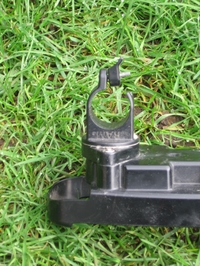
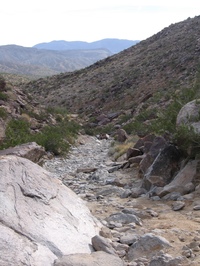
Last fall, my wife actually managed to crack the RAM handlebar mount which held her Magellan Meridian Platinum. The damage is shown in the photo to the left. Thishappened during our vacation at Anza Borrego. It broke while she was pounding (or getting pounded by) the downhill shown below on the right. See the people in the photo? Those are park rangers moving boulders so they can take their 4WD up the "road!"

RAM mounts have a reputation for being very tough, and they come with a lifetime warranty, so when we returned, I sent them an email explaining the problem. I got no response, so after a few days, I called them. It was after hours (I’m on the west coast) and I got their voice mail. I left a message, but still received no response. Now I was getting frustrated. I finally managed to call during business hours and they gave me 4wd_roadan email address and said send a digital photo if possible. I did and, while I got no reply, five days later a new handlebar mounting bracket showed up in the mail. All’s well that ends well.
RAM mounts are great and I have no complaints. I’m not sure I’ve ever even heard of one breaking before. But sometimes a RAM mount is overkill. They can be fairly bulky. I have one for my Garmin 60CS on my bike, but the mount in my car is a Garmin windshield suction cup mount. RAM mounts are great for where you need something fairly rugged, like on a mountain bike, ATV or 4WD. Still, Garmin’s eTrex bicycle mount worked great for my old eTrex Venture. I suggest finding a discussion board for your make of GPS and asking there before making a purchase.

If you do decide to buy a RAM mount, you may find their catalog confusing. These are component mounts, and you’ll likely be selecting a couple of different items. I’ve found it easier to identify the proper components at GPSCity, so you may want to check there.


Magellan eXplorist 100 Review

Magellan_explorist100
UPDATE: The Magellan eXplorist line has been officially discontinued. For an overview of our current recommendations, check out our handheld GPS buyers guide.

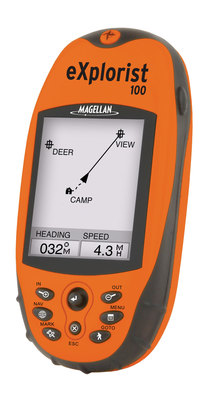
The Magellan eXplorist 100 GPS is basically the eXplorist 200 minus the base map. It shares the same lack of a PC interface. Unlike most GPS receivers, you cannot transfer waypoints, tracks and routes between it and your PC. All coordinates must be entered manually.

10 people gave the 100 an average 3-1/2 out of 5 star rating at Amazon.


More Magellan eXplorist 100 reviews

Other Magellan eXplorist 100 resoruces

Related posts:


GPS Maps for Mexico

Cabo_san_lucas

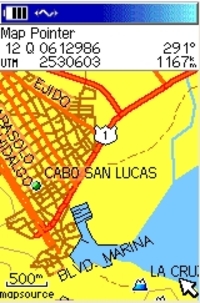
The holidays are over, winter is here, and many of us are dreaming of vacations in warmer climes. I’ve been asked a few times about maps for Mexico, and I was reminded recently of a website that offers a great deal of resources for the GPS enthusiast headed south of the border. So it seemed an appropriate time to call your attention to BiciMapas.

Although the stated focus is maps for mountain biking, there’s a lot more to the site than that. They have highway maps and digital raster graphics (DRG’s) that can be used in programs like OziExplorer. It seems like the most common format for their GPS maps is Garmin, but some maps are also available for Magellan receivers. And if Alberto Najera, the man behind BiciMapas, has his way, I’ll bet that you’ll see Lowrance maps from him before long.

Other than BiciMapas, your choices are limited. You could get the Garmin World Map or the Magellan Worldwide Basemap. But even Garmin says that such a low-level of detail product "is generally recommended only if no other coverage is available for the area."

read more