Sunday, March 18, 2012

Inland Lakes maps released by Garmin

Us_inland_lakes

Garmin has released Inland Lakes mapping software for the U.S., described by Garmin as follows:

"From small, local lakes to large ones, this software contains highly detailed data for lakes of almost every size in the continental United States. With exceptional detail — including amazing contour lines on most inland lakes plus high-definition shoreline, river and creek channels, islands, boat ramps, campgrounds, rivers, streams, tide stations and predictions, U.S. Coast Guard aids to navigation, a wrecks and obstructions database, and road data…"


Unlike
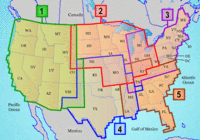
other recent releases, Inland Lakes is to be made available on SD cards, micro-SD cards and DVD, though the DVD version is not available yet. Five regions, shown at left above, are available on individual cards, or you’ll be able to buy the full set of five on DVD. The list price for the individual regional cards is $116.65. No word yet on the cost of the DVD. More detailed information on the regions is available here.


New version of National Geographic TOPO! – GPX support added

Ng_topo_new
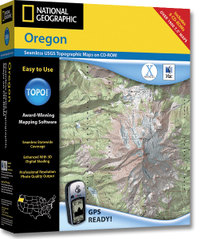
National Geographic is selling a new version of its TOPO! state series mapping software. Instead of separate Windows and Mac versions, the new edition integrates support for both in one box. This release also incorporates the features found in the TOPO! Streets & 3-D Views expansion pack:

  • 3-D views and fly-throughs
  • Updated street layer information
  • Live map update feature allows you to download new USGS quads
  • Support for more GPS models including those using a USB interface

If you have one of the older versions (3.X), you’ll need to buy Streets & 3-D Views to upgrade. If you already have Streets & 3-D Views, you can download the latest upgrade to version 4.1.5. A Mac version of the upgrade is expected to be posted any day now.

The latest version also adds GPX file support, although at this time it only allows import of GPX files. I have been told that the next upgrade, due to be posted in April, will allow GPX file export. No word yet on whether this will allow the export of tracks, the current lack of which is the only major fault I can find with TOPO!

Finally, although the image on the TOPO! state series website shows the new version, it does not appear to have been otherwise updated. The current GPS compatibility list doesn’t even show the Garmin USB units made compatible by Streets & 3-D Views.

UPDATE: A conversation at Groundspeak tipped me off that, even though the update says v. 4.1.5, it is in reality now v. 4.2.2. This update includes support for Garmin x-series receivers and Magellan eXplorist. Still no .gpx file export though.

Related posts:

Technorati tags: GPS

Points of Interest (POIs) resources

Last updated February 19, 2008

This thread originally dealt solely with custom points of interest
(POIs), but I’ve updated and reorganized it to include online sources
of POIs, conversion tools and more.

Custom points of interest (POI) resources

read more

Convert Google Maps data to GPS waypoints

Josh at Communications from Elsewhere has updated his GMapToGPX bookmarklet, that allows you to convert Google Maps search results to GPX waypoints for your GPS. More information can be found in my previous post on this. As Josh opines, it’s difficult to keep up with changes to the Google Maps API, so it may break again. Crank out those waypoint files while you can.

How are Garmin and Magellan topo maps different?

Over at Groundspeak, Geocaching.com‘s message forum, Peter gave a great explanation of the differences between Garmin and Magellan topo maps:

"As Sputnik indicated, the approaches taken by Magellan and Garmin are different. Garmin uses Digital Raster Graphics (DRG) to basically create an image of the USGS 1:100,000 series maps. Therefore their maps have all the detail and accuracy provided by those maps, and nothing else – which means they lack most road names and anything built since the maps were last updated (20 years or so ago in many areas). But they do show the features included by the USGS: springs, fire roads, quite a few trails, etc. Also note that the 1:100,000 maps are metric so the contour spacings are based on rounded numbers of meters. When your GPS is set to feet the spacings look a bit strange (e.g. contours at 164′, 328′, 492′, etc.)

Magellan’s topo maps are instead based on the Digital Elevation Model (DEM) technology where elevations are sampled in a grid pattern and the contour lines are then recreated by interpolation between grid points. That provides the contour line detail but by itself wouldn’t give you anything else. So Magellan combines this topology data with the same road data they use for their street maps (based on TIGER for the original Streets and Topo programs, based on NavTeq for DirectRoute and 3DTopo).

If you want to get by on just a single set of maps then Magellan’s approach is clearly superior. But anyone who wants auto-routing and elevation data (both good things to have) will need to get both sets of maps anyway. In that case each approach has its good and bad sides. Magellan lets you see all the data at one time on your screen since their street data is identical on both and therefore doesn’t cause a problem, but they lack many of the older dirt roads and trails that are included on the old USGS maps used by Garmin. And, as Sputnik said, you can load both sets of maps in your Garmin and toggle between them. I frequently use CitySelect to get to a trailhead and then switch to Topo to see the terrain and trails for a hike."


Theme park maps for your Garmin GPS

Stonemaps offers GPS maps for theme parks including Disney World and Disneyland. They also have some maps for Utah ski resorts, and for other theme parks in California and Florida. Sorry, no Magellan maps yet. Found via Groundspeak.

Related posts:

Technorati tags: GPS, Disney World, Disneyland

Hacking eXplorist 100, 200 and 300 GPS Receivers

PC-Mobile.net, a popular aftermarket supplier of GPS cables, has a product that may bring joy to many Magellan owners. It’s a PC interface cable for the eXplorist 100, 200 and 300 units. These GPS receivers don’t come with this capability, nor can you buy such a cable from Magellan. The only options I know of are this aftermarket unit or a do-it-yourself hack.

Using GIS Data with GPS

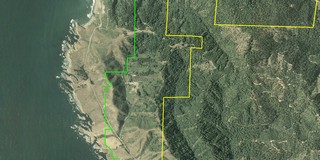
Aerial photo with GIS boundary filesThere is a wealth of Geographic Information System (GIS) data available on the web — everything from public land boundaries to international contour files. It is amazing what you can find. A few examples:

  • I live in an area dominated by private timber lands. I found private timber company boundary files offered through this website.
  • Looking around for public land boundary files, I discovered that the California Department of Fish and Game owns a series of ecological reserves. Not only did I learn about this little known treasure, I found boundary files as well.
  • I was fortunate to be able to visit Ecuador a year ago. I used files from the GIS Data Depot to create a contour map of the country, that I was able to load onto my GPS receiver. I was able to find other sources showing roads, streams, cities, provincial boundaries and major volcanoes

GIS files are most commonly found in either .shp (shapefiles) or .e00 formats. Unfortunately, few consumer-level GPS mapping programs allow you to utilize GIS files.  OziExplorer is my favorite program for working with GIS files. Using it, you can convert these files to tracks and points, and even display this info on your GPS. Another program, ArcExplorer, is a free GIS viewer, but it lacks GPS compatibility. The image, to the right above, was captured from OziExplorer. It shows public land boundaries in green and private timberlands in yellow, superimposed on a color aerial photo.

read more

How to Create Custom POIs for your Garmin GPS

GPSInformation.net has posted a how-to guide for creating custom points of interest (POIs) for certain Garmin GPS receivers. It gives step-by-step instructions for creating custom POI files compatible with the Garmin POI Loader. Thanks to Allory Deiss for keeping us up to date on the latest at the  GPSInformation.net website.

Related post: Custom POIs


MapSource for Macs!

Garmin announced today that it will begin making all of its hardware and software compatible with Mac OS X. Beginning this spring, Garmin will offer a Mac version of their Training Center software. Also this spring, MotionBased will be OS X compatible. But the big news in my mind is this tidbit:

"By the end of 2006, Garmin intends to have made all its popular hardware and software applications Mac OS X compatible. This includes the ability to load MapSource map data to Garmin units via a Mac, as well as waypoint and trip planning applications."
