Sunday, March 18, 2012

Archives for October 2005

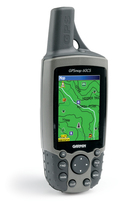
Garmin GPSMap 60CS Review

60cs_1

UPDATE: This model has been discontinued. For more current recommendations, please refer to our handheld GPS buyers guide or our Garmin handheld GPS comparison chart.

Regular readers of GPS Tracklog may recognize the Garmin GPSMap 60CS as one of my personal GPS receivers.  It’s my favorite workhorse in the stable at this point, and is highly visible in posts here and on the cover of my book, GPS Mapping: Make Your Own Maps.  The 60CS has it all — a bright color screen, turn-by-turn routing capabilities, on screen maps (separate purchase required), an electronic compass, and a barometric altimeter to accurately track elevation gain.

I’m planning to review quite a few of the current crop of GPS receivers over the next month or two, and it only seemed fitting to start with the 60CS. I highly reccomend it on the basis of two years of personal use. The menus are intuitive, and Garmin has an excellent reputation for customer service. The 60CS does double duty as a great ruggedized unit for the backcountry or a dashboard companion for highway navigation.

57 reviewers gave an average rating of 4 out of 5 stars at Amazon, which said the 60CS “is packed with navigational features, but Garmin knows that a great device has to go beyond a simple color display to be the cream of the crop. With that, Garmin has upped the ante on this lightweight, rugged, waterproof unit, offering a 256-color, highly reflective display that provides easy viewing in almost any lighting condition, including bright sunlight. This transreflective TFT, 2.6-inch diagonal screen provides excellent viewing while maximizing your battery life (up to twenty hours with typical use).”
read more

Downloading GPS tracks from MotionBased.com for trip planning

As promised in last week’s review of MotionBased software, I’m going to show you how to use their site to download tracks for trip planning. Recently, I was trying to find a good map for Annadel State Park, a little slice of mountain biking heaven in Santa Rosa, California. My wife and I used to ride there all the time before we were married, when she lived within a stone’s throw of the park. About the time I lured her away, there was a massive reconfiguration of the trail system.
An opportunity came up to ride Annadel again recently, and I really wanted a detailed map so I could plan to ride as much single-track as possible. I turned to MotionBased and searched their extensive trail network for MotionBased users who had mountain biked Annadel, which turned up nearly a dozen tracks.

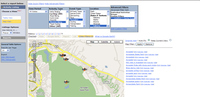
I was able to download .gpx files for each one. This feature is a bit hidden, so let’s look at how to go about it. Go to MotionBased.com and click the Trail Network tab. Use the Quick and Advanced Filters to narrow your search. In my case I chose Cycling (Mountain Biking), MotionbasedRecreation for event type and California for location. I then narrowed the location to Santa Rosa using the advanced filters. This brought up 11 records for Annadel, which I selected using the check boxes. The next step is to click on the left side of the screen to select Map View instead of Table View. Your screen should now look something like the thumbnail to the right. 
As you can see, there is a Google Map image on the left and a list of selected tracks on the right. Click the Info link next to one of the tracks and a balloon will appear on the map, providing an option to export as a Google Earth (.kml) or .gpx file. I downloaded the 11 tracks as .gpx files.

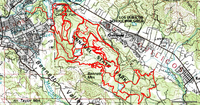
Topofusion_7There are other ways to do this, but I chose to open the saved .gpx files in TopoFusion and used its Cut Track feature to remove stray track segments. The result is shown in the screenshot to the left. I then transferred the tracks to my GPS.
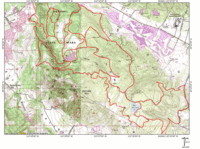
I was getting close to my goal, but I also wanted a good quality printed map.  As much as I like TopoFusion, it and other TerraServer based programs have very limited printing capabilities, and TerraServer topo maps are fairly low-resolution scans. So I transferred Annadel_mapthe tracks to National Geographic TOPO!, and printed the map shown to the right.

The folks at MotionBased have plans to incorporate waypoint management, so in the future you may be able to download those too. For the time being though, it’s a great resource for grabbing tracks placed online by other outdoor adventurers.


MotionBased: Online GPS mapping (review)

A couple of weeks ago I wrote that MotionBased, a website for online GPS mapping, had been acquired by Garmin. I’ve been playing with a Garmin ForeRunner 301 recently and used it to check out MotionBased, which keeps all your data online so that you can access it from anywhere. As a result, you can share trail info with others, though you do have the option of making your trails private. This is a great program for athletes, or anyone working on physical conditioning.

GPS based training

One of the strengths of MotionBased is its ability to integrate heart-rate data. It’s very cool to be able to overlay an elevation profile with your heart-rate graph. I had never thought about it, but my heart was pounding as fast going all out in the flats as when I was climbing a steep hill. Seeing such things is part of the wow factor for me; serious athletes will be more interested in seeing how long they stayed in various heart rate zones, and the multiple ways to view speed, distance and time data. This information is presented in both tables and graphs.

Multiple mapping modes

Now I like to stay in shape, but my perspective here is decidedly unathletic. I’m more interested in maps, and this is where MotionBased offers something other mapping software doesn’t.  Using their Map Player (which unfortunately will not yet work in Firefox), you can view a track superimposed on a street map, contour map, topo map, satellite image or elevation model!  You can even export the track to a .kml file for viewing in Google Earth. Here’s a link to MotionBased for a recent bike ride I did. Click the "Dashboard" button for a more extensive look.

Waypoints and routes are missing

No software has it all, and MotionBased has yet to add the ability to manage (or even show) waypoints and routes. But it is worth looking at for its other features. And it’s great to be able to view your trips anywhere you have an internet connection. If you own a Magellan or Lowrance GPS receiver however, beware—MotionBased is designed primarily to work with Garmin.

Cost

The free version, MotionBased Lite, gives access to mapping and analysis of your ten most recent activities. These limitations are removed with a subscription, which also gives you access to more extensive analysis features. Subscriptions to MotionBased Standard run $11.95/month, which is discounted 33% if you sign up for an annual plan.

This review just scratches the surface of a feature rich software program. I suggest trying it out yourself. Finally, stay tuned…in the near future I plan to post about the extensive data you can download from MotionBased for trip planning.


Google Maps: USA Hot Springs

A new Google Maps "mashup" is out, this one focusing on USA Hot Springs. I don’t usually post Google Maps mashups; so many other blogs cover the subject quite well. But much of my focus is on maps and the great outdoors, so I just couldn’t resist this one. I’m not a hot spings nut, but I have enjoyed a few, and they bring back fond memories. Except the one in Big Bend National Park where the NPS ranger threatened to bust everyone and got his jollies by shining his flashlight on the ladies!

Via Google Maps Mania.


Rechargeable batteries for your GPS

For some time now, I’ve been wanting to research and blog about choosing recharegable batteries for your GPS receiver. This is one of the few topics I regret not covering in my book, GPS Mapping: Make Your Own Maps. I didn’t have to look far to research the subject. I turned to one of my favorite GPS/mapping software discussion boards and found this thread. The idea of being able to recharge batteries in only 15 minutes was quite enticing, so I went out and bought the suggested unit, a 15-minute charger from Energizer (Amazon link), which comes with 4 AA batteries. I got mine at Target, but as you can see from the link, Target is also selling them through Amazon.

I did a quick test with my GPS, a Garmin GPSMap 60CS (Amazon). Granted, it wasn’t the most scientific test, but I was pleased to get 20 hours out of two batteries, which is exactly what the unit is rated. I’m quite excited, since all four of my GPS receivers use AA batteries, as does my digital camera.


Serial to USB converters and GPS receivers

So you got a new laptop, which has no serial port, but your GPS came with a serial cable. What do you do? The answer lies in a serial to USB converter, but sometimes they don’t work at first. I’ve heard people say that some cheap models are problematic, and that you should buy a name brand. Generally speaking, I think this is good advice. But I’ve also heard of cheap brands working and name brands failing to. What is going on here? A thread on the Yahoo OziExplorer discussion board delved into the topic this past week. Here are a few key snippets from the discussion…

read more

Converting Google Maps searches to GPS waypoints in Internet Explorer

Yesterday I posted about how to convert Google Maps search results to GPS waypoints. I said then that "I couldn’t get it working in IE." The author sent me a note on how to do it, and this is such a cool tool that I decided to put it in a new post. Just right-click on the GMapToGPX button on his site and select "Add to Favorites." Then do your search at local.google.com and then click your GMapToGPX favorite.  The rest of the instructions should work fine.

UPDATE from Josh:

I’ve updated the bookmarklet code to handle searches on maps.google.com, too. I haven’t tested it in IE, but I know it works in Firefox. You shouldn’t need to do anything to get the new code; it should automatically use the latest version. I had to clear my browser cache to get the new version, though, so if you still can’t get a GPX file for maps.google.com search results, try that.


Garmin acquires MotionBased.com

Garmin announced this morning that it is acquiring MotionBased Technologies. MotionBased is an online GPS mapping service that offers a number of unique features. I’ve actually been using MotionBased for awhile now and plan to post a review in the near future.

I suppose this move should come as no surprise following this story last week. It appears that Garmin and MotionBased have had a cozy relationship for some time now, even sharing a booth at Outdoor Retailer this year.

UPDATE: Here is the MotionBased take on it, courtesy of their weblog, MBlog.

Converting Google Maps search results to GPS waypoints

A while back I was travelling quite a bit, and I wanted to figure out where I could find free wifi while on the road. So I went to Google Maps and clicked "Local Search." I entered wifi in the "what" field and a city name in the "where" field and, like magic, I had a map with lots of wifi hot spots. But now what? I had a GPS. There had to be a way to convert these search results to waypoints so my GPS could guide me there. I searched for a converter, and though I found a couple, I couldn’t get them to work. After a little sleuthing, I’ve discovered one that works, and the trick to get it to do so. Thanks to Josh of Communications From Elsewhere for this great tool.  Here are step-by-step instructions for you…

  1. Get the GMapToGPX converter and drag it to your browser’s bookmark toolbar. Now Josh says it works in Firefox and Internet Explorer (IE). There’s a bookmark toolbar in the Firefox, and it works fine there. I couldn’t get it working in IE though. UPDATE: In IE, just right-click on the GMapToGPX button on his site and select "Add to Favorites."
  2. Go to local.google.com and enter a query. This is where I had problems. It works with local.google.com but not with maps.google.com. I have no idea why. Maybe a more tech-savvy reader can enlighten us. Regardless, you end up in Google Maps.
  3. Once the local search loads, click the GMapToGPX button on your toolbar. Or if you’re using IE, click the GMapToGPX Favorite. This opens an xml/gpx file.
  4. Copy this file to a text editor and save it with a .gpx extension (e.g., Saratoga wifi.gpx)
  5. Open this in your favorite GPX compatible mapping software and send it to your GPS. One caveat here. I could not open this in MapSource. I was successful in transferring it to TopoFusion, ExpertGPS and USAPhotoMaps. I was also able to transfer from those, into my GPS, and then into MapSource.
  6. Now, hit the road!

Hmm, I’ll be on the road again next weekend, so what do I want to do? Here’s an idea. Just imagine the possibilities…
