Sunday, March 18, 2012

Archives for 2006

Another broken RAM mount

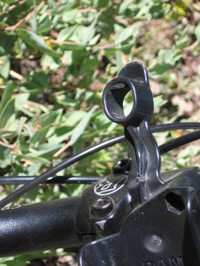
Broken_ram_mount_1Last month I wrote about trying to find a RAM mount that would fit 31.8 mm diameter bicycle
handlebars
.  It turns out that my new bike doesn’t have 31.8 mm bars, but my wife’s does. So I was able to go with a RAM mount while her bike got the Garmin mount. That’s okay I thought, since I’m the one with the expensive new Garmin 60CSx, while she is stuck with the last generation 60CS. RAM mounts have a reputation for being tougher than the Garmin mounts, so I felt secure having my new GPS in a RAM mount — until a few days ago anyway.

To make a long story short, we’ve been on a mountain biking vacation for the past week and, while riding the Hole in the Ground trail near Lake Tahoe, I had a rather spectacular crash. Fortunately, I was okay and my bike was okay, but my 60CSx was nowhere to be found! Yes, the mount had taken a hit and the 60CSx went sailing. A 5 or 10 minute search located it, but it definitely picked up a few nasty screen scratches. Do any readers know if Garmin will fix that under their warranty? I’ve only had the unit for a month or so. The Garmin warranty policy FAQ states:

"This warranty does not cover failures due to abuse, misuse, accident, or unauthorized alterations or repairs."

But Garmin has been known to go the extra mile when it comes to warranties and support.

Back to the RAM mount, a close inspection of the photo will reveal a break near the bottom of the narrow portion of the mount. I still think RAM mounts are the best ones going, and as soon as we return home, I’ll take them up on their lifetime warranty replacement. But this is the second RAM mount we’ve broken (the other was for a Magellan). Now we do tend to be rough on mounts and our GPS receivers, all in the name of reporting back to you of course! Still, I had my 60CS in a RAM handlebar mount for two years without incident, but my 60CSx takes a hit almost immediately. Kinda sucks.


Get maps and aerial photos online: TopoFusion

Choosing_mapping_software_2
UPDATE: Check out ten reasons TopoFusion rocks.

Today we’re going to look at programs that download maps from  TerraServer, a partnership between Microsoft and USGS. With these  applications, you can view topo maps and aerial photos, and even detailed color imagery for urban areas.

My favorite application in this category is TopoFusion, which has a long list of advantages. Here are a few of them:

  • A free demo mode. The full version is $40 and well worth it.
  • A log book that captures a history of your trips in calendar format.
  • Ability to switch between topos and aerial photos of a location, or blend the two.
  • 3-D views.
  • PhotoFusion automatically links photos to where they were shot.

read more

CD-based mapping software: National Geographic TOPO!

Choosing_mapping_software_1

We’ll start this series off with CD (or DVD) -based mapping software to use with (not on) your GPS. In this category, you typically buy a package that has all the topo maps for an entire state, usually for around $100 retail. This is a great deal for your home state, but could get expensive for those with a serious case of wanderlust! Most of these programs are relatively simple to learn, and most produce great printed maps for field use as well.

National Geographic TOPO!

My favorite software in this category is National Geographic TOPO! (Amazon). It is fairly straightforward and easy to learn, and a number of common features are well designed. One example is that you can construct routes from existing waypoint names. You would think that would be a no brainer for the designers of these programs, but sadly, too many software packages lack this feature.

read more

Choosing the best mapping software

Choosing_mapping_softwareToday we’re going to begin a series of posts that look at mapping software choices — a complex decision that can befuddle the most rabid and tech savvy GPS enthusiast.
Much of what I say here will be opinion; I’ll tell you what my favorite mapping programs are, but I’ll also tell you why. It may be because they do an outstanding job meeting everyday needs, implement popular features exceptionally well, or use intuitive interfaces that dramatically reduce the learning curve. I’ll also highlight programs that do what the others don’t, giving you powerful tools for atypical needs.

These programs were all featured in my book, GPS Mapping – Make Your Own Maps, in more detail. Consider this a short course. So check in frequently over the next week or two. I’ll cover a wide range of options that will help you meet your mapping needs.

Other posts in this series:

SiRFstar III reception under dense canopy

Img_0769_1
UPDATE: Here’s my 2010 take on SiRFstar III, which is rarely available these days.

My wife and I went on our weekly mountain bike ride today, and of course we took our GPS receivers along for the ride!  I was kind of excited about it; we were going to ride a trail in dense redwoods that I had never been able to map due to poor satellite reception. But today I had my Garmin 60CSx along, which has the SiRFstar III chipset on board.

Now when I say dense, I do mean dense. Redwoods are actually a low biodiversity plant community; very little grows on the forest floor due to their dense shade. I’ve heard it said that native Americans here didn’t like the redwoods — that they are downright spooky. More likely it was just the lack of game and edible plants, but you get the idea.

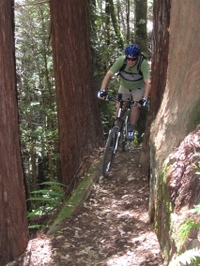
Manly_gulchThe trail we rode, Manly Gulch, is as challenging as it sounds — narrow and technical, with steep dropoffs. The photo at left is of me coming around a tight curve between two redwoods. The trail section pictured is a narrow perched run set between a cut redwood stump on the upper side and a retaining wall on the lower side.

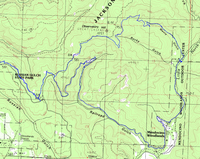
But to make a long story short, the 60CSx and SiRFstar III performed admirably, as can be seen in the map posted at right. I’ve seen my 60CSx get a lock inside, and I knew it had greatly improved reception over the 60CS, but it was still nice to see it all work so well where it counts.


GPS Tracklog turns one year old

One year ago today, I launched GPS Tracklog with this simple post…

Welcome to GPS Tracklog. This weblog is devoted to the convergence of GPS and the personal computer. With your help, I’ll be exploring mapping software and all things GPS. If you use the cable that links your GPS to your computer, you should feel at home here. One other thing — I’m going to focus on user-friendly applications here. I don’t know an API from a hole in the ground. This site isn’t about code, this is mapping for the masses. I’m not a programmer, but I might occasionally try some simple hacks. When I do, I’ll try to lead you through them step-by-step.

Little did I know where it would lead and just how popular it would become.  But here we are, over 100,000 visits and nearly 300,000 page views later. I thought about doing a little retrospective, but I keep links to the most popular and useful posts in a sidebar (now on the left), so if you haven’t been here since the beginning, why not take a look.

The blog has become quite a balancing act, as it is a popular site for people looking for GPS reviews. But I’m also trying to carve out more time for content that will appeal to GPS veterans. In the next couple of weeks, I plan to begin a series on mapping software, and I hope it will prove useful to long-time readers and newbies alike.

Finally, a big thank you to everyone who has supported GPS Tracklog and my book, GPS Mapping: Make Your Own Maps. The blog is a lot of work, but it’s also a lot of fun, and it’s been truly wonderful to hear from other GPS enthusiasts out there. So here’s to year two…

GPS mapping solutions for Macs

ApplelogoRouteBuddy, a new Mac application, made the news today on a number of sites. High Earth Orbit’s coverage caught my eye due their extensive list of GPS mapping resources for Macs.

Related post: Macs, Maps and GPS


Technorati tags: GPS

Bike mounts for Garmin 60 series

I’m happy to say that my wife and I are both getting a new mountain bikes. Decommissioning of the old ones is nearly a decade overdue! The problem is, these days, most nice bikes come with 31.8 mm diameter handlebars, and I’m having a hard time finding a mount for my Garmin 60CSx that will fit.

In the past, I’ve used RAM mounts, and have been very happy with them, but that’s not a good option unless I switch out handlebars. So I emailed RAM, and they suggested this monster mount. Um, thanks guys, but I don’t really like the plumbing clamps.

Garmin_60_handlebar_adapter_1
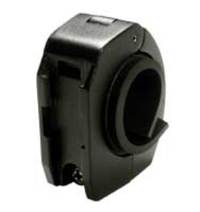
It turns out that Garmin has a large diameter rail mount adapter (seen at left) for their mount. Unfortunately, Garmin mounts (for the 60 series) have a reputation for disengaging in rough terrain, sending that very expensive GPS flying. I don’t like that idea either.

The best solution I’ve seen was posted in this thread about Garmin 60CS bike mounts on Groundspeak:

"What I finally did, which doesn’t obscure the screen, is to take a wire tie, like the ones used for vegetables and string it through the lanyard strap hole on the 60CS and then to the space on the 60CS holder where the holder clips onto the mount on the bicycle handlebar. Tighten up the wire and twist it around itself to hold it in place. Tuck the ends under the 60CS and then click on the 60CS to the bike."

I’m not sure that would hold it in place if the mount broke, but that may be the solution I go with. I’ll try and remember to update this post once I’ve made a final decision and tested it out.


Technorati tags: GPS

How Garmin came to dominate the GPS marketplace

Earlier this week, in an article on Garmin GPS units being offered in Avis and Budget rental cars, the Kansas City Business Journal noted that:


"Garmin is the leading maker of portable navigation units for automobiles in the United States. In June, Garmin sold 58 percent of all portable navigation units domestically, ahead of TomTom NV (24 percent) and Magellan (7 percent), according to researcher NPD."

Just how did Garmin achieve this lofty position in the GPS marketplace? Sure they have wonderfully intuitive interfaces, a reputation for good customer service, a weak competitor in Magellan and a fumbling one in TomTom.

But I see another reason. Garmin has done an excellent job of developing niche markets. Let’s see how many I can list:

read more

Garmin zumo 550

ZumoUPDATE: Read our Garmin zumo 550 review

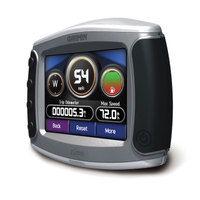
Garmin has announced the zumo 550, a GPS navigation device designed for motorcycles. Due to hit the market in October 2006, the zumo comes pre-loaded with maps of Europe or North America. Bluetooth allows for hands free cell phone calling through the cyclist’s helmet.

The zumo includes an MP3 player, and XM radio, traffic and weather are options. TMC traffic alerts are available as an alternative.

For more information, there is a flash demo for the Garmin zumo 550, and here is a link to the zumo 550 announcement / press release.

Technorati tags: GPS