Sunday, March 18, 2012

Archives for 2006

GPS Comparison Tools

Here are several GPS comparison tools, allowing you to pick specific GPS receivers for a head-to-head comparison:

Garmin

Magellan

TomTom

Mio

Additionally, at the beginning of each of my GPS reviews, I try to compare it to the units above and below it in the same product line.

read more

Links

Our friends in cyberspace…

  • Magellan GPS
  • Travel By GPS – GPS maps and tour guides
  • Laptop GPS World – reviews and discussion forums focused on GPS navigation software programs for PC, Laptop, Netbook, Notebook, Tablet PC, UMPC, and CarPC

Free Garmin World Wide Basemap, Part II

Following a comment today, and further investigation when I got home, I’m going to retract what I said about the free Garmin World Wide Basemap, at least for the 60CSx. The transfer to my unit appears to have not worked, and I now believe that what I am seeing on the screen is nothing more than the 60CSx’s built-in Americas autoroute basemap.

I have no reason to believe that it would not work in a nuvi, and I have to wonder if it wouldn’t work for any Garmin mapping GPS, if you ran it through MapSource, which requires significant effort. We’re talking registry hacks or the use of GPS Map Manager as described in my book.

On the bright side, my existing basemap does seem to be intact! My apologies if I got your hopes up for something both free AND easy.

read more

Mountain biking Lake Tahoe and Downieville by GPS

Sand_harbor_1
Last week I posted about preparing my GPS and maps for a mountain biking vacation around Lake Tahoe, and it’s high time for a trip report. My wife and I got in four good rides, and here are the highlights and GPX track files for each:

Tahoe Rim Trail (TRT) and the Flume

We were a little nervous about topping 8,000 feet our first day, but there was only a thousand feet or so of climbing, so what better way to acclimate to elevation? We took the Mt. Rose shuttle, and had a great deal of fun on top of the ridge on the TRT, even though we were feeling the elevation. The Flume Trail portion was a bit disappointing, and not nearly as scary as we had been warned. Then again, we were riding it on a weekday, so there was little traffic coming at us. The photo at right is  a shot of Sand Harbor, from the Flume Trail.

read more

Free Garmin World-Wide Basemap

World_wide_base_map_1UPDATE: Before you get too excited, read this.

As if my recent posts dissing the nuvi weren’t enough to earn me the enmity of Garmin, now I go and post this. I’ll never get a review unit now!

I saw this thread in the GpsPasSion nuvi forum the other day, showing how to get a World-Wide Garmin basemap for free. Now this isn’t from some file-sharing site; nope, this is straight from Garmin themselves. The page is actually set up to download the Garmin World Wide Basemap for iQue 3600 owners, but I beleive it will work for any Garmin GPS that can accomodate maps. I was able to easily get it on my 60CSx.

Okay, before you go off and download it, here are a few caveats:

  • Read the full thread at GpsPasSion before doing anything.
  • I’m not guaranteeing anything here. You could erase your existing basemap. You may want to change the name of this one before transferring it to your GPS, but I’m not sure that will prevent erasure of the original. (Should have tried that myself!)
  • This is version 3.01, and it bears a date of April 7, 2004.
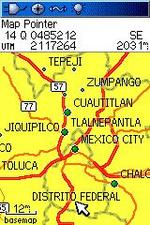
  • It does not appear to be the same product as Garmin’s WorldMap product, which has more detail, at least in some areas. But as you can see in the screen capture, it ain’t bad.

read more

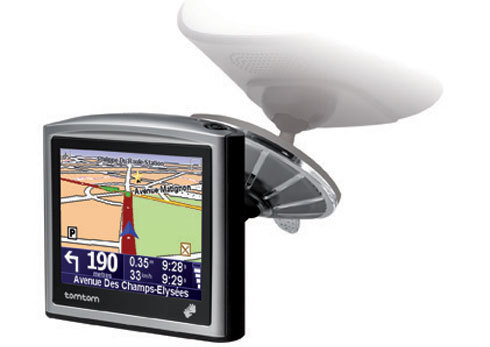
TomTom ONE review

Tomtom_one

UPDATE: This model has been discontinued. For a list of current TomTom models and their features, please see our TomTom comparison chart.

The TomTom ONE (original edition) is a small, pocket-sized device, similar in form to Garmin’s nuvi, and it is a more basic navigational device than some other TomTom units. Rather than try to cover the differences here, check out our TomTom GPS comparison chart.

read more

Software for power mappers: OziExplorer

Choosing_mapping_software_3

I just can’t say enough good things about OziExplorer. When you hit a wall with other software, OziExplorer can usually get the job done. Before we get into the feature list, let me point out that while OziExplorer costs $85, there are two free trial versions that will allow you to check out nearly all its features. But unless you have  one-time needs, I’m betting you’ll pony up the bucks after trying  it out. It’s that good.

Here are a few highlights:

Free maps. Sure, the program may cost $85 but, after that, you can use Ozi_1_2many sources of free maps. Often these are USGS maps in digital form, known as digital raster
graphics (DRG). One example is shown at right. This can come in quite handy. I own National Geographic TOPO! for California, but on a recent vacation to Tahoe, I was contemplating a side-trip into Nevada to ride the Pine Nut Mountain loop. I was able to download free maps from a Nevada site and use them in OziExplorer.

read more

Magellan RoadMate 3050T review

Magellan_3050t

UPDATE: This model has been discontinued. For current recommendations, please refer to our auto GPS buyers guide or check out our other Magellan auto GPS reviews.

The Magellan RoadMate 3050T GPS is one of the newest additions to Magellan’s line of auto
navigation systems. Featuring built-in maps of the U.S. and Canada, the
30050T also includes a digital music player (MP3 and WMA compatible), a
photo viewer and the SiRFstar III chipset (unlike the Magellan 860T). A built in li-ion rechargeable battery makes it easier to use these features away from your car. Also included is the Magellan TrafficKitTM receiver and a 3-month starter
subscription, which provides live
traffic incident reports to avoid accidents, road work and more. The 3000T is basically the same unit, minus the TrafficKit receiver and starter subscription, though you can buy the receiver as an add-on.

Compare prices on the Magellan RoadMate 3050T

read more

Garmin StreetPilot c530 review

Garmin_c530_1 UPDATE: Most of the several generations old StreetPilot series, including this model, has been discontinued. For a more current recommendation, check out our Auto GPS buyers guide or go straight to our Garmin nuvi comparison chart.
 

The Garmin StreetPilot c530 offers pre-loaded maps of North America, Garmin Lock™ anti-theft protection and the SiRFstar III chipset. You can also add an optional FM TMC traffic receiver. Step up to the c550 for an integrated traffic receiver, MP3 capabilities, Bluetooth wireless and a unit that calls out upcoming street names.

Additional options include live traffic information, the Garmin Language Guide™ and Garmin Travel Guide™.

read more

Downloading tracks to your GPS for navigation

Downloaded_track

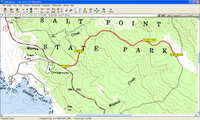
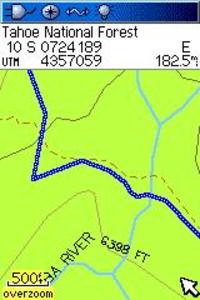
I returned a couple of days ago from a week long mountain biking vacation at Lake Tahoe and Downieville, California. I had wanted to ride many of these trails for years and since I had not ridden them before, prior to going I downloaded tracks that others had posted online. Most of them came from MotionBased, although I did get a file of the Tahoe Rim Trail from National Geographic TOPO!‘s mapXchange. Tracks from the latter are much easier to use now (even for non-TOPO owners), thanks to the newly minted ability of GPSBabel to convert .tpo track files from TOPO!

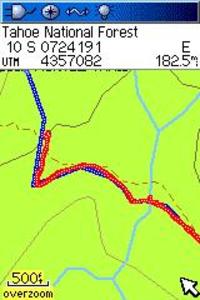
So I layered the downloaded tracks and waypoints on maps I then printed with TOPO!, constructed routes, transferred maps and tracks to my GPS, etc. But once on the trail, I was reminded what a useful tool these pre-loaded tracks are for navigation, especially when you are moving fast on a bike. The image at the left is one such track. Notice that I set the track color to blue.

Actual_track_over_downloaded_track
The screen image to the right gives you an idea what this looks like in the field, as my actual track (in red) overlays the pre-loaded track as I progress along the trail. (These are reconstructed images, so the current position cursor is missing; I did not take my laptop on the ride to do screen captures!) With this sort of setup, it’s easy to see at a glance if you’ve taken a wrong turn.

Now I do have a few caveats:

  • This is no substitute for conventional navigation.
  • The downloaded tracks are representations of someone else’s experience, and may include a wildly inaccurate track, wrong turns, etc.
  • Check to be sure that the downloaded track matches up to written trail descriptions and maps of the route that you are planning to take.

read more