Sunday, March 18, 2012

Archives for 2005

Online Sources of GPS Waypoints and Tracks

Some weeks ago I posted about downloading GPS tracks from MotionBased.com for trip planning. For a long time now, I’ve been wanting to post other online sources of GPS data. Lets say you’re planning a trip somewhere. Hiking, biking, fishing–it doesn’t matter. Wouldn’t it be nice to get waypoints and tracks from other GPS enthusiasts?

Some mapping software companies allow users to exchange data. Three notable examples are:

The first two are proprietary formats, which can limit their usefulness unless you have that product. The National Geographic TOPO format turns up a lot on websites devoted to outdoor adventure.

MotionBased uses the open standard .gpx format, which is being embraced by more and more software manufacturers over time. An extensive list of online sources of .gpx data is available from TopoGrafix, the developer of EasyGPS and ExpertGPS. This list encompasses everything from dive spots to UK hiking trails. Travel by GPS, one of the sources on the list has a page posted on data I contributed–my Mt. Diablo circumnavigation. I haven’t tried every source on the list, but GPXchange and TrailRegistry look particularly interesting.

There are plenty of other sources out there too. There is even a Yahoo GPS Tracks & Waypoints group devoted to data exchange. It’s always a good idea to search on Google for (insert park name, etc.) and waypoints or GPX. And there are a blue million hiking, biking, kayaking, hunting, fishing, etc., discussion groups out there. Many message boards have regional sections. There are typically some tech-type gear heads there who can help you out with online sources or even their own data.

Winter is a great time for planning next year’s adventures, and I hope these tools help!

Added 04.22.06 – GPS-Tour.info

Garmin StreetPilot i2

Streetpilot_i2

UPDATE: Most of the several generations old StreetPilot series, including this model, has been discontinued. For a more current recommendation, check out our Auto GPS buyers guide or go straight to our Garmin nuvi comparison chart.

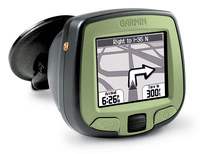
While the monochrome screen of the Garmin StreetPilot i2 will turn some folks off, the reasonable price makes it pretty attractive for those on a budget or for anyone looking at buying their first auto GPS, especially when you consider that it comes with Garmin’s City Select car navigation software ($139.99 MSRP). Step up to the StreetPilot i3 for a color screen.
Amazon has this to say in their Garmin StreetPilot i2 review.

read more

About Our GPS Reviews

You may have noticed a lot of GPS reviews showing up here over the past few weeks. It’s the holiday shopping season, and the message boards are full of "which GPS should I buy" questions, so I’m trying to create a resource that can help people make that decision. My posting frequency will go up for awhile but, along the way, I will continue to bring you original posts and news about GPS receivers and mapping software.

I’m trying to bring a degree of consistency to the reviews, so they (generally) include the following:

  • An introductory paragraph or two.
  • A link to Amazon’s page for that particular receiver, along with the stats on how many readers  have rated it and their average rating. I think it’s useful to read different people’s impressions of the unit, so my review "clipping service" is biased towards sites that let you read individual comments.
  • There is typically a banner ad for the receiver, along with Google text ad links at the end of the post. Yes, if you use these to make a purchase, I do get a small amount of revenue. It certainly helps pay the web hosting bills, but that’s about it so far.
  • Then there are links to a few other reviews, leaning towards sites that I think highly of (like www.gpsinformation.net) or ones where they have allowed various users to post their own ratings.
  • I close with some other resources. If I haven’t linked to it already, I give the manufacturer’s website.
  • I also include a link to the product manual (PDF) if that is available.
  • The post usually ends with a link to a discussion board for that particular model, if a good one (active and moderated to minimize spam) exists.

All in all, I’m trying to provide a one-stop clearinghouse for the information needed to select a receiver. You can help by posting your own comments. I welcome comments on GPS Tracklog and try to approve them ASAP.

My goal is to post reviews for the Amazon Top 20 best selling GPS receivers. This is a moving target, since the list changes hourly! Fortunately, the ranks don’t shift around all that much.

EDIT: I’ve reached my goal. Click here to go to my reviews of the top 20 best selling GPS receivers.

Linked to below are the reviews I have posted so far, along with their Amazon rank (as of this writing):

  1. Garmin StreetPilot c330
  2. Garmin StreetPilot i2
  3. Garmin Forerunner 301
  4. Garmin Forerunner 201
  5. Garmin StreetPilot 2720
  6. Garmin eTrex Legend
  7. Garmin Vista C
  8. Garmin Quest
  9. Garmin StreetPilot 2620
  10. Garmin StreetPilot i3

Additional reviews (and rank):

    11.  Garmin GPSMap 60CS
    17.  Magellan RoadMate 760
    90.  Garmin eTrex Venture

Finally, if you’re in the market for a GPS receiver, be sure to check out our newly updated GPS Buyers Guide.


Garmin eTrex Vista C Review

Etrex_vista_c_1

UPDATE: This model has been discontinued. For more current recommendations, please refer to our handheld GPS buyers guide or our Garmin handheld GPS comparison chart.

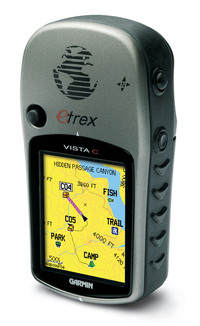
The Garmin eTrex Vista C has a compact design that belies its feature-rich3 nature; it includes an electronic compass, barometric altimeter, and automatic routing capability. With 24 MB of memory, it can handle a good amount of City Select maps for highway navigation, though probably not enough for multi-day trips. You’ll need a unit with more memory for that, like the newer Vista Cx.

At Amazon, the unit has garnered an average 4 star rating (out of 5) from dozens of customers in their Vista C reviews.

Compare prices on the Garmin eTrex Vista C

read more

Geocaching Software and Paperless Caching

GeocachingIn this, the latest in our best of the (discussion) boards series, we take a look at geocaching utilities. Before we get started, here’s the place to go if you haven’t heard of geocaching.

While my book, GPS Mapping, covers a wide range of mapping software, I did not get around to reviewing geocaching utilities in it. I was pleased last week to see this post on geocaching software show up on the official geocaching discussion board. Sputnik 57, a geocacher from Texas, was kind enough to pull this list together, giving a little bit of space to each manufacturer’s blurb, and a link to their product:

  • Geocaching Swiss Army Knife (GSAK) is the all in one Geocaching and waypoint management tool. Major features include: Multiple databases, sending/receiving waypoints to GPSr, conversion to many mapping formats, HTML output, extensive searching, macro support, backup and restore, distance/direction from other waypoints (including caches, locations, post codes) and much more.
  • CacheMate™ is a database for tracking GPS cache hunts. You can store information about caches or benchmarks, decode hints, and transfer data between CacheMate and the MemoPad application. Registered users can import LOC and GPX formatted XML files, which are available from Geocaching.com.
  • Watcher is a program that lets you view GPX files obtained from Pocket Queries (a membership benefit for Geocaching.com members). Offline viewing. filtering, and sorting are all possible, as well as merging multiple GPX files and outputting custom GPX files. Watcher is a GPX utility available at no charge (although tips are always appreciated) to paying members of Geocaching.com. It is our way of saying “thank you” to all those who support the site from which we have found countless hours of enjoyment.
  • Plucker is an offline Web and e-book viewer for PalmOS® based handheld devices and PDAs. Plucker comes with Unix, Linux Windows and Mac OSX tools, scripts, and conduits that let you decide exactly what part of the World Wide Web you’d like to download onto your PDA (as long as they’re in standard HTML or text format). These web pages are then processed, compressed, and transferred to the PDA for viewing by the Plucker viewer.
  • GPX Spinner puts a spin on your GPX files. Features include: Output a set of HTML files suitable for sending to a handheld device using Plucker or iSilo; Change the waypoint name to include the cache name, ID, difficulty, terrain, or any combination; Change the waypoint description to include the cache name, who it was placed by, difficulty, terrain, or any combination;Change the symbol to represent the type of cache (e.g. a camera for Virtuals, a penny for Micros, or a picnic table for Event Caches). Even change the default ‘Geocache’ treasure chest for regular caches; Change the symbol (e.g. to an animal) if the cache contains any travel bugs; Change the symbol (e.g. to a tombstone) if there are several recent Not Found logs; Fully configurable!
  • EasyGPS is the fast and easy way to create, edit, and transfer waypoints and routes between your computer and your Garmin, Magellan, or Lowrance GPS. Using EasyGPS, you can manage all of your waypoints and routes, and display them in lists sorted by name, elevation, or distance. EasyGPS connects your GPS to the best mapping and information sites on the Internet, giving you one-click access to street and topo maps, aerial photos, weather forecasts, and nearby attractions. And because EasyGPS is part of the TopoGrafix family of outdoor products, you’ll be able to exchange GPS data with EasyGPS and ExpertGPS users all over the world!

I should add that the focus here is on software for paperless geocaching, relying instead upon a Palm or Pocket PC device. Also, as long as EasyGPS was mentioned, I want to let you know that there is a full chapter on it in GPS Mapping, since it is such a great (and free) waypoint management tool.

GPS Buyers Guide

NEW: Check out our updated Automotive GPS Buyers Guide and Handheld GPS Buyers Guide.

Choosing a GPS to purchase can be a challenge, especially if it’s your first (yes, people do upgrade). So here for your reading pleasure is our new GPS buyers guide. Let’s get a couple of things out of the way immediately:

Garmin, Magellan or Lowrance

At the risk of alienating fans of a couple of brands, I’m going to stick my neck out and say…Garmin is generally considered to be the best brand going, at least in the handheld market. They have intuitive menus and a reputation for strong customer service. Magellan is in the middle with a quality product, and a strong share of the automotive market. Lowrance can be a great choice for those on a budget, and they certainly have their proponents. Those are very broad strokes, so please don’t flame me, but it is a question I am often asked. And apparently a lot of people agree…at the time I’m writing this Garmin has a lock on the Top 10 GPS receivers sold at Amazon.com.

Basic, Mapping or Autorouting

A basic GPS is just that. It will guide you to a waypoint, along a route and record a track. A good example is the Garmin eTrex Venture. (By the way, just so you know what you are clicking on, the remaining links on this post go to my reviews unless they say (Amazon) beside them. You can guess where those go, and yes, if you make a purchase through them, you help pay my hosting bills. End of disclaimer.) These basic units will only show the most rudimentary map — primarily your waypoints and tracks.

The next step up is a mapping unit like the Garmin eTrex Legend. This receiver has enough memory to accommodate topo maps or city maps, but it will not provide turn-by-turn highway directions.

For that, you’ll need to step up to a unit like the Magellan RoadMate 760  or the Garmin GPSMap 60CS.  With these receivers you can enter an address (or select a restaurant or…) and have it guide you there, turn-by-turn. These units are often referred to as autorouting receivers, short for automatic routing.

What Do You Want To Do With Your GPS?   

read more

Garmin eTrex Legend Review

Etrex_legend

UPDATE: This model has been discontinued. For more current recommendations, please refer to our handheld GPS buyers guide or our Garmin handheld GPS comparison chart.

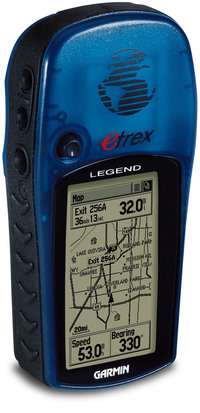
The Garmin eTrex Legend is an entry level mapping receiver. A good choice for the outdoor enthusiast, the Legend can accommodate products  like MapSource USA TOPO for backcountry maps and MetroGuide to show points of interest on the road, but it will not provide turn-by-turn automatic routing. You’ll need to step up to the Legend C for that.

If numbers are any reflection of its popularity, that can be seen by the fact that well over 100 people have reviewed it at Amazon, where they gave an average 4 out of 5 star review to the eTrex Legend.

Compare prices on the Garmin eTrex Legend

Here’s what other people are saying about the Legend:


Here are some additional resources that may prove useful:


Compare prices on the Garmin eTrex Legend at these merchants:

The official Garmin eTrex Legend web page.

Recommended accessories:

Other reviews:

Garmin Forerunner 201 Review

Forerunner_201

UPDATE: This model has been discontinued. For more current recommendations, please refer to our GPS for runners post.

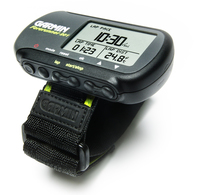
Awhile back I reviewed the Forerunner 301. Today we’re going to look at its little brother, the Garmin Forerunner 201. Basically the same model, minus the heart rate monitor, this Forerunner shares most of  the advantages and disadvantages of the 301. At a mere 2.75 ounces, it is ideal for runners, hikers or cyclists looking for a lightweight device. If your primary interest is in training and tracking your athletic performance, the 201 is a good choice. If you plan to do some serious navigation, I’d recommend something with more features than the Forerunner series. Sure, they’ll navigate to a waypoint or along a route, and create a track as you go along, but just about any other GPS receiver will provide you more options in this regard.

It certainly is a popular receiver, if numbers are any guide. A whopping 211 reviewers at Amazon gave the Forerunner 201 an average 4 out of 5 stars.

read more

GPS Trip Report: Southern California Deserts

I’ve posted several PhotoFusion pages from the recent Southern California desert trip my wife and I took. Check this link out for more on geocoded photos, including how to use the PhotoFusion pages.  Here are the links along with the .gpx files for anyone interested:

Oh yeah, if you want the whole trip report, I’ve posted it over on the SoCal Mtbr.com board.


Garmin StreetPilot 2720 Review

Streetpilot_2720_4

UPDATE: Most of the several generations old StreetPilot series, including this model, has been discontinued. For a more current recommendation, check out our Auto GPS buyers guide or go straight to our Garmin nuvi comparison chart.

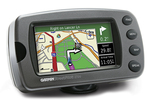
To call this GPS award winning is no overstatement. The Garmin StreetPilot 2720 was recognized in Popular Science as one of the best of “what’s new for 2005” and it’s also a winner of PC Magazine’s Editors’ Choice award.

The StreetPilot 2720 updates the older StreetPilot 2620, adding an improved, higher resolution screen and optional FM traffic services (see below). It also adds text-to-speech functionality, so it can call out upcoming street names and points of interest (POIs). Step up to the StreetPilot 2730 and you get XM radio compatibility, including weather and XM NavTraffic options.

There are dozens of reader reviews of the StreetPilot 2720 at Amazon.

Compare prices on the Garmin StreetPilot 2720

read more