Sunday, March 18, 2012

Archives for October 2006

GPS data search tool

Google recently announced their custom search engine tool. I didn’t really see how I would use it at first; then I thought about creating a search engine designed to go after GPS data. After all, I find myself searching for it often for trip planning. So give it a try, perhaps with the name of a popular trail or a geographical area: 


Search for waypoints, tracks, POI’s, maps and aerial imagery

I’ve included over 30 sources so far, including National Geographic TOPO!’s MapXchange, the TOPO USA file exchange, MotionBased, several points of interest (POIs) sites, a great U.S. DRG resource, sites with free Garmin maps, aerial photos, and more. I’ve tried to keep out sites that charge for data, or sites that will return massive numbers of duplicate or irrelevant results. Oh, and if you find yourself dealing with data types that your software won’t handle, check out a GPS file converter.
read more

Best GPS for pedestrians

This article in theday.com covers a lot of ground, focusing mainly on GPS for pedestrians, with a strong emphasis on the Garmin nuvi and its competitors. Here’s the most informative snippet from the piece, comparing Garmin, TomTom and Magellan for those on foot:

"…some devices are more helpful than others for walkers. Garmin says its pedestrian mode negates one-way roads so that walkers can be directed the wrong way. It also allows walkers to go through access roads in parks where cars aren’t allowed.

Similarly, TomTom International BV’s new entry-level $499 TomTom ONE device, 5.5 ounces lighter than TomTom’s next-smallest device, directs walkers in pedestrian mode down the wrong way on one-way streets or along pedestrian bridges or bike paths if those are the fastest routes. And the pedestrian modes on many cellphone services such as Sprint’s MapQuest Navigator enable users to find walking directions and eliminate restrictions such as one-way streets and right-turn-only intersections.

But on the Magellan devices, walkers using the street maps will be directed as if they were a car. Magellan expects pedestrian routing features to be available on its new products early next year."

Related posts:

read more

Bluetooth and GPS for hands-free cell phone use

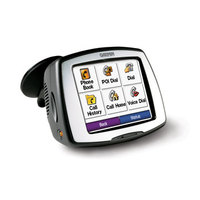
C550_bluetooth_screen
Bluetooth is one of the hottest new features in GPS receivers, primarily because you can use them for hands-free cell phone calls, via the GPS receiver’s built-in microphone and speakers. Yet this technology can do so much more.

Address book syncing allows you to look up and dial numbers from your personalized phone book or your phone’s call history log. Plus, you can look up points of interest (POI’s), find a restaurant and have your GPS call to make a reservation!

Each of the units listed below offer Bluetooth for hands-free cellphone use. Except where noted the links go to our own auto GPS reviews:

read more

Discriminav – The world’s first racist GPS

Check out this video promoting the Discriminav, billed as the world’s first fully racist GPS navigation system.

Via Digg. My apologies in advance to all who are offended.

Video: How to create custom maps for your Garmin GPS

A post showed up on Groundspeak (Geocaching.com’s discussion group) last night, with links to videos showing how to create custom maps for your Garmin GPS. The tutorials include info on loading the maps via MapSource and making your maps transparent, so that you can see Topo or City Select/Navigator at the same time.

read more

50 GPS message boards

Call them message boards, discussion groups, online forums, or some other combination of those terms — Connecting with other folks on the web, who are using your particular brand of GPS can be one of the quickest ways to get an answer on anything from basic noobie queries to perplexing technical questions. Especially helpful are groups that focus on particular brands and models of GPS.

A few caveats before the list of message boards…I’ve tried to screen out those groups dominated by spam. Also, some of these groups overlap, and they vary greatly in posting volume. Speaking of which, I have one tip for the many Yahoo groups below — you may want to choose to view messages on the web only, rather than by email, lest your inbox quickly become clogged. Finally, be sure to drill up and down through these websites. There were just too many forums to list them all, and there are other great message boards out there.

read more

Free Garmin Tour Guides

Travel by GPS has released their first Tour Guides for compatible Garmin GPS devices. The initial releases feature Huntsville, AL, and Asheville, NC — my former home, billed here as the "Paris of the South." Okay, I am biased, but I often describe it to people as a very cosmopolitan city.

This is the first third-party application like this that I have seen. Doug Adomatis, the guy behind Travel by GPS, has been wanting an application like this for years. He notes that his is the first site to publish free Garmin tour guides in the GPI format. This format is "compiled from a special version of the GPS data (gpx) file which links audio (mp3) files and image (jpg) files." The MP3 files play as you approach an included point of interest (POI).

read more

Source for U.S. Forest Service topo maps and vector files

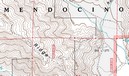
USFS topo mapA decade ago, B.G. (before GPS, at least for me), I lived in a part of the Southern Appalachians surrounded by National Forests. I loved exploring the area by mountain bike, and while I wasn’t yet into GPS, my love of maps was already deeply ingrained.
Not yet to the point of filling my hard drive with maps, I instead had a wall full of USGS topo quads, the collars cut from them, detailing a mosaic of the regional landscape. But one day my good friend, fellow biker and map junky, Sparrel, told me about U.S. Forest Service (USFS) maps.

The image above shows a portion of a map near my new neighboorhood, the Mendocino National Forest. Note that the map is brown and white, even though this is a heavily forested region. Unlike USGS quads, these maps don’t show vegetation. What you gain though, are Forest Service road and trail numbers, gate locations, and more legible boundaries. Sometimes these quads are even more up to date than the standard USGS 7.5’ series. Once I discovered these, I was well on my way to acquiring a second set of topo maps for the region!

I recently discovered a great portal for USFS maps and vector data. I stumbled across this via the OziExplorer message forum. They don’t have all the USFS topos, but you might want to check it out to see what they have for your favorite stomping grounds.

read more

Geocoding photos

Procrastination has posted a great review of photo geocoding solutions. Zack, the site’s owner, compared  RoboGeo, TopoFusion and WWMX Location Stamper combined with GPS Visulaizer.

Related post:


Lowrance iWAY 250C review


UPDATE: This model has been discontinued. For current recommendations, please refer to our auto GPS buyers guide.

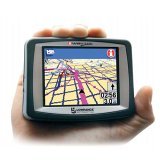
The Lowrance iWAY 250C is a compact GPS navigator, measuring only 4″W x 3″H x 1″D. Featuring turn-by-turn directions, an MP3 player and photo viewer, the iWAY 250C comes pre-loaded with maps of the U.S. and Canada or Western Europe.

Its maps are on a 2 GB MMC/SD card, which has 40 MB free for MP3 files and photos. This isn’t quite as nice as the iWAY 350C, which has a 4 GB hard drive for maps, freeing up the MMC/SD card for entertainment.

read more