A post showed up on Groundspeak (Geocaching.com’s discussion group) last night, with links to videos showing how to create custom maps for your Garmin GPS. The tutorials include info on loading the maps via MapSource and making your maps transparent, so that you can see Topo or City Select/Navigator at the same time.
Archives for 2006
50 GPS message boards
October 16, 2006 By 3 Comments
Call them message boards, discussion groups, online forums, or some other combination of those terms — Connecting with other folks on the web, who are using your particular brand of GPS can be one of the quickest ways to get an answer on anything from basic noobie queries to perplexing technical questions. Especially helpful are groups that focus on particular brands and models of GPS.
A few caveats before the list of message boards…I’ve tried to screen out those groups dominated by spam. Also, some of these groups overlap, and they vary greatly in posting volume. Speaking of which, I have one tip for the many Yahoo groups below — you may want to choose to view messages on the web only, rather than by email, lest your inbox quickly become clogged. Finally, be sure to drill up and down through these websites. There were just too many forums to list them all, and there are other great message boards out there.
Free Garmin Tour Guides
October 12, 2006 By Leave a Comment
Travel by GPS has released their first Tour Guides for compatible Garmin GPS devices. The initial releases feature Huntsville, AL, and Asheville, NC — my former home, billed here as the "Paris of the South." Okay, I am biased, but I often describe it to people as a very cosmopolitan city.
This is the first third-party application like this that I have seen. Doug Adomatis, the guy behind Travel by GPS, has been wanting an application like this for years. He notes that his is the first site to publish free Garmin tour guides in the GPI format. This format is "compiled from a special version of the GPS data (gpx) file which links audio (mp3) files and image (jpg) files." The MP3 files play as you approach an included point of interest (POI).
Source for U.S. Forest Service topo maps and vector files
October 9, 2006 By Leave a Comment
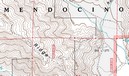 A decade ago, B.G. (before GPS, at least for me), I lived in a part of the Southern Appalachians surrounded by National Forests. I loved exploring the area by mountain bike, and while I wasn’t yet into GPS, my love of maps was already deeply ingrained.
Not yet to the point of filling my hard drive with maps, I instead had a wall full of USGS topo quads, the collars cut from them, detailing a mosaic of the regional landscape. But one day my good friend, fellow biker and map junky, Sparrel, told me about U.S. Forest Service (USFS) maps.
The image above shows a portion of a map near my new neighboorhood, the Mendocino National Forest. Note that the map is brown and white, even though this is a heavily forested region. Unlike USGS quads, these maps don’t show vegetation. What you gain though, are Forest Service road and trail numbers, gate locations, and more legible boundaries. Sometimes these quads are even more up to date than the standard USGS 7.5’ series. Once I discovered these, I was well on my way to acquiring a second set of topo maps for the region!
I recently discovered a great portal for USFS maps and vector data. I stumbled across this via the OziExplorer message forum. They don’t have all the USFS topos, but you might want to check it out to see what they have for your favorite stomping grounds.
Geocoding photos
October 2, 2006 By Leave a Comment
Procrastination has posted a great review of photo geocoding solutions. Zack, the site’s owner, compared RoboGeo, TopoFusion and WWMX Location Stamper combined with GPS Visulaizer.
Related post:
Lowrance iWAY 250C review
October 1, 2006 By 6 Comments
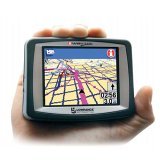
UPDATE: This model has been discontinued. For current recommendations, please refer to our auto GPS buyers guide.

The Lowrance iWAY 250C
Its maps are on a 2 GB MMC/SD card, which has 40 MB free for MP3 files and photos. This isn’t quite as nice as the iWAY 350C, which has a 4 GB hard drive for maps, freeing up the MMC/SD card for entertainment.
Magellan RoadMate 2000 review
September 29, 2006 By 26 Comments
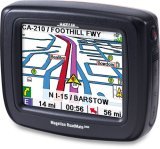

UPDATE: This model has been discontinued. For current recommendations, please refer to our auto GPS buyers guide or check out our other Magellan auto GPS reviews.
I’ve been playing with a Magellan RoadMate 2000
Choosing the best mapping software series
September 28, 2006 By 2 Comments

With the last post on GPS file converters done, I’ve concluded my series on "Choosing the best mapping software," which looked at some of the best programs in multiple categories. I’ve shared my favorites with you, and I hope you’ve found the series helpful. Working with track files, aerial photos and topo maps can be a lot of fun, especially if you’ve got the right tools.
And remember, each of the programs I’ve covered in this series is explored in detail in my book, GPS Mapping: Make Your Own Maps.
Posts in this series:
Converting GPS file formats
September 28, 2006 By 2 Comments

What to do? You’ve got a .tpo track file from TOPO! that you want to put on your GPS. or you’re dying to see how a .gpx file looks in Google Earth. Well, you’re not alone. Thousands of others GPS aficianados struggle with the same alphabet soup, and concommitant translation problems. Fortunately, solutions are at hand. Let’s look at some file converters.
GPSBabel
Developed by Robert Lipe, GPSBabel is my new favorite in this category, thanks to its newfound ability to convert .tpo files used in National Geographic TOPO! Heck, just take a look at this file compatibility list to get an idea of its utility. Most people will feel quite comfortable using their GUI interface.
Garmin nuvi 660 review
September 26, 2006 By 60 Comments
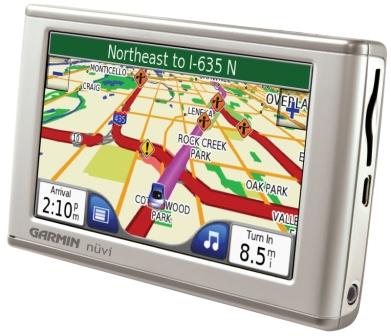
Hands on with the Garmin nuvi 660
UPDATE: Though still available and supported, Garmin has discontinued the nuvi 660. For newer models, check out my Garmin nuvi comparison chart.
I finally broke down and purchased a Garmin nuvi 660
and it has quickly become the favorite workhorse in my stable of GPS receivers.
The nuvi 660 is a joy to use.
Before we get into the details of my review, lets look at other models in the nuvi 600 series. The nuvi 670 is identical to the 660, except that it adds European maps as well. The nuvi 680 uses MSN Direct services, giving you access to weather, fuel prices and movie times, in addition to the 660’s live traffic.
