I saw a press release today for UNS Infotainment, a new GPS receiver from a Dubai company. A couple of things caught my eye. For one, according to the press release, "UNS Infotainment(TM) will be rolled out to other GCC countries in the
coming months. Plans are also underway for expansion to UK, Europe and
North America market by early 2007." But it was the feature list that really got me:
Archives for 2006
Cutting edge GPS?
September 25, 2006 By Leave a Comment
How to load Garmin TOPO maps to your hard drive
September 18, 2006 By 52 Comments
Last month my wife and I took a mountain biking vacation in the Lake Tahoe area and, of course, we took our GPS receivers along for the ride! While I posted a trip report, complete with GPS tracklogs, I haven’t quite fessed up to one thing.
You see, I took my laptop along for managing waypoints, tracks and maps, but forgot to take my Garmin U.S. TOPO
Putting Garmin TOPO maps on your hard drive is incredibly simple, and it has to do with the installation. Create a folder on your hard drive and copy the contents of the CD’s to it, including the setup disc. Then navigate to that folder and run setup from your hard drive, and not the CD. That’s it!
Magellan RoadMate 2200T review
September 16, 2006 By 3 Comments
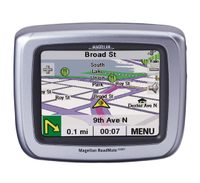
UPDATE: This model has been discontinued. For current recommendations, please refer to our auto GPS buyers guide or check out our other Magellan auto GPS reviews.
The Magellan RoadMate 2200T
Below this model, the RoadMate 2000 leaves off the SD slot, MP3 player, photo viewer and traffic capabilities. One step above the 2200T, the CrossoverGPS (formerly known as the 2500T) adds pre-loaded topo maps to the 2200T’s feature set.
Free waypoint manager: EasyGPS
September 12, 2006 By 7 Comments
 Though it’s not really a mapping program per se, EasyGPS is a great piece of software, especially suited for those just beginning to learn the capabilities of their GPS. You may not be ready to spend money on a sophisticated mapping program yet, but you’re piling up waypoints faster than your GPS receiver’s memory can handle them (many have a limit of 500 waypoints).
Well, EasyGPS is the answer, and it’s free. In addition to handling waypoints, you can also create routes with it. Plus, it’s geocaching friendly, because it handles both .loc and .gpx format files.
Shameless plug — There is a chapter on EasyGPS (and over a dozen other GPS programs) in my book — GPS Mapping: Make Your Own Maps.
Other posts in this series:
Free nautical charts
September 11, 2006 By 4 Comments
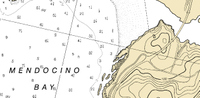
NOAA has a site where you can download free nautical charts for the entire U.S. The charts are in BSB/KAP format, and can be used in OziExplorer. I found this via a post on the OziExplorer message forum.
NAIP aerial photography
September 11, 2006 By Leave a Comment
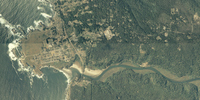
The Map Room recently covered the National Agricultural Imagery Program (NAIP). Now don’t be confused by the Agriculture part of the name, because the NAIP is of value to a much broader audience. NAIP offers very recent, natural-color aerial imagery of almost the entire U.S., at a relatively high resolution. Full county mosaics are $50. For my county, there is a 2006 image with a resolution of 2 meters/pixel, and a 2005 image at 1 meter/pixel. The image at left, of the Big River estuary and Mendocino, CA, is supposed to be 2 meter resolution. The resolution doesn’t look quite that sharp to me, but nevertheless, I can make out recent changes in logging roads in the area I frequent for mountain bike rides. The image to the right below, shows a 3-D view with waypoints, that I created using OziExplorer.
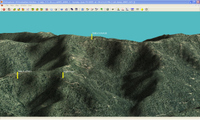
The color county mosaics are in MrSID format. You can use OziExplorer to work with these files, and the NAIP website lists several viewers. Quarter quadrangles are available in GeoTIFF format. Here’s the latest (2005) aerial photo coverage map for color county mosaics.
Unfortunately, we’re dealing with the feds here, so ordering is a pain and delivery is slow.
Magellan RoadMate 6000T review
September 6, 2006 By 2 Comments
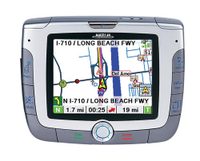
UPDATE: This model has been discontinued. For current recommendations, please refer to our auto GPS buyers guide or check out our other Magellan auto GPS reviews.
The Magellan RoadMate 6000T comes pre-loaded with maps of the U.S and Canada, uses the SiRFstar III chipset, and sports an integrated traffic receiver (3 month subscription included). It also has entertainment features — MP3’s and photos can be loaded to an SD card. The 6000T differentiates itself from the 3000T and 3050T primarily by incorporating Bluetooth for hands-free cellphone use.
Compare prices on the Magellan RoadMate 6000T
10 ways to get lost with a GPS
September 6, 2006 By 3 Comments
- Don’t try it out at home first
- Don’t add waypoints before leaving home
- Enter coordinates by hand instead of transferring them from a computer
- Don’t bring along spare batteries
- Don’t bring a map and compass as backup
- Don’t mark your trailhead before hitting the trail
- Overestimate its capabilities in dense canopy
- Follow the compass arrow blindly (without realizing you need to go around an obstacle (like a mountain)
- Drop it in a river or off a mountain-side
- Think that you can’t get lost because you have a GPS
Free topos and aerial photos: USAPhotoMaps
September 5, 2006 By Leave a Comment

Everybody loves stuff they can get for free, right? Especially if it is way cool and quite useful. Well, USAPhotoMaps fits the bill. Created by Doug Cox, USAPhotoMaps is TerraServer-based, just like TopoFusion. And just like TopoFusion, you can look at aerial photos or topo maps of just about any location in the U.S. For some urban areas, you can even view color aerial photos down to 0.25 meters/pixel (see below left)!
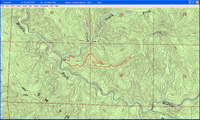
One of the ways I’ve used USAPhotoMaps is to locate newer 4WD roads that don’t appear on topo maps, which are usually much  older than USGS aerial photos. In the image on the right below, I’ve drawn a track along a logging road. To the left below, you can see how I’ve been able to update a topo map with the hand-drawn track.
One of the other great things about USAPhotoMaps, is that Doug Cox just keeps updating it, adding new features and keeping it current.
USAPhotoMaps does lack some features, but all in all, it’s a great program, and you sure can’t beat the price. I believe it is 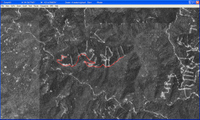 particularly useful for people new to the world of GPS, who may not be ready to lay out money for mapping software and aren’t quite sure what all they can do with it. If you’ve never transferred your track to your computer, to view it on an aerial photo, you’ve got a treat coming. And now you don’t have any excuse not to!
There is a full chapter on USAPhotoMaps in my book, GPS Mapping – Make Your Own Maps.
Other posts in this series:
What the heck is RSS and why should I care?
September 4, 2006 By 2 Comments

Don’t have time to read this entire article? Here’s a one minute video tutorial, but don’t forget to come back and grab our RSS feed.
Good questions. You may have noticed the RSS buttons in the right sidebar on GPS Tracklog. For those of you not familiar with RSS, this post attempts to answer the questions in the title.
So first, here’s why you should care.
Unlike getting website updates or ezines by email, RSS feeds give you absolute, 100% complete control over the situation.
You don’t have to reveal your email address. If you want to stop receiving content, you don’t have to request to be “taken off the list.”
One click, and poof… the subscription is gone.
Plus, since there’s no email address involved, there’s no way a publisher can sell, rent or give away the means to contact you.
That’s right… no more spam, viruses, phishing, or identity theft. And best of all, no reason to put yourself at the mercy of the publisher’s intentions.
You won’t need to suffer through the legalese in the privacy policy (if there is one) looking for loopholes that will send you deeper into inbox hell. No more setting up dummy Hotmail accounts “just in case.”
Again, if you don’t like the content, you can make it disappear as fast as you can change a TV channel. With just one click.
Pretty cool, huh?
That is cool! Umm… What the heck is RSS?
Alright! Now we’re ready to get to that part.
RSS is a simply an Internet technology standard that allows busy people to receive updates to web-based content of interest.
You might have figured that much out by now. But basically, that’s the essence of an RSS feed – you subscribe and then receive new content automatically in your feed reader.
If you actually want to know how RSS works, click here.
What the heck is a feed reader?
