Sunday, March 18, 2012

Archives for November 2005

My Favorite GPS Mapping Software

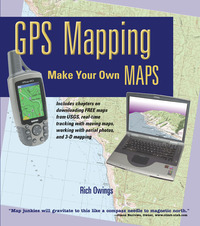
Frontcvr_webBecause I compared so many different software packages in my book, GPS Mapping – Make Your Own Maps (cover at right), I’m often asked what programs I like. In the book, I shied away from recommendations, focusing instead upon the pros and cons of each program, because no software is perfect. People who really get into this will often use multiple packages (a number of them are free or have extensive demo modes). Today, I’m going to take a different approach and share my favorites in each of several major categories.

CD-based maps

Here we’re talking about programs that package all the USGS topo quads for an entire state or region onto a DVD or set of CD’s, products like DeLorme 3-D TopoQuads and Maptech Terrain Navigator. These packages are ideal for producing printed maps. No other category can beat them for this. My current favorite though, is National Geographic TOPO! It’s not perfect, but in my mind, it has fewer drawbacks than the other two. One caveat though–these programs are constantly being upgraded. For example, I haven’t had a chance to check out the recently released Terrain Navigator 7.0, but I’m expecting a copy soon and will report back here with a full review.

Internet-based maps
read more

Garmin StreetPilot c320 review

Streetpilot_c320

UPDATE: Most of the several generations old StreetPilot series, including this model, has been discontinued. For a more current recommendation, check out our Auto GPS buyers guide or go straight to our Garmin nuvi comparison chart.


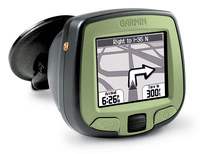
The Garmin StreetPilot c320 is a popular entry level auto navigation system. It is very similar to the c330 and c340, except that maps do not come pre-loaded on a hard drive. Instead, you get a City Select disc from which maps can be transferred to the unit via USB or loaded onto an SD card.  Additionally, while the c320 gives voice prompts for navigation, it will not call out upcoming street names and points of interest (POI) like the c340.  But even though it doesn’t have a hard drive that will hold the entire
country, you can still fit all of California on the 128 MB SD card that comes
with it, and you can always get a bigger card.

This unit is quite popular, with dozens of users rating it highly in their StreetPilot c320 reviews at Amazon, which has this to say in their editorial review…

"With a simple touch screen interface, automatic route calculation to any destination, and turn-by-turn voice-prompted directions, the StreetPilot c320 GPS navigator is a powerful companion for your adventures on the road. Plus, Garmin has designed the "c-series" of car navigation units to be as simple and easy-to-use as possible– no more intimidating features, just straightforward, basic navigation at your fingertips. Selecting a destination is as simple as a few finger-strokes, and you can choose between a three-dimensional navigation view or the more traditional "bird’s eye" overhead view.

Although the c320 boasts distinctive and sleek styling, simplicity is the name of the game. The only buttons are a rotary volume knob and an on/off switch. The device is secured by a suction-mount cradle that fastens to the windshield for easy portability between vehicles. You can customize the unit’s appearance with an array of colored faceplates that are sold separately…"

read more

GPS Comparison Charts

UPDATE: We’ve created a number of comparison charts to assist you:

There are so many GPS receivers on the market with similar features; the minute differences between models in a single product line can make buying decisions a real challenge. I’d like to call your attention to some tools that can help make these critical choices a little easier. Garmin and Magellan both have product comparison tools on their sites, which you can use to generate side-by-side comparisons. It won’t help with the Garmin vs.Magellan decision though!  Here are the links:

You’ll find most of these in the upper-right corner of your screen under the heading Buying a GPS?, along with our GPS Buyers Guide and other useful links.

A special note here to all the new readers coming to us from Engadget and GPS Information.org. You may have missed my recent About Our Reviews post where I explained that, due to the holiday season, readers of GPS Tracklog will be seeing a temporary increase in the frequency of reviews (and posts in general). I will however, continue to intersperse other original posts filled with news, tips and other cool GPS stuff as we go. Poke around the site; I hope you enjoy what you find here.


Garmin Quest

UPDATE: This model has been discontinued. For current recommendations, please refer to our auto GPS buyers guide.

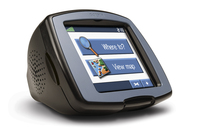
The Garmin Quest is a perennial favorite among car navigation systems. The Quest is reasonably priced and has a bright color screen. To top it all off, it comes complete with Garmin’s richly detailed City Select software.

12 reviewers gave the Quest an average 4-1/2 (out of 5) star rating at Amazon.

read more

Online Sources of GPS Waypoints and Tracks

Some weeks ago I posted about downloading GPS tracks from MotionBased.com for trip planning. For a long time now, I’ve been wanting to post other online sources of GPS data. Lets say you’re planning a trip somewhere. Hiking, biking, fishing–it doesn’t matter. Wouldn’t it be nice to get waypoints and tracks from other GPS enthusiasts?

Some mapping software companies allow users to exchange data. Three notable examples are:

The first two are proprietary formats, which can limit their usefulness unless you have that product. The National Geographic TOPO format turns up a lot on websites devoted to outdoor adventure.

MotionBased uses the open standard .gpx format, which is being embraced by more and more software manufacturers over time. An extensive list of online sources of .gpx data is available from TopoGrafix, the developer of EasyGPS and ExpertGPS. This list encompasses everything from dive spots to UK hiking trails. Travel by GPS, one of the sources on the list has a page posted on data I contributed–my Mt. Diablo circumnavigation. I haven’t tried every source on the list, but GPXchange and TrailRegistry look particularly interesting.

There are plenty of other sources out there too. There is even a Yahoo GPS Tracks & Waypoints group devoted to data exchange. It’s always a good idea to search on Google for (insert park name, etc.) and waypoints or GPX. And there are a blue million hiking, biking, kayaking, hunting, fishing, etc., discussion groups out there. Many message boards have regional sections. There are typically some tech-type gear heads there who can help you out with online sources or even their own data.

Winter is a great time for planning next year’s adventures, and I hope these tools help!

Added 04.22.06 – GPS-Tour.info


Garmin StreetPilot i2

Streetpilot_i2

UPDATE: Most of the several generations old StreetPilot series, including this model, has been discontinued. For a more current recommendation, check out our Auto GPS buyers guide or go straight to our Garmin nuvi comparison chart.

While the monochrome screen of the Garmin StreetPilot i2 will turn some folks off, the reasonable price makes it pretty attractive for those on a budget or for anyone looking at buying their first auto GPS, especially when you consider that it comes with Garmin’s City Select car navigation software ($139.99 MSRP). Step up to the StreetPilot i3 for a color screen.

Amazon has this to say in their Garmin StreetPilot i2 review.

read more

About Our GPS Reviews

You may have noticed a lot of GPS reviews showing up here over the past few weeks. It’s the holiday shopping season, and the message boards are full of "which GPS should I buy" questions, so I’m trying to create a resource that can help people make that decision. My posting frequency will go up for awhile but, along the way, I will continue to bring you original posts and news about GPS receivers and mapping software.

I’m trying to bring a degree of consistency to the reviews, so they (generally) include the following:

  • An introductory paragraph or two.
  • A link to Amazon’s page for that particular receiver, along with the stats on how many readers  have rated it and their average rating. I think it’s useful to read different people’s impressions of the unit, so my review "clipping service" is biased towards sites that let you read individual comments.
  • There is typically a banner ad for the receiver, along with Google text ad links at the end of the post. Yes, if you use these to make a purchase, I do get a small amount of revenue. It certainly helps pay the web hosting bills, but that’s about it so far.
  • Then there are links to a few other reviews, leaning towards sites that I think highly of (like www.gpsinformation.net) or ones where they have allowed various users to post their own ratings.
  • I close with some other resources. If I haven’t linked to it already, I give the manufacturer’s website.
  • I also include a link to the product manual (PDF) if that is available.
  • The post usually ends with a link to a discussion board for that particular model, if a good one (active and moderated to minimize spam) exists.

All in all, I’m trying to provide a one-stop clearinghouse for the information needed to select a receiver. You can help by posting your own comments. I welcome comments on GPS Tracklog and try to approve them ASAP.

My goal is to post reviews for the Amazon Top 20 best selling GPS receivers. This is a moving target, since the list changes hourly! Fortunately, the ranks don’t shift around all that much.

EDIT: I’ve reached my goal. Click here to go to my reviews of the top 20 best selling GPS receivers.

Linked to below are the reviews I have posted so far, along with their Amazon rank (as of this writing):

  1. Garmin StreetPilot c330
  2. Garmin StreetPilot i2
  3. Garmin Forerunner 301
  4. Garmin Forerunner 201
  5. Garmin StreetPilot 2720
  6. Garmin eTrex Legend
  7. Garmin Vista C
  8. Garmin Quest
  9. Garmin StreetPilot 2620
  10. Garmin StreetPilot i3

Additional reviews (and rank):

    11.  Garmin GPSMap 60CS
    17.  Magellan RoadMate 760
    90.  Garmin eTrex Venture

Finally, if you’re in the market for a GPS receiver, be sure to check out our newly updated GPS Buyers Guide.


Garmin eTrex Vista C Review

Etrex_vista_c_1

UPDATE: This model has been discontinued. For more current recommendations, please refer to our handheld GPS buyers guide or our Garmin handheld GPS comparison chart.

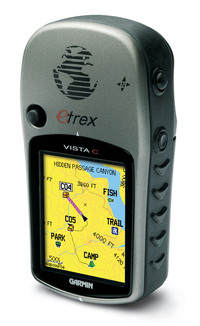
The Garmin eTrex Vista C has a compact design that belies its feature-rich3 nature; it includes an electronic compass, barometric altimeter, and automatic routing capability. With 24 MB of memory, it can handle a good amount of City Select maps for highway navigation, though probably not enough for multi-day trips. You’ll need a unit with more memory for that, like the newer Vista Cx.

At Amazon, the unit has garnered an average 4 star rating (out of 5) from dozens of customers in their Vista C reviews.

Compare prices on the Garmin eTrex Vista C

read more

Geocaching Software and Paperless Caching

GeocachingIn this, the latest in our best of the (discussion) boards series, we take a look at geocaching utilities. Before we get started, here’s the place to go if you haven’t heard of geocaching.

While my book, GPS Mapping, covers a wide range of mapping software, I did not get around to reviewing geocaching utilities in it. I was pleased last week to see this post on geocaching software show up on the official geocaching discussion board. Sputnik 57, a geocacher from Texas, was kind enough to pull this list together, giving a little bit of space to each manufacturer’s blurb, and a link to their product:

  • Geocaching Swiss Army Knife (GSAK) is the all in one Geocaching and waypoint management tool. Major features include: Multiple databases, sending/receiving waypoints to GPSr, conversion to many mapping formats, HTML output, extensive searching, macro support, backup and restore, distance/direction from other waypoints (including caches, locations, post codes) and much more.
  • CacheMate™ is a database for tracking GPS cache hunts. You can store information about caches or benchmarks, decode hints, and transfer data between CacheMate and the MemoPad application. Registered users can import LOC and GPX formatted XML files, which are available from Geocaching.com.
  • Watcher is a program that lets you view GPX files obtained from Pocket Queries (a membership benefit for Geocaching.com members). Offline viewing. filtering, and sorting are all possible, as well as merging multiple GPX files and outputting custom GPX files. Watcher is a GPX utility available at no charge (although tips are always appreciated) to paying members of Geocaching.com. It is our way of saying “thank you” to all those who support the site from which we have found countless hours of enjoyment.
  • Plucker is an offline Web and e-book viewer for PalmOS® based handheld devices and PDAs. Plucker comes with Unix, Linux Windows and Mac OSX tools, scripts, and conduits that let you decide exactly what part of the World Wide Web you’d like to download onto your PDA (as long as they’re in standard HTML or text format). These web pages are then processed, compressed, and transferred to the PDA for viewing by the Plucker viewer.
  • GPX Spinner puts a spin on your GPX files. Features include: Output a set of HTML files suitable for sending to a handheld device using Plucker or iSilo; Change the waypoint name to include the cache name, ID, difficulty, terrain, or any combination; Change the waypoint description to include the cache name, who it was placed by, difficulty, terrain, or any combination;Change the symbol to represent the type of cache (e.g. a camera for Virtuals, a penny for Micros, or a picnic table for Event Caches). Even change the default ‘Geocache’ treasure chest for regular caches; Change the symbol (e.g. to an animal) if the cache contains any travel bugs; Change the symbol (e.g. to a tombstone) if there are several recent Not Found logs; Fully configurable!
  • EasyGPS is the fast and easy way to create, edit, and transfer waypoints and routes between your computer and your Garmin, Magellan, or Lowrance GPS. Using EasyGPS, you can manage all of your waypoints and routes, and display them in lists sorted by name, elevation, or distance. EasyGPS connects your GPS to the best mapping and information sites on the Internet, giving you one-click access to street and topo maps, aerial photos, weather forecasts, and nearby attractions. And because EasyGPS is part of the TopoGrafix family of outdoor products, you’ll be able to exchange GPS data with EasyGPS and ExpertGPS users all over the world!

I should add that the focus here is on software for paperless geocaching, relying instead upon a Palm or Pocket PC device. Also, as long as EasyGPS was mentioned, I want to let you know that there is a full chapter on it in GPS Mapping, since it is such a great (and free) waypoint management tool.

GPS Buyers Guide

NEW: Check out our updated Automotive GPS Buyers Guide and Handheld GPS Buyers Guide.

Choosing a GPS to purchase can be a challenge, especially if it’s your first (yes, people do upgrade). So here for your reading pleasure is our new GPS buyers guide. Let’s get a couple of things out of the way immediately:

Garmin, Magellan or Lowrance

At the risk of alienating fans of a couple of brands, I’m going to stick my neck out and say…Garmin is generally considered to be the best brand going, at least in the handheld market. They have intuitive menus and a reputation for strong customer service. Magellan is in the middle with a quality product, and a strong share of the automotive market. Lowrance can be a great choice for those on a budget, and they certainly have their proponents. Those are very broad strokes, so please don’t flame me, but it is a question I am often asked. And apparently a lot of people agree…at the time I’m writing this Garmin has a lock on the Top 10 GPS receivers sold at Amazon.com.

Basic, Mapping or Autorouting

A basic GPS is just that. It will guide you to a waypoint, along a route and record a track. A good example is the Garmin eTrex Venture. (By the way, just so you know what you are clicking on, the remaining links on this post go to my reviews unless they say (Amazon) beside them. You can guess where those go, and yes, if you make a purchase through them, you help pay my hosting bills. End of disclaimer.) These basic units will only show the most rudimentary map — primarily your waypoints and tracks.

The next step up is a mapping unit like the Garmin eTrex Legend. This receiver has enough memory to accommodate topo maps or city maps, but it will not provide turn-by-turn highway directions.

For that, you’ll need to step up to a unit like the Magellan RoadMate 760  or the Garmin GPSMap 60CS.  With these receivers you can enter an address (or select a restaurant or…) and have it guide you there, turn-by-turn. These units are often referred to as autorouting receivers, short for automatic routing.

What Do You Want To Do With Your GPS?   

read more