Sunday, March 18, 2012

Switching between highway and topo maps on Garmin handhelds

Hidemaps
Oftentimes, handheld users will load both highway and topo maps to their unit.  Garmin handhelds will show the highway maps by default. The highway map (City Navigator or City Select) for an area must be turned off before you can see the topo map. This is especially problematic when you have a lot of maps loaded and you don’t know the name of the map for your current location.

In the past, I’ve laboriously scrolled through long lists of highway maps, deselecting each one until contour lines appeared on the map. But there is a simple solution. The instructions below are for the Garmin 60CSx, but I’m hoping this works for the eTrex series too. Perhaps someone can verify that and comment below.

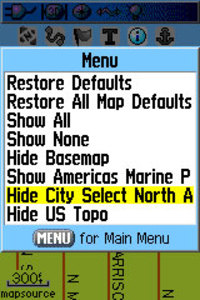
From the map screen, press Menu, then Setup Map, and scroll over to Map Setup – Information. You’ll see your list of loaded maps with a check mark next to each one. But rather than de-selecting them one by one, press Menu again and you’ll see two choices – Hide City Select (or Navigator) and Hide US Topo, as shown in the image. Pretty cool, huh?

Thanks to Hogrod on Groundspeak for this tip.
Garmin nuvi 200W review

Garmin_nuvi_200w

UPDATE: This model has been discontinued. For current recommendations, please refer to our auto GPS buyers guide.

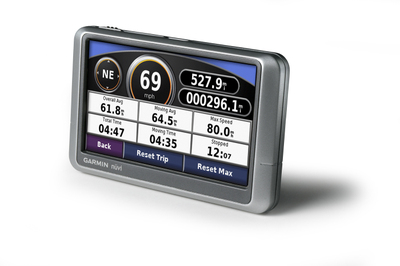
The Garmin nuvi 200W is a wide screen version of the entry-level nuvi 200. This is still a very basic unit, albeit with a 4.3″ touch screen instead of the  3.5″ screen found on the 200. Like all 200-series nuvis, this GPS navigator has an internal antenna, for a sleeker design than older nuvis that bore the flip-up antenna.
UPDATE: A similar but newer model, the nuvi 205W, adds quite a few features, and has occasionally been selling for a little less than the 200W.

read more

Garmin Rino 530HCx review

Rino_530hcx

NOTE: A newer model, the Garmin Rino 655t, adds many new features.

UPDATE: This model has been discontinued. 

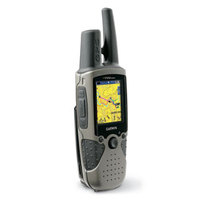
The Garmin Rino 530HCx is a handheld GPS that includes a two-way radio, and the ability to track another Rino user on your screen. Updating the Rino 530, the HCx model adds a high-sensitivity chipset and a micro-SD card slot for adding topo or highway maps (which must be purchased separately). The Rino has a bright, sunlight-readable screen, and is powered by a rechargeable lithium-ion battery rated at up to 14 hours.

read more

Video tutorial for making custom Garmin maps

Custom_garmin_map
A member of Groundspeak, Geocaching.com’s message board, has posted a video tutorial showing how easy it is to make custom maps for a Garmin GPS. Unfortunately, it’s hosted on MediaFire and I wasn’t able to embed it here. Follow the link above and look for "click here to start download." That’s the video tutorial, not the Paris Hilton video showing below it (the one I saw was family safe though)!

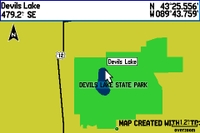
In the example, he traces the outline of a park boundary and lake in Google Earth, and uses it to create a map for his GPS as shown. The Groundspeak post links to the map making tools he used.

I covered many of these techniques in my 2005 book, GPS Mapping: Make Your Own Maps. The video only scratches the surface of what is possible. There is a ton of free GIS data on the Web that you can use to build custom maps. There’s a bit of a learning curve but if you use a handheld GPS and like to play with hacks, you should probably check it out.

read more

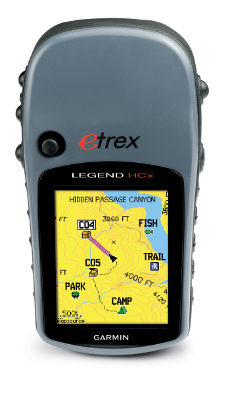
Garmin eTrex Legend HCx review

eTrex Legend HCx review

UPDATE: This model has been superseded by the new Garmin eTrex 20.

UPDATE: This model has been discontinued. For more current recommendations, please refer to our handheld GPS buyers guide or our Garmin handheld GPS comparison chart.

Hands on with the Garmin eTrex Legend HCx

I’ve had a chance to try out the Garmin eTrex Legend HCx recently. This is my first extended experience with an eTrex model since I purchased my first GPS — an eTrex Venture — many years ago.

One of Garmin’s newer eTrex H-series receivers, the Legend HCx updates the very popular Legend Cx. The “H” stands for high-sensitivity chipset, to ensure great satellite reception under canopy and in other situations where you have a limited view of the sky.

read more

Garmin eTrex Vista HCx review

Etrex_vista_hcx

UPDATE: This model has been superseded by the new Garmin eTrex 30.

UPDATE 2: This model has been discontinued. For more current recommendations, please refer to our handheld GPS buyers guide or our Garmin handheld GPS comparison chart.

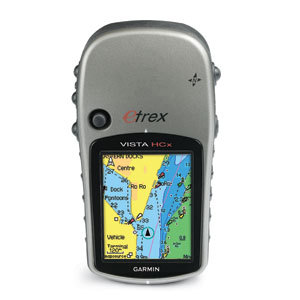
The Garmin eTrex Vista HCx is the flagship model in Garmin’s new eTrex H series line. The successor to the popular Vista Cx, the Vista HCx adds a high-sensitivity MediaTek chipset and has a faster processor as well, which will give you faster map scrolling and screen redraws.

read more

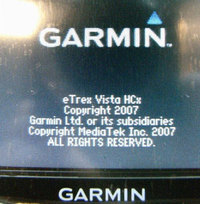
Confirmed: Garmin eTrex H series uses MTK chipset

Mediatekonsplashscreen
UPDATE
: Check out our MediaTek vs. SiRFstar III smackdown.

Two independent reports are confirming that the new Garmin eTrex H series is using a MediaTek chipset.

One is coming from Groundspeak, Geocaching.com’s message board, where people are reporting good reception.

Another report, via GpsPasSion, includes screen shots comparing the MediaTek chipset in the Vista HCx with the SiRFstar III chipset in the 60CSx. While I can’t read German, it looks like the Mediatek chipset holds its own pretty well in that comparison.

read more

Should you get a nuvi or a Mio

Miodigiwalkerc520EDIT: While this post originally focused on the Mio C520, the points are generally true for the Mio C220 too. Its not quite as complex, but it is still not as simple to operate as a nuvi.

Following my review of the Mio C520, I wanted to delve a little more deeply into why you might buy a Mio or a Garmin nuvi. I’m a big fan of Garmin; they rock — intuitive menus, great customer service and quality products. But Mio really grabbed my attention with the C520.

So let’s say you’re in the market for an auto navigation GPS. Which do you buy — a nuvi or a Mio?

Reasons to get a Mio C520

  • Price – At a list price of $399.95, and with it discounted more and more as the weeks go by, you’ll get a lot of bang for your buck.
  • The geek factor – Do you like tech toys with lots of menus that you can tweak and get them to do just what you want? If so, buy this and not a nuvi.
  • You’ve got a human navigator too – The Mio C520 has complex menus and you don’t want to be distracted using them while driving. If you’re usually the passenger, or you’ve got a co-pilot that also likes tech toys, this could be the perfect unit for you.

read more

Transfer Google Maps data to your GPS

EarthNC.com, best known as a source for nautical data, has announced a new service and website — TakItWithMe.com, which allows you to transfer Google Maps data and KML files directly to Garmin receivers, or download them as GPX files. The site utilizes the new Garmin Communicator plugin.

I just gave it a try and it worked very well. Output can be downloaded as waypoints, tracks and routes. The team there has put together a great video (shown below, after the jump) that does an excellent job of showing you how. It’s really pretty simple.

read more

Finding your elevation on a nuvi

Ever been crossing a mountain pass when you wondered just how high you were? This review of the Garmin nuvi 650 reminded me that it’s not the most intuitive thing to find on a nuvi.

read more