Sunday, March 18, 2012

Archives for December 2005

Top posts of 2005

Thanks to everyone for the great reception you’ve given GPS Tracklog since its debut earlier this year.  Before we move on to another year of exciting GPS news, reviews, tips and tricks, let’s take a look at this past year’s most popular posts (in no particular order):

  1. New Garmin receivers with expandable memory and SiRF chipsets. This post continues to bring in 20% of referral traffic. Of course, getting linked to by Engadget, the number one blog on the web, didn’t hurt! Stay tuned, because I hope to have more info on these units in another week or so. Word has it that Garmin is going to announce them at CES.
  2. Converting Google Maps search results to GPS waypoints. What an incredibly awesome tool for road trips. I use it every time I’m preparing for a vacation.
  3. Geocoding photos with TopoFusion. Some of you may be getting tired of me harping on this one, but I just can’t help myself—it is way cool.
  4. Does heavy cloud cover affect GPS reception? A favorite FAQ. The related post on GPS reception indoors was another hit with readers.
  5. My favorite GPS mapping software. As soon as my book came out, this became a constant question.
  6. What kind of maps can I put on my GPS (and what do you mean by raster and vector)? The most common FAQ of all. From what I can see on the message boards, the store sales clerks must not be doing a very good job of explaining this one.
  7. Online sources of GPS waypoints and tracks. Some great trip preparation resources here.
  8. Garmin Nuvi 350 review. I had no idea that reviews of new units would be so popular. Close behind it in traffic are recent reviews of the Magellan eXplorist 210 and RoadMate 360 models. My GPS buyers guide was another popular post.
  9. Free USGS topo maps. Not surprisingly, “free” continues to be one of the most popular words in the English language.
  10. Rechargeable batteries for your GPS receiver. From the looks of things, there are a lot fewer batteries going into landfills these days. And that’s good news.
  11. Creating custom maps for Lowrance receivers. Lowrance users are finally getting the custom map making tools we’ve had for some time now for Garmin and Magellan receivers.
  12. Flying with GPS on commercial airliners. A topic that focuses solely on the joys of having fun with your GPS.
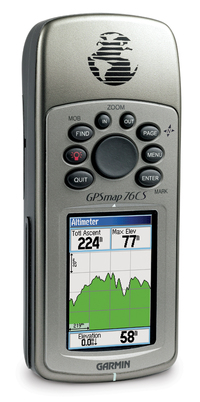

Garmin GPSMap 76CS Review

Gpsmap_76cs

UPDATE: This model has been discontinued. For more current recommendations, please refer to our handheld GPS buyers guide or our Garmin handheld GPS comparison chart.

The Garmin GPSMap 76CS, while billed as a marine GPS unit, is very popular with landlubbers as well, due to its 115 MB of memory (enough to load highway maps for almost the entire state of California). An ideal unit for boaters, the 76CS floats and is waterproof, and comes with an Americas marine database that includes navigational aids.
Confused about the 76 series? Here’s the low-down on the differences. The 76 and 76S have black and white screens, while the 76C and 76CS are color. The 76 has 8 MB of memory, the 76S has 24 MB, while the 76C and 76CS both have 115 MB of memory. Units with an S have an electronic compass and barometric altimeter, while the C units, in addition to color screens, have turn-by-turn routing capability. Finally, the 76CS has recently been updated with the new 76CSx.

14 readers at Amazon gave the GPS Map 76CS an average 4-1/2 out of 5 star rating.

Here are some other resources on the 76CS…

read more

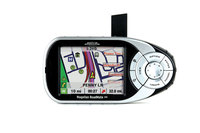
Magellan RoadMate 360 Review

Roadmate_360

UPDATE: The Magellan RoadMate series has been officially discontinued. For a more current model, check out our Magellan auto GPS comparison chart or our list of current Magellan receivers.


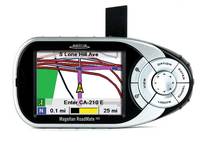
The Magellan RoadMate 360 GPS auto navigation system is a relatively new addition to Magellan’s popular RoadMate line. An entry level model, the 360 updates the old RoadMate 300 model by incorporating a hard drive that holds pre-loaded maps for the entirety of U.S. and Canada.

Customer reviews of the RoadMate 360 at Amazon have been mixed.

Compare prices on the Magellan RoadMate 360

Here’s what other early reviewers have to say:

read more

Magellan RoadMate 300 Review

Roadmate_300

UPDATE: The Magellan RoadMate series has been officially discontinued. For a more current model, check out our Magellan auto GPS comparison chart or our list of current Magellan receivers.


The Magellan RoadMate 300 GPS is an older version of the more recent RoadMate 360 model. Maps must be transferred via USB cable from your PC with the 300, whereas the 360 has maps for the entire U.S. and Canada pre-loaded, already in the unit.

46 readers at Amazon gave an average 3.5 out of 5 star rating in their RoadMate 300 reviews.

Here’s what others have to say:

read more

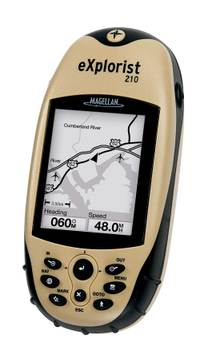
Magellan eXplorist 210 Review

Explorist_210_4
UPDATE: The Magellan eXplorist line has been officially discontinued. For an overview of our current recommendations, check out our handheld GPS buyers guide.

The Magellan eXplorist 210 GPS is a low cost handheld that can do double-duty as an auto navigation system (with the added purchase of Magellan DirectRoute software). This attractive combination makes the 210 one of the most popular Magellan handhelds.

The 210 comes with a cable to transfer maps, waypoints and other data to and from a PC, a capability the eXplorist 200 lacks. The 210 is very similar to the eXplorist 400, except that the 210 has 22MB of built-in memory, whereas the 400 utilizes an SD card for memory.

read more

Our GPS Reviews

Listed below are links to all the GPS reviews I've written on GPS Tracklog. The list is kept up to date and there is a link to it on the sidebar labeled "Our GPS Reviews." If this long list is overwhelming, be sure to check out our Auto GPS buyers guide and Handheld GPS buyers guide.

Jump to:

DeLorme Handheld GPS reviews

Garmin Auto GPS reviews

A note about discontinued Garmin auto units:

Most Garmin auto units without the flat form factor have been discontinued, as have older nuvis. In most cases, a newer Garmin nuvi is the best choice rather than one of these older units.

Garmin Fitness GPS reviews

Garmin Handheld GPS reviews

Garmin Marine GPS reviews

Lowrance Auto GPS reviews

Lowrance Handheld GPS reviews

Magellan Auto GPS reviews

Magellan Handheld GPS reviews

Mio Auto GPS reviews

Navigon Auto GPS reviews

TomTom Auto GPS reviews

Other GPS reviews

Mobile phone reviews

Tracks and Routes

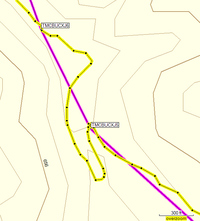
Mapsource_rte_and_trk_2When I was on the road doing GPS mapping demos, pitching my book, it became clear what things confused people over and over again. So today we’re going to take a look at one of those and inaugurate a new category — FAQs (I’m going to dig through the archives and add at least one other post to the category).
The issue today is routes vs. tracks. What is the difference? A route has the following characteristics:

  • It is used in the field to guide you from waypoint to waypoint.
  • It uses straight-line, as the crow flies, navigation. For highway navigation, the term "route" has a slightly different meaning.
  • It is about where you are going.

A track, on the other hand, has the following defining characteristics:

  • Tracks are about where you have been.
  • They are a record, created by your GPS, which is constantly recording your location. Many people like to use the analogy of an electronic "bread crumb trail," ala Hansel and Gretel.
  • They more accurately reflect the shape of the trail or road you have taken than the straight-line segments representing a route.
  • They can be downloaded to your computer to create a record of your trip.

We can see the route in the image above, represented in pink, showing straight-line segments between waypoints. The track, shown in yellow, more closely resembles the shape of the trail.

Now many new GPS users don’t like this. They want their receiver to guide them at every turn of the trail. But think about it–you don’t need your GPS to tell you there is a bend ahead in trail. You just need it to guide you to critical waypoints–trail junctions, campsites, etc.

There is much more to say about both routes and tracks, but I hope that this will give you a basic understanding of the difference.

read more

Garmin eTrex Vista Review

Etrex_vista_1

UPDATE: This model has been discontinued. For more current recommendations, please refer to our handheld GPS buyers guide or our Garmin handheld GPS comparison chart.

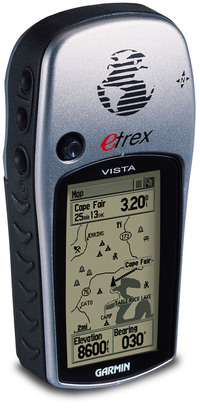
The Garmin eTrex Vista GPS, a mid-level model in the eTrex line, is perfect for the avid outdoorsman. With 24 MB of memory, it will likely hold all the topo maps you could use on a single trip, unless you are hiking the entire Appalachian Trail!  This unit includes a barometric altimeter and electronic compass, two very nice features.. Be aware though that, unlike the Vista C, it will not auto-route. That is, you can’t plug in an address and have it give you turn by turn directions. You can use it in a car with Garmin MetroGuide software, to direct you to points of interest (POIs) “as the crow flies,” and show your position in real-time.

88 reviewers at Amazon gave an average 4 out of 5 star rating to the eTrex Vista.

Here’s what other reviewers have to say:

read more

12 tips for getting more from your GPS

Here are some tips for all you outdoor enthuisiasts, designed to help you get more from your GPS on the trail:

  • Most GPS units come with a cable, allowing you to connect it to your computer. If yours didn’t, buy one.
  • Get a software program that allows you to print customized maps, showing your waypoints, previous trails you have taken, etc. CD-based map sets like National Geographic TOPO! are great for this.
  • Use your mapping software to mark waypoints of hidden trail junctions, so you don’t miss them.
  • Download a program for viewing aerial photos. USAPhotoMaps is free, while the more versatile TopoFusion is only $40. Aerial photos are usually more current than topo maps and are a great way to find new 4WD roads and trails.
  • While in the field, use your GPS to mark unexplored roads and trails, so that you can return and check them out in the future.
  • To keep an eye on your progress at a glance, set your data screen for the most important fields,  such as elevation, distance to next waypoint, etc.
  • Create waypoints of major peaks and other significant features, to help you identify them when checking out those awesome views.
  • Download your track (and any waypoints you marked while out) upon return. This gives you a record of all your trips and helps you prepare for future adventures in the same area.
  • If you have a track you’ve downloaded (or drawn from an aerial photo), you can load it to your GPS to see if you’re going where you thought you were!
  • Use your mapping software as a training aid. Download your track to create a record and compare distance, elevation gain, etc., with other outings.
  • Set your maps to print with a UTM grid, allowing you to easily pinpoint your location in the field.
  • Synchronize the clock on your digital camera to the time on your GPS. When you return home, download your track to TopoFusion and, using the PhotoFusion feature, clickable camera icons will automatically show where each photo was taken. Just click to see the picture!

Related posts:


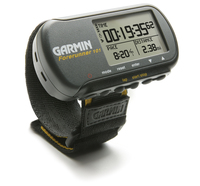
Garmin Forerunner 101 Review

Forerunner_101_1

UPDATE: This model has been discontinued. For more current recommendations, please refer to our GPS for runners post.

The Garmin Forerunner 101 GPS is Garmin’s entry level product in the Forerunner series. The primary features distinguishing it from the Forerunner 201 are that it runs on two AAA batteries and cannot be connected to a computer for data transfer. Meanwhile, the 301 adds a heart rate monitor and some advanced features.

A popular device, the Forerunner 101 got an average 4 out of 5 star rating from 32 reviewers at Amazon.

Here’s what other reviewers have to say about the Forerunner 101:

read more